
Platform
Godlike.Host Skin Editor: Minecraft Skin Editor in the Browser
Godlike Digital Solutions · checked 3 Nov 2026
A free browser tool for creating, editing, previewing and exporting Minecraft skins with 2D and 3D painting tools.
How it plugs in
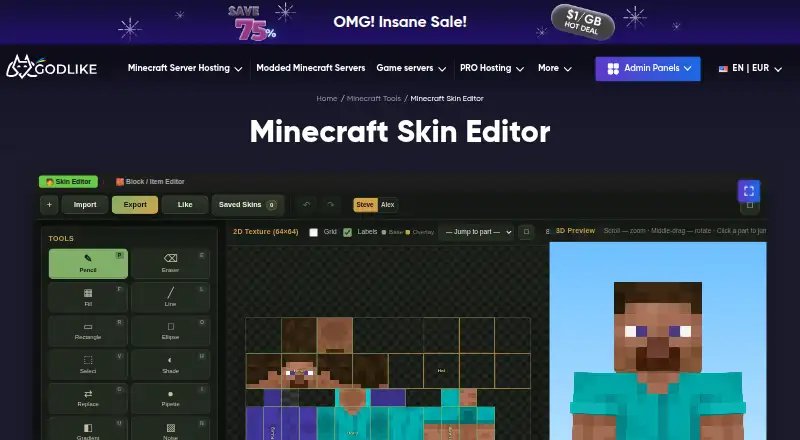
Godlike.Host Skin Editor is a free Minecraft skin editor that runs in the browser. It creates, edits, previews and exports skins with 2D and 3D painting tools, so you can customize a character and download the finished skin. Nothing needs to be installed, and a Minecraft account is only needed when you upload the skin to your profile in the game.
Review
In a line
Godlike.Host Skin Editor is a free browser tool for making and changing Minecraft skins, the image that sets how your character looks.
What it does
The editor creates, edits, previews and exports Minecraft skins with 2D and 3D painting tools. You customize the character, check the result in the preview and download the finished skin as a standard skin PNG file, the format Minecraft Java Edition uses.
How it connects
It works directly in the browser, with no mods, launchers, plugins or extra software to install. Godlike says most of its tools work locally, so imported images and saved work usually stay on your device.
You only need a Minecraft account when you upload the finished skin to your profile in the official game.
Good fit
It fits players who want a quick way to design or adjust a skin and see it before uploading, on a computer or, for lighter edits, on a phone or tablet.
Watch for
Godlike notes that precise skin editing is easier with a mouse on a larger screen.
Work saved in the browser can disappear if you clear site data, use a private window, switch browsers or move to another device, so export a copy of anything you want to keep.
Pricing
The Skin Editor is free to use online. No Minecraft account is needed unless you upload the skin to the official game.
Verdict
Godlike.Host Skin Editor suits players who want to make or change a Minecraft skin in the browser and download it straight away.
It is less suited to detailed editing on a small touch screen or to work that must be saved across several devices without exporting it.
Our take
Godlike.Host Skin Editor suits players who want to make or change a Minecraft skin in the browser and download it, without installing anything. Godlike notes that precise skin editing is easier with a mouse on a larger screen, and that browser saves can disappear, so export a copy of work you want to keep.
- Free and runs in the browser
- 2D and 3D painting tools with a preview
- Exports standard skin PNG files used by Java Edition
- No mods, launcher or extra software needed
- No Minecraft account needed to make a skin
- Precise editing is easier with a mouse on a larger screen
- Work saved in the browser can disappear if site data is cleared
- FocusPlayers who want to create or change a Minecraft skin quickly; Players who prefer a browser tool to installed software; Players who want to preview a skin before uploading it
- Skip it ifYou need to edit skins mostly on a phone, since precise editing is easier with a mouse; You need saved work to follow you across devices without exporting it
Plans
| Plan | Includes | Price |
|---|---|---|
| Free | — | Free |
| Minecraft Skin Editor | browser-based · no installation · no Minecraft account required | Free |
As godlike.host lists them, checked 3 Nov 2026; the plan page has the final word.
Questions
What is Godlike.Host Skin Editor?
A free browser tool that creates, edits, previews and exports Minecraft skins with 2D and 3D painting tools.
Is it free?
Yes. Godlike says its Minecraft tools are free to use online.
Do I need to install anything?
No. It works directly in the browser, without mods, launchers, plugins or extra software.
Do I need a Minecraft account?
No. You only need an account to upload the finished skin to your Minecraft profile.
Which file does it export?
Standard skin PNG files, the format used by Minecraft Java Edition.
Does it work on a phone?
Yes, but Godlike notes that precise skin editing is easier with a mouse on a larger screen.