GotFreeFax online fax service review
gotfreefax.com · checked 15 Oct 2026
Fax from your phone or computer and follow delivery, using either the free tier or pay-per-fax service.
How it plugs in
Signal on eFax Software6.6#2 of 24
From a computer or phone, GotFreeFax sends documents online without requiring a fax machine, dedicated software, or an account. Web, Android, and iOS access cover international destinations, delivery monitoring, and a shared public number for occasional incoming faxes. Prepaid users also get broadcasting and a REST API.
Review
In a line
GotFreeFax transmits faxes online from computers and phones. No fax machine, additional software, or account is required.
What it does
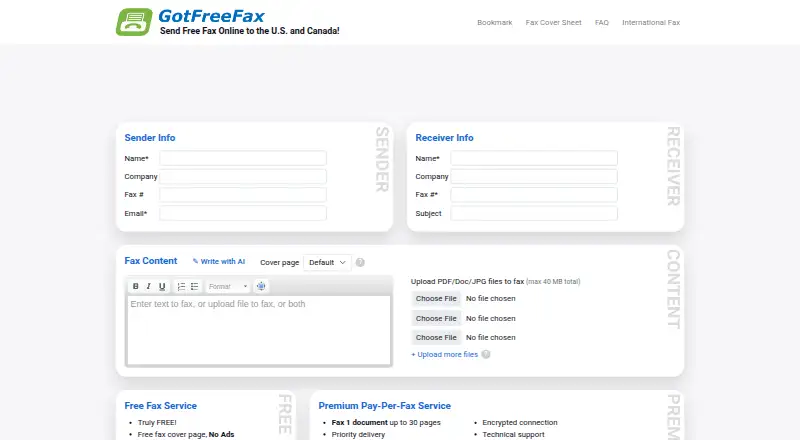
Each fax may contain as many as 10 PDF, Word, ODT, RTF, or JPG uploads. The combined allowance is 40 MB for US and Canada jobs and 20 MB for international ones.
You can select a free cover page, supply your own, or omit one. GotFreeFax says sent faxes carry no advertisements, logos, watermarks, or company branding.
A live status page lets you follow a fax after submission. More than 200 countries and regions are available internationally, with prices determined by destination.
The service provides a shared public number for occasional online reception once the sender's number is verified. Received files disappear after five days, and the company advises against using the number for sensitive material or routine business.
How it connects
GotFreeFax runs on the web and has Android and iOS access. It also offers a REST API for prepaid account holders to submit faxes, check status, view account balance, list supported formats, and receive callbacks. API requests use bearer authentication and return JSON error codes.
Through streamable HTTP JSON-RPC, the GotFreeFax MCP server gives Claude, ChatGPT, and other MCP clients fax-sending and account functions. Claude Desktop setup uses the npx mcp-remote bridge and requires Node.js on the local computer.
The software is proprietary, not open source. The company says files travel over encrypted connections with SSL, gateway antivirus, and intrusion prevention. Uploaded files are automatically deleted after five days.
Good fit
GotFreeFax suits people who need occasional online faxing without buying a machine or creating an account. The free service covers US and Canadian faxes of up to three pages, with two faxes allowed per day.
Prepaid account holders can send broadcast faxes and personalize messages for each recipient. Businesses that need programmatic sending can use the REST API, while AI users can connect through the MCP server.
For other options, compare it with online fax services such as WestFax or InterFAX.
Watch for
The free allowance is limited to two faxes per day and three pages per fax, and it works only for US and Canadian destinations. Larger jobs require a paid option.
The shared receiving number is public, so it is unsuitable for personal or sensitive documents. Telephone technical support may not be available; the terms direct users to email support for technical problems.
API and broadcast features require a prepaid account. Claude Desktop's MCP connection also requires Node.js and the npx mcp-remote bridge.
Pricing
Free Fax has no charge and permits two daily US or Canadian faxes, each up to three pages. There is no free trial.
For one-time priority delivery to the US and Canada, pay-per-fax choices are $1.25 for up to 10 pages, $2.45 for up to 20, or $3.75 for up to 30.
Prepaid page credits cost $9.95 a month for 100 pages, $19.95 a month for 250 pages, or $49.95 a month for 800 pages.
Verdict
Choose GotFreeFax if you want straightforward online sending, a small free allowance, or occasional paid faxes without maintaining a fax machine. Its delivery page, broad international reach, and document format support cover common one-off jobs.
Consider another service if you need private inbound faxing, regular receiving, telephone support, or free sending beyond the stated limits. Prepaid billing is also required for the API, broadcasting, and related account tools.
Our take
GotFreeFax works well for occasional outbound jobs, particularly US or Canadian faxes within the daily free allowance. One-time paid options accommodate longer documents, and prepaid credits enable API use and broadcasting. The shared receive number is public, limiting confidential inbound use, while phone support may be unavailable. Organizations needing a private number, steady incoming traffic, or more generous free use may need another service.
- Two daily free faxes are available for US and Canada, each up to three pages
- Up to 10 files can be submitted in common document and image formats
- A live status page lets senders monitor delivery
- International destinations span over 200 countries and regions
- Prepaid customers can use REST API and MCP features
- Free jobs cannot exceed three pages, and only two may be sent daily
- The shared receive number is public and unsuitable for sensitive material
- Phone-based technical assistance might not be offered
- API and broadcasting depend on a prepaid account
- Pick it ifPeople who send occasional faxes online instead of using a machine; Prepaid customers requiring API tools or broadcast sending; AI users linking Claude or ChatGPT through MCP
- Skip it ifYou need a private number for regular or confidential incoming faxes; You require telephone-based technical support; You need free faxing beyond two three-page US or Canadian faxes per day
Pricing
The no-cost tier permits two daily faxes of up to three pages to US and Canada.
- Free Fax3 pages per fax · 2 faxes per day · US and CanadaFree
- Premium Pay-Per-Fax (up to 10 pages)Pay-per-fax · 1 fax · Up to 10 pages$1.25/mo
- Premium Pay-Per-Fax (up to 20 pages)Pay-per-fax · 1 fax · Up to 20 pages$2.45/mo
- Premium Pay-Per-Fax (up to 30 pages)Pay-per-fax · 1 fax · Up to 30 pages$3.75/mo
- Prepaid Page Credits — 100 pagesPrepaid; billed by page · 100 page credits$9.95/mo
- Prepaid Page Credits — 250 pagesPrepaid; billed by page · 250 page credits$19.95/mo
- Prepaid Page Credits — 800 pagesPrepaid; billed by page · 800 page credits$49.95/mo
- International faxingDestinations in 200+ countries and regionsOn request
As gotfreefax.com lists them, checked 15 Oct 2026.
Questions
Can I send a fax without an account?
Yes. GotFreeFax says its service can send faxes from a computer or phone without an account, fax machine, or special software.
What does the free plan include?
The Free Fax option permits two faxes each day, limited to three pages apiece, for US and Canadian destinations.
Which files can I upload?
PDF, DOC or DOCX, ODT, RTF, and JPEG files are supported, with a maximum of 10 uploads for one fax.
Can GotFreeFax receive faxes?
A free shared public number is available for occasional reception. After sender-number verification, incoming faxes appear online and are removed after five days; the number should not be used for sensitive documents.
Does it have an API?
Prepaid account holders can use a REST API to submit faxes, check status, retrieve account balance, list supported formats, and receive callbacks.
Can AI assistants send faxes?
Yes. Claude, ChatGPT, and other MCP clients can send through the GotFreeFax MCP server. Claude Desktop setup uses Node.js together with the npx mcp-remote bridge.
How long are uploaded files kept?
GotFreeFax automatically removes uploaded fax files after five days.