
GPTExcel Review: AI Help for Excel and Google Sheets
gptexcel.app · checked 27 Sept 2026
GPTExcel brings AI formula help, data cleanup, analysis, and workflows to Excel and Google Sheets.
How it plugs in
Signal on AI Spreadsheet Tools7.5#3 of 31
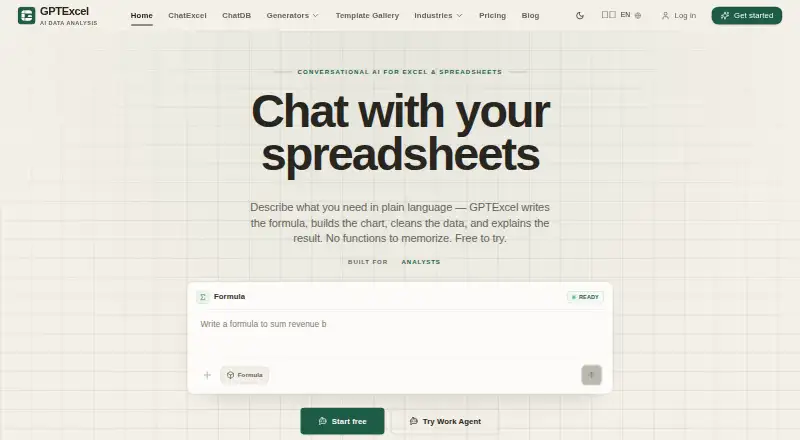
GPTExcel provides a chat-based way to use Excel and Google Sheets on the web, plus programmatic API access. It can create, explain, and repair formulas, transform data, analyze spreadsheets, and run multi-step workflows. Supported connections span Excel, CSV, Google Sheets, MySQL, and PostgreSQL. Users can start on a free plan with as many as 90 monthly credits; paid options begin at $19.90 per month.
Review
In a line
GPTExcel is a conversational spreadsheet service for Excel and Google Sheets. It also offers an API for programmatic access.
What it does
Ask GPTExcel for help creating, explaining, or repairing formulas in Excel and Google Sheets. It also analyzes spreadsheets and supports custom functions.
Its data features handle cleaning, reshaping, splitting, merging, and deduplication, while showing the result before and after. The library includes more than 299 ready-to-use templates.
Work Agent runs connected, multi-step data processes from start to finish. Teams can share saved analyses and templates for reuse.
How it connects
Excel, CSV, Google Sheets, MySQL, and PostgreSQL are among GPTExcel's supported connections. Spreadsheet apps users can access it through the web app, and the site lists API access among the Teams Max use cases.
ChatDB only runs read-only queries, leaving connected data unchanged. Database passwords are encrypted at rest, stay out of the browser, and are not written to logs. Files, sheets, and connections stay scoped to the account and answer the user request only.
Good fit
GPTExcel suits people who want chat-based help with spreadsheet formulas, data preparation, and analysis. It can fit teams that reuse templates or saved analyses.
It supports 18 languages and can run workflows across connected data sources. The service can be tried without entering a credit card.
Watch for
The free plan offers up to 90 credits per month through daily check-ins. Monthly subscriptions refresh their credits automatically, and additional credit packs are offered.
The site names API access among the Teams Max use cases, so check plan requirements for programmatic use. ChatDB is read-only and cannot edit connected databases.
Pricing
GPTExcel offers a Free plan at $0 forever with up to 90 credits each month. You can try the service without a credit card.
Pro costs $19.90 a month for 300 credits. Max costs $29.90 a month with unlimited usage. Teams Max is also $29.90 a month with unlimited usage. Lifetime access costs $599 one time.
Credit packs include 650 credits for $14.99 a month, 1,400 for $29.99 a month, 4,000 for $79.99 a month, and 10,000 for $179.99 a month. One-time options listed are Popular at $14.99 for 650 credits, Power at $29.99 for 1,400, and Mega at $79.99 for 4,000.
Verdict
Choose GPTExcel if you want one chat interface for formula assistance, spreadsheet cleanup, analysis, and connected database queries. Its Excel and Google Sheets support, read-only database access, and team reuse features cover common office workflows.
Review the credit limits and API plan before signing up. The free tier is suited to light use, while frequent work may require a monthly unlimited plan or credit packs. If you need to change data through database queries, this service is not a match because ChatDB only reads.
Our take
GPTExcel is a sensible option for spreadsheet users who prefer conversational help instead of building formulas and cleanup steps manually. It covers formulas, transformations, analysis, templates, and multi-step workflows, with connections to common files, sheets, and databases. The free plan makes initial use low-risk, but its 90-credit monthly limit is small for regular work. API access is listed as a Teams Max use case, and database queries cannot make changes. Choose a paid plan when your workload outgrows the free allowance.
- Formula creation, explanations, and repairs for Excel and Google Sheets
- Data transformation includes a before-and-after preview
- Works with Excel, CSV, Google Sheets, MySQL, and PostgreSQL
- Up to 90 credits monthly are available on the free plan
- Supports 18 languages and team reuse of saved work
- Free usage is capped at 90 credits per month
- Database queries are read-only and cannot modify data
- The site lists API access among the Teams Max use cases
- Paid plans and credit packs have different billing structures
- Pick it ifPeople who want chat-based formula and spreadsheet help; Teams reusing analyses and templates; Users combining sheets with database data
- Skip it ifYou need database queries that can edit connected data; Your work will exceed the free credit allowance regularly
Pricing
A free plan covers up to 90 credits monthly. Pro is $19.90/month for 300 credits, while Max and Teams Max are $29.90/month with unlimited usage. Credit packs and one-time options are available for different credit amounts.
- Free$0 forever · 90 credits/monthFree
- Probilled monthly · 300 credits/month · ~150 formulas · ~75 charts and analyses$19.90/mo
- Maxbilled monthly · Unlimited usage$29.90/mo
- LifetimeOne-time payment · Unlimited usage$599 one-time
- 650-credit packCredit pack · 650 credits · ~325 formulas · ~162 charts and analyses$14.99/mo
- Power credit packCredit pack · 1400 credits · ~700 formulas · ~350 charts and analyses$29.99/mo
- Mega credit packCredit pack · 4000 credits · ~2000 formulas · ~1000 charts and analyses$79.99/mo
- Ultra credit packCredit pack · 10000 credits · ~5000 formulas · ~2500 charts and analyses$180/mo
As gptexcel.app lists them, checked 27 Sept 2026.
Questions
Does GPTExcel have a free plan?
Yes. The Free plan is $0 forever and provides as many as 90 credits monthly through daily check-ins.
Which spreadsheet products does GPTExcel support?
Its conversational web app supports Excel and Google Sheets.
What data sources can it connect to?
Connections include Excel, CSV, Google Sheets, MySQL, and PostgreSQL.
Can GPTExcel change database data?
No. ChatDB runs read-only queries and cannot modify connected data.
Does GPTExcel offer an API?
Yes. API access appears in the listed Teams Max use cases.
How much is the Pro plan?
Pro costs $19.90 a month and includes 300 credits per month.
Is there a no-card trial?
The service can be tried without a credit card.
How many languages does it support?
GPTExcel works with 18 languages.