GradeAid: AI Lesson Planning and Teaching Materials
gradeaid.ai · checked 15 Oct 2026
Web-based AI lesson and teaching-material planner for curriculum-focused teachers.
How it plugs in
Signal on AI Lesson Plan Generators6.3#3 of 26
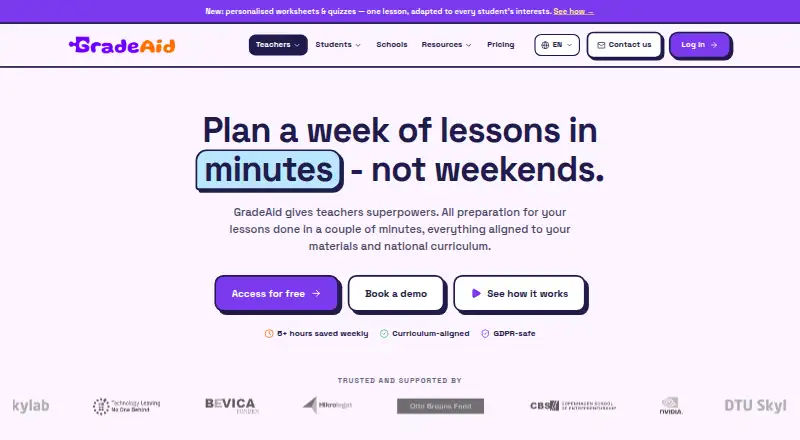
GradeAid is a web platform for teachers working with learners aged 6 to 16. It drafts curriculum-linked lessons, slide decks, worksheets, quizzes and project activities. Teachers can personalize materials, assign homework and track submissions. A free plan is available, with paid tiers adding more resources, longer lesson series and school management features.
Review
In a line
GradeAid is a web-based AI platform for creating curriculum-aligned lessons and classroom materials, then assigning work to pupils. It was built in Copenhagen, Denmark.
What it does
Its planner turns teacher input into editable lesson plans with objectives, timed activities and curriculum links.
Teachers can adapt resources to learning levels, learning styles, pupil interests and dyslexia-friendly OpenDyslexic fonts. Aidly, its teacher-facing chat, can create or change an open lesson, worksheet, quiz, presentation or project from plain-language requests.
Presentations export to PowerPoint or PDF. Worksheets can include answer keys and individual versions. Quizzes grade responses automatically and give immediate feedback.
How it connects
GradeAid runs in a web browser through separate teacher and pupil applications. Teachers send assignments, collect submissions and monitor completion.
The privacy policy names Google Gemini for generation and uploaded-material processing, Google Sign-In, Stripe for payments and YouTube embeds. Presentations export to PowerPoint or PDF, while the free plan also includes PDF and Word export.
GradeAid is not open source. Uploaded PDFs are converted to page images and transcribed so their contents can be searched and used for generation.
Good fit
GradeAid suits teachers, subject leads, school leaders, and new or cover teachers preparing materials for children and young learners aged 6 to 16.
It lists support for Danish, Spanish, Romanian, US, UK and Australian national curricula. Schools can use a pupil workflow for homework and completion tracking, while teachers keep control of AI-created content.
Watch for
Generated material is a draft. The terms require a qualified teacher to review and correct it before assigning it.
Pupils do not get a chatbot, AI tutor or content-generation tool in the pupil application. AI requests are initiated by teachers.
Check the resource limits on lower plans and whether your curriculum is covered. School pricing is quoted per school.
Pricing
GradeAid has a free plan and a free trial. Free includes worksheets, slideshows, quizzes, real-life activities, interest theming, PDF and Word export, and five resources per week with no card required.
Pro costs $8.99 a month. It adds curriculum and standards alignment, homework sending, 200 resources per month, lesson series up to 12 lessons and lessons up to 25 slides.
Max costs $14.99 a month. It adds unlimited resources, lesson series up to 25 lessons, lessons up to 35 slides, priority support and early feature access. Schools and municipalities can request a tailored quote, priced per school, with student accounts, class management, progress insights and GDPR data agreements.
Verdict
GradeAid provides separate teacher and pupil web properties for planning, creating and assigning curriculum-linked work. The free tier lets users try core resource types, while Pro and Max raise usage limits and add workflow features.
Schools should review the pupil-AI limits, curriculum coverage and teacher-review requirement before adoption. Organisations that need class management and progress insights can ask about the school plan.
Our take
Choose GradeAid if you want teacher-led AI assistance for lessons, worksheets, quizzes, presentations and projects across its teacher and pupil web applications. It is designed for children and young learners aged 6 to 16, with options for individual teachers and schools and support for its listed national curricula. The free plan is useful for occasional creation, while paid plans fit heavier monthly use or longer lesson sequences. Avoid committing without confirming that your curriculum is supported and that teachers can review every generated draft before pupils receive it.
- Free plan includes five resources per week and no card required
- Supports six listed national curriculum systems
- Creates lessons, slides, worksheets, quizzes and projects
- Personalizes materials to interests and learning needs
- Teacher-controlled pupil workflow with homework tracking
- Generated content must be reviewed and corrected by a qualified teacher
- Pupil app has no chatbot, AI tutor or generation feature
- Free plan is limited to five resources per week
- School plan pricing is available only on request
- Pick it ifTeachers creating curriculum-linked materials for ages 6–16; Schools needing teacher-assigned homework and completion tracking; Teachers working with Danish, Spanish, Romanian, US, UK or Australian national curricula
- Skip it ifYou need pupils to use an AI tutor or chatbot; You require an open-source licence; Your curriculum is outside GradeAid’s listed coverage
Pricing
A free tier supports five resources per week. Pro is $8.99/month with 200 resources, while Max is $14.99/month with unlimited resources. School and municipality plans are quoted per school.
- FreeWorksheets, slideshows, quizzes, real-life activities · interest theming · PDF and Word export · 5 resources per week · no card requiredFree
- Pro$8.99/mo · Free features · curriculum and standards alignment · remove badge · homework sending · 200 resources/month · lesson series up to 12 lessons · lessons up to 25 slides$8.99/mo
- Max$14.99/mo · Pro features · unlimited resources · lesson series up to 25 lessons · lessons up to 35 slides · priority support · early feature access$14.99/mo
- Schools & MunicipalitiesPriced per school · Student accounts · class management · progress insights · GDPR data agreementsOn request
As gradeaid.ai lists them, checked 15 Oct 2026.
Questions
Does GradeAid have a free plan?
Yes. The Free plan includes worksheets, slideshows, quizzes, real-life activities, interest theming, PDF and Word export, and five resources per week. No card is required.
Can pupils chat with GradeAid’s AI?
No. The pupil application has no chatbot, AI tutor or content-generation feature. Teachers create and assign the work.
Which curricula does GradeAid support?
The site lists Danish, Spanish, Romanian, US, UK and Australian national curricula.
How much do Pro and Max cost?
Pro costs $8.99 a month. Max costs $14.99 a month. Pro allows 200 resources per month; Max allows unlimited resources.
Does GradeAid connect to other services?
Its privacy policy names Google Gemini, Google Sign-In, Stripe and YouTube embeds. Presentations can export to PowerPoint or PDF.
Is GradeAid open source?
No open-source licence is identified. GradeAid states that its software, logo, prompts and templates are its intellectual property.