
Graphtr: Browser-Based Design Tools and Pricing
graphtr.com · checked 7 Oct 2026
Make everyday graphics in Graphtr’s browser editor, with templates, AI assistance, and API access.
How it plugs in
Signal on Logo Design Software6.3#16 of 45
Graphtr’s AI assistant fills a chosen layout with copy, then lets users refine the design. The free plan pairs several export formats with cloud storage and capped AI and API usage. Paid plans raise limits and add storage and other features.
Review
In a line
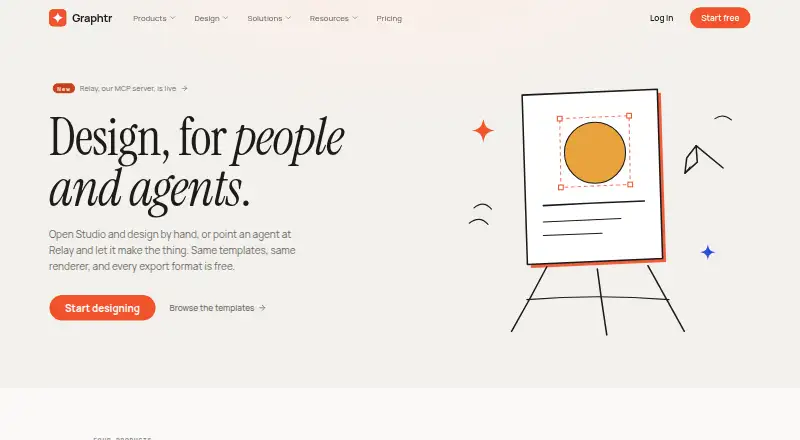
Graphtr provides a browser editor for making graphics and presentations for everyday use. It combines editable templates, design tools, and AI assistance.
What it does
Templates are available for social posts, posters, thumbnails, invitations, business cards, logos, and presentations. In the editor, users can add and style text, place shapes and charts, upload and filter images, and work with layers, alignment guides, and keyboard shortcuts.
The AI assistant chooses a layout and drafts copy for it. Afterward, users can fine-tune the design layers themselves.
How it connects
The editor runs in up-to-date browsers on Windows, macOS, Linux, and ChromeOS. Graphtr targets desktop and laptop displays and does not provide a desktop or mobile app.
API and MCP usage is available, subject to monthly render allowances that vary by plan. Graphtr’s website also lists an MCP server for Claude Code. Free-plan files can be exported as PNG, JPG, SVG, or PDF, without a watermark and at up to 2x size.
Good fit
Students, small businesses, and creators looking for routine graphics without professional software may find Graphtr useful, particularly if they favor browser-based tools and templates. Presentation features and brand kits can also support these design tasks.
Watch for
The editor is intended for computer screens rather than phone design. Account sign-in is through Google or an email link, with no single sign-on option.
Quick tools work without an account and keep no server-side data, so download their results before you close the tab. Account-saved designs are private to that account. Graphtr states that it neither sells data nor trains on designs; it also says API keys have scoped permissions, are hashed in storage, and can be revoked.
Pricing
The Free plan provides every editing tool, 250 MB of cloud storage, one brand kit, 20 AI idea prompts per hour, and 50 API renders each month. Its exports are PNG, JPG, SVG, or PDF at up to 2x.
Pro costs $9.99 monthly. It brings a premium template library, up to 30 AI-assisted designs and 100 idea prompts per hour, 4x export, 5 GB of storage, 1,000 monthly API renders at up to 4096px, and five brand kits.
Business is $49.99 monthly. It provides up to 120 AI-assisted designs and 400 idea prompts per hour, priority AI capacity, 25 GB of storage, 10,000 monthly API renders, 25 API keys, and 25 brand kits.
Verdict
Graphtr is worth considering for everyday graphics or presentations in a browser if the free plan’s export, storage, and usage limits are enough. Paid plans may suit users who need more monthly API renders, storage, or AI and export capacity. Look elsewhere if you need phone or desktop apps, or single sign-on.
Our take
Graphtr is worth considering for people making everyday graphics or presentations who prefer templates and a browser editor to a more complex design setup. Its free plan includes useful export formats and a brand kit, but storage, AI prompts, and API renders are capped. Pro and Business increase those limits at different monthly prices. Skip it if you require phone-based editing or single sign-on; the editor is aimed at desktop and laptop screens, and SSO is unavailable.
- Free-plan exports include PNG, JPG, SVG, and PDF without a watermark, at up to 2x.
- Editable templates are available for social posts, posters, presentations, invitations, business cards, and logos.
- The AI assistant picks a layout and drafts copy for users to refine.
- API and MCP access are available, with monthly render allowances varying by plan.
- The editor targets desktop and laptop screens rather than phones.
- No desktop or mobile app is available.
- Single sign-on is unavailable.
- Download quick-tool results before closing the tab.
- Pick it ifStudents, small businesses, and creators making everyday graphics; People who want browser-based templates and presentation tools; Teams needing API renders within plan-based monthly limits
- Skip it ifYou need to create or edit designs on a phone.; You require a desktop app or single sign-on.
Pricing
Free includes capped storage, AI prompts, API renders, and one brand kit. Pro at $9.99 a month raises those limits and adds premium templates and 4x export. Business at $49.99 a month provides higher AI, storage, and API limits, plus priority AI capacity and more API keys and brand kits.
- FreeEvery editing tool · PNG, JPG, SVG and PDF export up to 2x · 250 MB cloud storage · 20 AI idea prompts per hour · 50 API renders per month · 1 brand kitFree
- Pro$9.99/ month · Premium template library · AI assistant: 30 designs per hour · 100 AI idea prompts per hour · 4x export · 5 GB storage · 1,000 API renders per month up to 4096px · 5 brand kits$9.99/mo
- Business$49.99/ month · AI assistant: 120 designs per hour · 400 AI idea prompts per hour · Priority AI capacity · 25 GB storage · 10,000 API renders per month · 25 API keys · 25 brand kits$49.99/mo
As graphtr.com lists them, checked 7 Oct 2026.
Questions
Does Graphtr have a free plan?
Yes. Free includes all editing tools, 250 MB of cloud storage, one brand kit, 20 AI idea prompts per hour, and 50 API renders per month.
What does Graphtr cost?
Free costs nothing. Pro is $9.99 per month, and Business is $49.99 per month.
Can I use Graphtr on a phone?
The browser editor is intended for desktop and laptop screens rather than phones. Graphtr has no mobile app.
What file types can I export?
Free-plan exports include PNG, JPG, SVG, and PDF without a watermark, at up to 2x.
Does Graphtr connect to Claude Code?
Graphtr’s website lists an MCP server for Claude Code. It also offers API and MCP access with monthly render limits that vary by plan.
Can I use Graphtr without an account?
Quick tools work without an account and keep no server-side data. Download the result before closing the tab.
Does Graphtr offer single sign-on?
No. Sign-in uses Google or an email link; single sign-on is not offered.