gVisor: Free Linux Sandbox for Containers
gvisor.dev · checked 4 Oct 2026
Open-source Linux sandbox that isolates containers from the host.
How it plugs in
Signal on Container Engines6.3#5 of 31
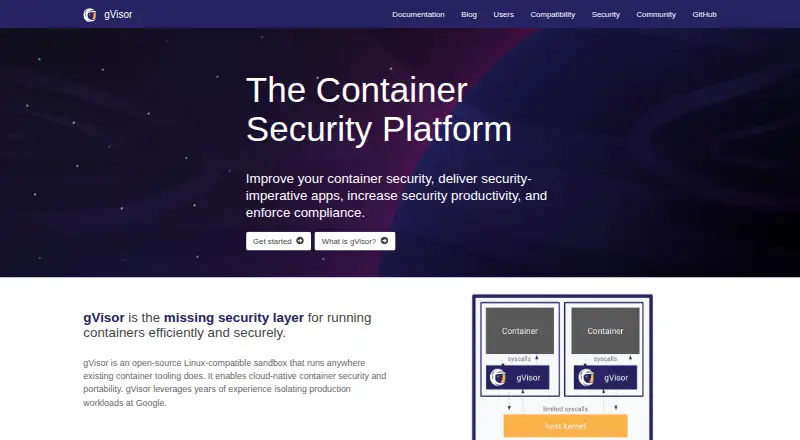
gVisor provides a free, open-source sandbox for Linux containers on infrastructure you control. A Sentry process receives application system calls and implements them without handing them straight to the host. Designed for untrusted workloads such as uploaded, generated, or third-party code, it works with Docker, Kubernetes, containerd, and OCI runtimes.
Review
In a line
As an open-source Linux-compatible sandbox and application kernel, gVisor runs containers with an added boundary between them and the host operating system. It runs on Linux systems you manage yourself.
What it does
Each sandbox has a Sentry process that handles application system calls rather than sending them straight through to the host. A separate Gofer process controls filesystem access.
Least-privilege operation and a strict system-call filter limit the Sentry's host access. Checkpointing and restoring containers can preserve state, resume workloads on another machine, or retain a service for forensics.
Most CUDA applications are supported on selected NVIDIA driver versions and can run unmodified in the sandbox. GPU availability varies by model, driver, capability, device file, ioctl call, and platform.
How it connects
Docker, Kubernetes, containerd, and OCI runtimes are among the integrations documented by the open-source project. Kubernetes setups can use GKE Sandbox, Minikube, or nodes configured with containerd and the gVisor shim. It supports the Kubernetes Container Runtime Interface and rootless mode.
Application trace points can be sent to an external threat-detection engine such as Falco for alerts. Image building is supported, along with both image formats. Its runtime interface is listed as other. See related container runtime software and container engines.
Good fit
gVisor suits teams that need to run user-uploaded, LLM-generated, third-party, or other untrusted code while reducing direct access to the host. It is also aimed at Linux container deployments using Docker or Kubernetes.
Its checkpoint and restore features fit workloads that need saved state, warm-service caching, relocation to another machine, or forensic copies.
Watch for
Installation requires Linux 5.6 or later on x86_64 or ARM64 hardware. Windows containers are not supported, and the supported host operating system is Linux.
gVisor leaves some system calls and /proc or /sys files unimplemented. Its compatibility list is best effort rather than a promise that marked applications will work fully. Documentation also notes higher per-system-call overhead and lower application compatibility than other isolation approaches.
It generally does not defend against hardware side channels; those protections depend on the host operating system and platform. GPU support has additional limits tied to hardware, drivers, and platform details.
Pricing
gVisor is free. The project offers one free, open-source plan with no paid tier listed in these facts.
Verdict
Choose gVisor when isolating container workloads from a Linux host matters more than maximum compatibility or the lowest system-call overhead. It is a practical fit for services that execute code from users, language models, or outside parties.
Check your applications against its compatibility guidance, confirm the Linux and CPU requirements, and verify any GPU needs before adoption. Skip it for Windows containers or workloads that require complete system-call and kernel-file coverage. Community help is provided through GitHub issues, documentation, and mailing lists.
Our take
gVisor is a sensible choice for Linux operators who need an extra boundary around containers that may execute untrusted code. Its Sentry and Gofer processes, restrictive filtering, and least-privilege approach add isolation without requiring application changes in supported GPU cases. The trade-off is real: some system calls and kernel files are missing, compatibility is not guaranteed, and system-call overhead is higher. Confirm hardware, kernel, CPU architecture, and application behavior first. Organizations running Windows containers or depending on broad kernel compatibility should choose another approach.
- Free and open-source
- Docker, Kubernetes, containerd, and OCI runtime integrations
- Rootless operation and Kubernetes CRI are supported
- Container checkpointing and restoration
- Selected CUDA applications can run without changes
- Linux 5.6 or newer is required on x86_64 or ARM64
- Some system calls and /proc or /sys files are unimplemented
- The compatibility list is best effort rather than a guarantee
- Per-system-call overhead exceeds that of some isolation approaches
- GPU support is limited to selected hardware and drivers
- Pick it ifRunning untrusted container code on Linux hosts; Docker or Kubernetes deployments needing extra isolation; Workloads that benefit from checkpoint and restore
- Skip it ifYou need Windows container support; Applications depend on every system call, /proc file, or /sys file; You need broad GPU support beyond listed models and drivers
Pricing
The only listed plan is free and open source. There is no paid tier in the supplied pricing facts.
- gVisorOpen-source Linux-compatible sandbox; requires Linux 5.6+ and x86_64 or ARM64Free
As gvisor.dev lists them, checked 4 Oct 2026.
Questions
Is gVisor free?
Yes. gVisor is listed as a free, open-source plan.
Which operating systems can run gVisor?
gVisor runs on Linux hosts and requires Linux 5.6 or later. It supports x86_64 and ARM64. Windows containers are not supported.
What container tools work with gVisor?
Docker, Kubernetes, containerd, and OCI runtimes are documented integrations. Kubernetes can use GKE Sandbox, Minikube, or a gVisor shim.
Can gVisor run GPU workloads?
Most CUDA applications can run unchanged with selected NVIDIA driver versions. Availability is constrained by models, drivers, capabilities, device files, calls, and platforms.
Does gVisor support rootless containers?
Yes. Rootless mode is listed as supported.
What are gVisor's main compatibility limits?
Some system calls, /proc files, and /sys files are not implemented. The compatibility list is best effort, and documentation notes higher system-call overhead.
How can users get support?
The project directs users to GitHub issues, documentation, and mailing lists for support and community discussion.