
Hatica engineering analytics review
hatica.io · checked 28 Sept 2026
Engineering analytics with team, project, DevOps, and AI-driven productivity insights.
How it plugs in
Signal on DevOps analytics software6.3#9 of 48
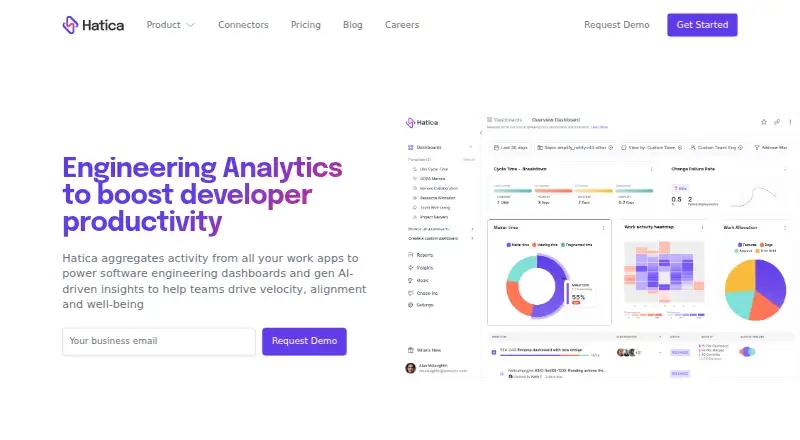
Hatica gives engineering teams visibility into software delivery, productivity, and project results. Activity from connected work tools feeds project, team, DORA, and CI/CD dashboards, while generative AI surfaces observations on velocity, alignment, and well-being. It runs in the cloud or on your own infrastructure and has a free plan.
Review
In a line
Hatica shows how software-development activity flows through teams and projects with engineering analytics.
It is available as a web service, API, Linux deployment, or self-hosted installation.
What it does
Work-app activity becomes dashboards spanning projects, teams, and the organization. Individual activity is tracked alongside DevOps measures such as DORA and CI/CD insights.
Generative-AI features use that activity to produce insights about delivery speed, team alignment, and well-being. Check-ins and standups remain free for teams of any size.
How it connects
Connections include GitHub, GitLab, and Bitbucket, along with Azure DevOps and collaboration tools such as Slack, Zoom, and Google Meet. It also connects with Microsoft Teams, Gmail, Outlook, and Google Calendar.
For planning and project work, Hatica lists Jira, Asana, ClickUp, Trello, Clubhouse, Aha!, Productboard, ProductPlan, and Linear. Integrated records generally update in 10–15-minute increments, although the stated synchronization service level is 24 hours.
A Product API exposes metrics and configuration, while an Events API accepts work and system activity such as deployment events. Business includes data exports, while Enterprise adds data-warehouse synchronization and custom integrations. Depending on the plan, imported history reaches as far back as five years.
Good fit
Hatica is aimed at executives, engineering managers, and engineers who need organization, team, or individual productivity views. Its dashboards cover delivery, reliability, custom measures, and DevOps work.
It can suit small, mid-market, and enterprise organizations. Teams can use cloud hosting or run the service themselves with Docker containers on Linux or UNIX 64-bit x86 systems.
Watch for
The amount of history depends on the subscription: one month on Free, six months on Pro, two years on Business, and five years on Enterprise. The stated 24-hour data-sync service level is longer than the usual 10–15-minute incremental updates.
Self-hosting requires your own infrastructure, such as Kubernetes, AWS ECS, bare metal, or a virtual private server. Confirm that this setup and the required integrations fit your operations.
Hatica says customer source code is not retained and that repository access uses encryption and access controls. Compliance listings include SOC 2, GDPR, and SAML single sign-on.
Pricing
Hatica uses a freemium model. Its Free tier is billed at Free and provides unlimited team members, unlimited data sources, one month of history, and documentation and email support.
Pro is $19 a month, billed $19 /member/mo, with six months of history, the Events API, SSO, and documentation and email support. Business is $29 a month, billed $29 /member per mo, and adds two years of history, data exports, on-premises integrations, HRMS integrations, and a dedicated Customer Success Manager.
Enterprise is price on request, billed Custom. It includes self-hosted or private-cloud deployment, the Product API, data-warehouse sync, custom metrics, custom integrations, and five years of history. Entry-level paid access is $19/user/mo, and a 14-day trial is available.
Verdict
Choose Hatica if you want one view of engineering activity across many work tools, with DORA, delivery, reliability, and custom metrics available. Its APIs and self-hosted options matter when standard connections are not enough or data must stay in your environment.
The Free plan works for basic dashboards and short history. Pro adds API events and SSO, while Business and Enterprise suit organizations that need longer history, exports, private deployment, or tailored integrations. Check synchronization timing, infrastructure effort, and history limits before committing.
Our take
Hatica fits organizations that need measurable views of software delivery across teams and tools rather than a simple task tracker. Its broad integrations, dashboard types, APIs, and self-hosted choices give larger teams room to shape the setup. Smaller groups can start without paying, but the one-month history on Free may be restrictive. Review the plan-specific retention, synchronization expectations, and hosting responsibilities before choosing a tier. The 14-day trial offers a short way to check whether the connected activity produces useful reports for your roles.
- Unlimited team members and data sources are available on the Free tier
- Dashboards include DORA, CI/CD, delivery, and reliability measures
- Offers Product and Events APIs
- Cloud or self-hosted deployment options
- 14-day trial and free check-ins
- Free plan keeps only one month of history
- Typical sync runs every 10–15 minutes
- Self-hosting requires Linux or UNIX 64-bit x86 infrastructure
- Enterprise pricing is custom
- Some features are limited to higher plans
- Pick it ifEngineering leaders tracking delivery across many tools; Teams needing DORA and custom productivity metrics; Organizations requiring self-hosted or private-cloud deployment
- Skip it ifYou need a simple task list rather than engineering analytics; You cannot manage self-hosted infrastructure when cloud hosting is unsuitable; You require more than one month of history on a free plan
Pricing
Free covers unlimited members and data sources but only one month of history. Pro costs $19/member/month, Business $29/member per month, and Enterprise is custom-priced. A 14-day trial is available.
- FreeFree · Unlimited team members · Unlimited data sources · 1 month history · Docs and Email SupportFree
- Pro$19 /member/mo · 6 month data history · Events API · SSO · Docs and Email Support$19/mo
- Business$29 /member per mo · 2 year data history · Data exports · On-prem integrations · HRMS integrations · Dedicated Customer Success Manager$29/mo
- EnterpriseCustom · Self-hosted/Private cloud · Product API · Data Warehouse sync · Custom metrics · Custom integrations · 5 year data historyOn request
As hatica.io lists them, checked 28 Sept 2026.
Questions
Is a no-cost Hatica tier available?
Yes. Hatica's Free tier is billed at Free, supports unlimited team members and data sources, and retains one month of history.
Which tools can Hatica connect to?
It lists GitHub, GitLab, Bitbucket, Azure DevOps, Slack, Zoom, Google Meet, Microsoft Teams, Gmail, Outlook, Google Calendar, Jira, Asana, ClickUp, Trello, Clubhouse, Aha!, Productboard, ProductPlan, and Linear.
Can Hatica run on my own servers?
Yes. Self-hosted Hatica runs in Docker containers on Linux or UNIX 64-bit x86 and can use Kubernetes, AWS ECS, bare metal, or VPS infrastructure.
Does Hatica provide an API?
Yes. The Product API handles metrics and configuration, while the Events API accepts work and system activity such as deployment events.
How often does Hatica sync data?
Integrated data typically syncs incrementally every 10–15 minutes, with a stated 24-hour data-sync service level.
Which plan includes the longest history?
Enterprise includes five years of history. Business includes two years, Pro six months, and Free one month.
What support does Hatica offer?
Support channels include email, chat, phone, and documentation. Priority support adds a Customer Success Manager, dedicated channel, and guided onboarding.