
Disk Health Monitoring Software
HDDlife: Windows Hard-Drive and SSD Health Monitor
hddlife.com · checked 15 Oct 2026
Windows software that tracks hard-drive and SSD health, temperature, space and warning signs.
How it plugs in
Signal on Disk Health Monitoring Software6.3#5 of 30
HDDlife is a Windows monitor for hard drives and SATA SSDs. More than 20 S.M.A.R.T. readings are examined, with health, temperature, life estimates and failure warnings shown. Noise and power controls are included. A free plan and 14-day full trial are available; paid licenses start at $19 one time.
Review
In a line
HDDlife is Windows software that watches hard-drive and SATA SSD health in the background. It alerts you when drive data points to a developing problem.
What it does
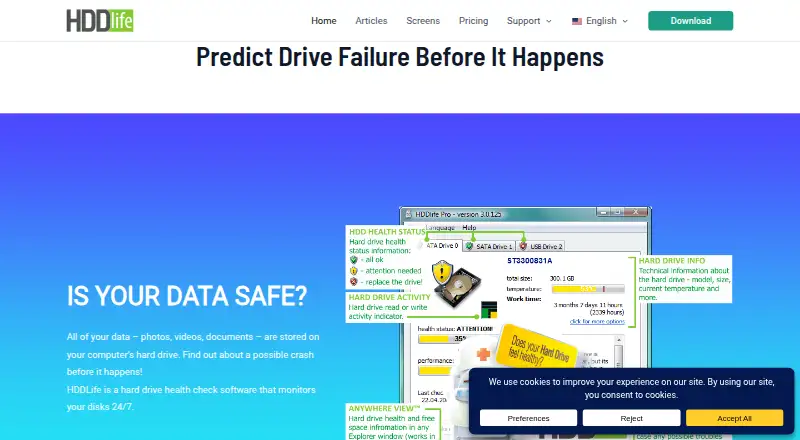
Using over 20 S.M.A.R.T. parameters, the app presents drive condition in plain language. Its display includes temperature, free space, resource level, power-on time and an estimated remaining life.
You can adjust the balance between disk noise and performance, use a quieter mode, and reduce power use. Alerts can cover temperature and free space, with actions such as sound, email, a local-network message, sleep, hibernation or shutdown.
Detailed S.M.A.R.T. fields—including raw readings, thresholds and statuses—are available in HDDlife. Drive details can be saved as a LOG file.
How it connects
HDDlife runs on Windows and supports hard drives and SATA SSDs. Its supported storage list leaves out NVMe and M.2. Certain USB controllers fail to relay S.M.A.R.T. commands, which can prevent the program from checking those drives.
Remote alerts can go by email or to another computer on the same local network.
Good fit
Windows users can run ongoing drive checks with HDDlife without administrator permissions. It can help you watch temperatures, available space, operating time and warning signs before deciding whether to back up or replace a disk.
The Professional, Notebook and Bundle plans cover one PC, one laptop, or one of each. The Family plan covers five PCs and adds multiple-PC use.
Watch for
This is Windows-only software, and its listed hardware support excludes NVMe and M.2. USB monitoring works only when the controller exposes S.M.A.R.T. commands.
The official guidance suggests keeping ordinary hard drives below 40°C and laptops below 45–50°C, although brief higher readings can occur. Your purchase carries a year of updates; once that period ends, the purchased build continues to function and later builds operate as the free edition.
Pricing
A free plan is available, and the fully functional trial lasts 14 days. One-time prices are $19 for Professional (one PC), $25 for Notebook (one laptop), $35 for Bundle (one PC and one laptop), and $65 for Family (five PCs).
Every paid license comes with its first year of updates, and renewal can be purchased at half price. Paid plans list priority email support. A 30-day no-questions-asked refund is offered, subject to possible blocking after a refund.
Verdict
Choose HDDlife if you use Windows with supported SATA storage and want readable health details, background checks and failure warnings without giving the program administrator access. The one-time pricing and free option make it easy to try before buying.
Consider another tool if your systems rely on NVMe or M.2 drives, or when a USB controller withholds S.M.A.R.T. data.
Our take
HDDlife is a practical choice for Windows households and small setups that use compatible hard drives or SATA SSDs. Its background monitoring, clear S.M.A.R.T. information and remote notifications may reveal temperature, capacity or failure issues sooner. The free option and 14-day full trial lower the risk of trying it. Compatibility is the deciding issue: NVMe and M.2 storage is outside its support, and some USB enclosures hide the data it needs. Buyers should also account for updates beyond the included first year.
- Checks over 20 S.M.A.R.T. parameters
- Shows temperature, free space and estimated drive life
- Runs without administrator rights
- Offers email and local-network alerts
- 14-day fully functional trial and free plan
- Windows only
- NVMe and M.2 storage is outside the supported list
- Some USB controllers prevent health checks
- Updates after year one require optional renewal
- No open-source license is stated
- Pick it ifWindows users with HDDs or SATA SSDs; People wanting background health and temperature warnings; Homes needing monitoring across several PCs
- Skip it ifYou need NVMe or M.2 monitoring; Your USB enclosure does not relay S.M.A.R.T. commands
Pricing
A free plan and 14-day full trial are available. Paid one-time licenses cost $19–$65, with the first year of updates included and renewal offered at 50% off.
- ProfessionalPay once; one year of free updates, optional renewal at 50% discount · 1 PC · JustNow lifetime calculation · AnyWhereView · detailed S.M.A.R.T. attributes · multilingual interface · priority email support$19 one-time
- NotebookPay once; one year of free updates, optional renewal at 50% discount · 1 laptop · JustNow lifetime calculation · AnyWhereView · detailed S.M.A.R.T. attributes · multilingual interface · priority email support · laptop specificity$25 one-time
- BundlePay once; one year of free updates, optional renewal at 50% discount · 1 PC and 1 laptop · JustNow lifetime calculation · AnyWhereView · detailed S.M.A.R.T. attributes · multilingual interface · priority email support · laptop specificity$35 one-time
- FamilyPay once; one year of free updates, optional renewal at 50% discount; page shows $99 crossed out · 5 PCs · JustNow lifetime calculation · AnyWhereView · detailed S.M.A.R.T. attributes · multilingual interface · multiple-PC use · priority email support$65 one-time
As hddlife.com lists them, checked 15 Oct 2026.
Questions
What operating systems does HDDlife support?
HDDlife runs on Windows. Its listed hardware support is for hard drives and SATA SSDs; NVMe and M.2 storage falls outside that list.
Can HDDlife monitor USB drives?
Sometimes. When a USB controller does not carry S.M.A.R.T. commands, HDDlife might be unable to report that drive’s health.
Does HDDlife need administrator rights?
According to the maker, regular users can access every program function without administrator permissions.
How long is the HDDlife trial?
The trial provides the complete feature set for 14 days.
What does a paid HDDlife license include?
Professional is $19, Notebook $25, Bundle $35 and Family $65, all sold as one-time purchases. The first 12 months of updates are included, and renewal is optional at half price.
Can HDDlife send alerts remotely?
Yes. Notifications may be delivered by email or sent to another computer on the local network.
Near it
All alternatives →- AHActive@ Hard Disk Monitor#4 on this board
- DDDA Drive Analyzer#6 on this board
- G
 GSmartControl#3 on this board
- DDiskMaster#7 on this board
- Ssmartmontools#2 on this board
- SScrutiny#8 on this board
- SSSMART Sniffer#1 on this board
- HDHard Disk Sentinel#9 on this board
- NDNEAITECH DiskHealth#10 on this board
- ASApacer SSDWidget 2.0#11 on this board