IT Capacity Management Software
Hyperview: Data Center Infrastructure Management Software
hyperviewhq.com · checked 14 Oct 2026
Cloud data center infrastructure management for assets, capacity, power and environmental monitoring.
How it plugs in
Signal on IT Capacity Management Software6.3#1 of 23
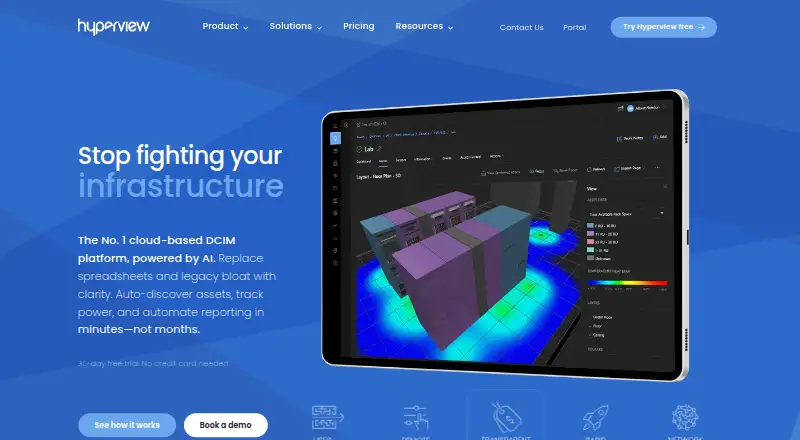
Hyperview provides cloud-based DCIM for managing data center infrastructure. It discovers networked equipment, keeps asset records, monitors power and environmental conditions, and supports capacity planning. Teams can inspect facilities in 2D and 3D, create dashboards, use a versioned REST API, and bring in ServiceNow CMDB or Equinix Smart View data.
Review
In a line
Hyperview is a cloud service for managing data center infrastructure, including equipment, space, power and environmental conditions. It is aimed at teams that need one view of their facilities and assets.
What it does
Using agentless discovery, Hyperview collects information on network-connected servers, storage, power distribution units, network devices, sensors, virtual machines and cloud instances. The service maintains asset inventories, equipment relationships, hierarchies and lifecycle details.
Power, energy, capacity, temperature, humidity, airflow, cooling and leak-related sensors are covered by the monitoring tools. Alerts, heat maps, custom dashboards, room layouts, drag-and-drop tools, and 2D and 3D views help teams inspect conditions and plan rack, power and facility capacity.
Hyperview also tracks kilowatt usage, carbon footprints and sustainability reports, with support for ASHRAE thermal-compliance work. An AI Assistant is available in beta for feature guidance and task help.
How it connects
Hyperview provides a versioned REST API backed by OpenAPI. It supports role-based tokens, notifications, an interactive API explorer, and example integrations in PowerShell, Python and Java. The main service is proprietary SaaS; separate tools such as hvcli are open source.
Pages are provided for ServiceNow CMDB synchronization and for bringing Equinix Smart View data into Hyperview. Monitoring and discovery require installing and registering a Hyperview Data Collector on a networked server.
The web application is supported in Google Chrome, Microsoft Edge and Mozilla Firefox. Microsoft Azure hosts the service, with selectable regions such as US West, US East, Canada Central, EU North, UAE North and APAC Southeast.
Good fit
Hyperview suits data center managers, colocation providers, systems administrators, network engineers and CIOs. It fits teams that need asset records alongside rack, space, power, cooling and environmental oversight.
Its capacity tools are useful for checking available rack, power and facility headroom. API access and ServiceNow or Equinix connections help organizations tie infrastructure information to other systems.
Watch for
You must deploy a Hyperview Data Collector on a networked server for discovery and monitoring. The service is hosted SaaS, and the main DCIM product is not open source.
Included limits list 10 sensors per asset, 30 days of full-resolution sensor history, three years of daily summaries and 5 MB of document storage per asset. The stated asset limit is 500 assets.
The Connectivity add-on is listed separately. Network mapping and reporting, document and media association, and IP address management are marked as coming soon. Hyperview is also described as having no mobile application.
Pricing
All features are available during a 30-day trial, and no credit card is needed. There is no free plan.
The Hyperview plan is priced at $3 per asset annually, requires at least 500 assets, excludes taxes and add-ons, and applies in qualifying regions. A separate per-asset plan is listed at $3 a year for one asset and includes a 30-day trial.
The Subscription plan starts at $125 a month and includes all features after the trial. The Connectivity add-on is $2 an asset a year.
Verdict
Choose Hyperview if your organization needs cloud-based DCIM with asset discovery, facility monitoring, capacity planning and an API. Its dashboards, layouts, heat maps and Azure region choices support teams managing distributed infrastructure.
Check the 500-asset minimum, retention and document limits, collector requirement and add-on roadmap before signing up. Smaller installations may prefer the trial or per-asset listing, while teams needing a mobile app or an open-source DCIM platform should look elsewhere.
Our take
Hyperview can suit organizations managing physical or hybrid data centers that want hosted asset records, monitoring and capacity views together. Its API and ServiceNow and Equinix connections can place infrastructure data into existing workflows. Before buying, confirm that your asset count meets the plan minimum, that the Data Collector can be installed, and that the stated sensor, history and document allowances are sufficient. It is a weaker match for buyers seeking a free tier, mobile app or fully open-source software.
- Finds servers, storage, network devices, sensors and cloud instances without installing agents.
- Tracks power, energy, capacity, temperature, humidity, cooling and leak conditions.
- Provides 2D and 3D facility views, dashboards, layouts and heat maps.
- Includes a versioned REST API and connections for ServiceNow and Equinix data.
- Includes carbon tracking, sustainability reporting and ASHRAE support.
- No free plan; paid options follow the trial.
- Monitoring and discovery require a registered Data Collector.
- The listed Hyperview plan has a 500-asset minimum.
- Included history and document storage are limited per asset.
- The service is described as having no mobile application.
- Pick it ifData center managers and colocation providers; IT teams planning rack, power and facility capacity; Organizations needing API-based DCIM records
- Skip it ifYou need a free or open-source DCIM product.; You require a mobile app for routine work.; Your deployment cannot meet the 500-asset plan minimum.
Pricing
There is a 30-day full-feature trial with no credit card and no free plan. Connectivity costs $2 an asset a year.
- 30-day free trial30 days · all features · no credit card neededFree
- HyperviewPer asset, per year; minimum 500 assets; qualifying regions listed on page; excluding taxes · 500-asset minimum · core features included · add-ons priced separately$3/yr
- Per-asset planper asset per year · 30-day free trial · listed as 1 asset per year$3/yr
- Subscriptionmonthly · all features after trial · starts at $125 per month$125/mo
As hyperviewhq.com lists them, checked 29 Sept 2026.
Questions
Does Hyperview offer a free plan?
No. Hyperview provides a 30-day, all-feature trial without a credit card, but no continuing free tier.
What systems can Hyperview connect to?
Connections include a versioned REST API, ServiceNow CMDB synchronization pages and Equinix Smart View import pages. API examples are available for PowerShell, Python and Java.
What does Hyperview monitor?
Its monitoring covers power, energy, capacity, temperature, humidity, airflow, cooling and leak-related sensors, and includes alerts and heat maps.
How is Hyperview hosted?
The platform runs in Microsoft Azure, with region options including US West, US East, Canada Central, EU North, UAE North and APAC Southeast.
What are the main pricing limits?
Listed allowances are 10 sensors for each asset, 30 days of full-resolution retention, three years of daily summaries and 5 MB of document storage per asset.
Does Hyperview have a mobile app?
It is described as SaaS without a mobile application. The web app is supported in Chrome, Edge and Firefox.
Near it
All alternatives →- BHBMC Helix Continuous Optimization#2 on this board
- D
 Device42#3 on this board
- FCFNT Command#4 on this board
- SD
 Sunbird dcTrack#5 on this board
- GCGoogle Cloud Capacity Planner#6 on this board
- VV
 Virtana VirtualWisdom#7 on this board
- IVInfovista VistaPlan#8 on this board
- IC
 ITRS Capacity Planner#9 on this board
- KN
 Kentik Network Capacity Planning#10 on this board
- PF
 Progress Flowmon#11 on this board