KColor: AI Color Palette Tool Review
kcolor.co · checked 3 Oct 2026
AI tool for building, evaluating, and exporting color systems.
How it plugs in
Signal on AI Color Palette Generators6.0#5 of 22
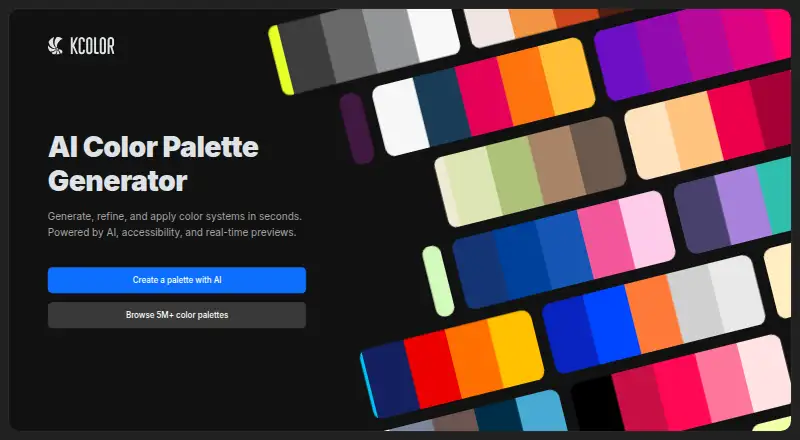
KColor brings AI palette generation to a browser and extension. It turns natural-language descriptions into palettes, shows them in website and app mockups, evaluates contrast and color-blind visibility, and pulls colors from images. Palettes can be exported in formats such as CSS, Tailwind, JSON, and CSV.
Review
In a line
KColor is an AI tool for generating, refining, and applying color palettes. You can use it in a browser or via an extension.
What it does
Give KColor a plain-language description for branding, websites, user interfaces, marketing materials, or other creative work, and it generates options you can refine and apply.
Website and app layouts in the previewer let you inspect contrast, visual hierarchy, accessibility, and balance before using the colors.
You can also upload an image to extract its colors. The page states that dropped files are not stored. Other listed tools include webpage CSS color extraction, Google image search, a Tailwind palette generator, palette audits, and palette import and sharing.
How it connects
Palette outputs cover SCSS, CSS, Tailwind, Bootstrap, Radix, JSON, CSV, PNG, SVG, ASE, HEX, OKLCH, HSL, RGB, and Display-P3. Copyable HEX values are available too.
A public MCP server connects KColor with Claude. Through Streamable HTTP, without authentication, Claude can generate or search palettes, check contrast, analyze palettes, and convert colors.
Links on the homepage lead to a Chrome extension and a Figma plugin. Palettes may be pinned without an account, whereas saving them requires one.
Good fit
Designers, developers, marketers, and other creators working on color systems for brands, websites, interfaces, campaigns, or images may find KColor suitable.
Layout previews, WCAG and APCA contrast checks, and a color-blindness simulator are useful when accessibility and readability matter. The palette collection contains more than 5 million palettes for browsing and reference.
Watch for
The homepage shows a daily allowance for Ask Jak sessions, which become available again after 24 hours.
You can pin without an account, but storing saved palettes needs one. Check that the export format you need is included in KColor's list, and note that access is through the web or an extension.
Pricing
KColor is free and has a free plan.
Verdict
Choose KColor for palette creation from prompts, layout previews, accessibility evaluation, image color extraction, and a broad set of export formats. Its Claude connector adds palette tools through a public, no-authentication MCP server.
It may be less suitable for anyone who needs unlimited Ask Jak sessions, account-free saved palettes, or a platform beyond the web and extensions. Review the output formats and account requirements before making it part of a regular workflow.
Our take
KColor is a practical free option for building color systems from text prompts or images. It covers the main checks designers need, including contrast, color-blind simulation, and layout previews, then exports palettes for common design and development formats. Claude users can access generation, search, analysis, and conversion through its public MCP server. Keep the homepage's daily Ask Jak allowance and the account requirement for saved palettes in mind. The web and extension focus also matters if your workflow depends on a different type of app.
- Free plan with browser and extension access
- Prompt-driven palette creation plus image color extraction
- WCAG, APCA, and color-blindness checks
- CSS, Tailwind, JSON, CSV, and other export options
- Public no-auth MCP server for Claude
- Ask Jak usage is capped each day
- An account is needed to save palettes
- Access is listed for web and extensions
- Pick it ifPrompt-based palette work for brands, websites, and interfaces; Teams needing accessibility checks and many export formats; Claude users seeking palette tools via MCP
- Skip it ifYou need unlimited Ask Jak sessions; You need to save palettes without registering an account; You require a platform other than the web or extensions
Pricing
KColor is free and includes a free plan. No paid pricing is listed in the facts.
Questions
Is KColor free?
Yes. KColor uses a free pricing model and offers a free plan.
Where can I use KColor?
KColor runs in a browser and through an extension; the homepage points to Chrome and Figma integrations.
Can KColor check color accessibility?
Yes. WCAG and APCA contrast validation are included, along with a color-blindness simulator.
What can KColor export?
The listed formats are SCSS, CSS, Tailwind, Bootstrap, Radix, JSON, CSV, PNG, SVG, ASE, HEX, OKLCH, HSL, RGB, and Display-P3.
Does KColor work with Claude?
Yes. Its public MCP server uses Streamable HTTP and needs no authentication. It supports palette generation and search, contrast checks, analysis, and color conversion.
Do I need an account to save palettes?
Pinning is available without an account, but an account is required to save palettes.
Can KColor get colors from an image?
Yes. Upload an image and KColor extracts a palette. The page states that dropped files are not stored.
Is there a usage limit?
The homepage shows a daily Ask Jak session allowance, with sessions resetting after 24 hours.
Near it
All alternatives →- CU
 Color Utility#4 on this board
- HCHanoDecor Color Palette Generator#6 on this board
- PPerception#3 on this board
- 1I
 10015.io AI Color Palette Generator#7 on this board
- PC
 Pantone Connect Palette Generator#2 on this board
- A
 AIColors#8 on this board
- CP
 ColorUI Prompt Palette Studio#1 on this board
- C
 ColorMagic#9 on this board
- C
 Coolors#10 on this board
- UPUI Palette Generator#11 on this board