Keyboard Maestro: Mac Automation Software Review
keyboardmaestro.com · checked 7 Oct 2026
Mac automation software for creating keyboard-driven and scheduled macros.
How it plugs in
Signal on Task Automation Software5.9#22 of 35
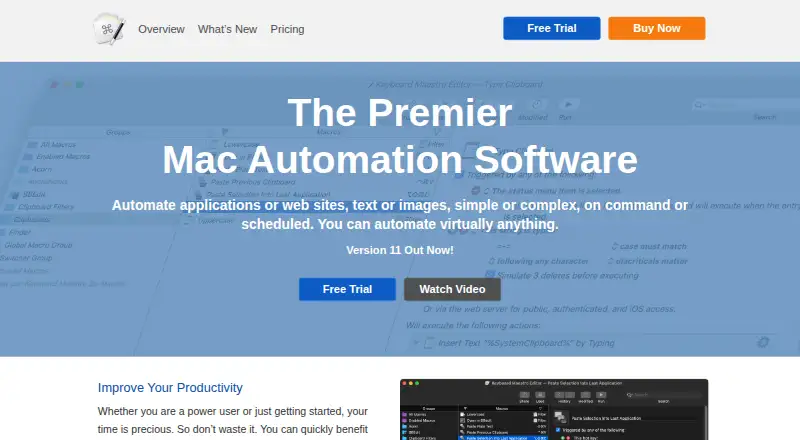
Users build Keyboard Maestro macros to automate Mac applications, websites, text, and images. Triggers, shortcuts, and schedules can start macros, while hundreds of built-in actions provide conditions, loops, and flow control. It also keeps clipboard history and named clipboards, and can work with Dropbox, Safari, Chrome, scripts, MIDI, and Stream Deck controls.
Review
In a line
Keyboard Maestro brings automation to macOS applications, websites, text, and images. You create macros that run when you choose or at a set time.
What it does
Macros combine triggers and actions. You can record or design keyboard shortcuts, then run them on demand or schedule them.
Hundreds of built-in actions handle conditions, loops, and other flow controls. The app also keeps clipboard history and lets you save an unlimited number of named clipboards.
Per-app profiles let you set different macros for different Mac applications.
How it connects
For browser and file workflows, the feature list names Safari and Chrome actions, along with Dropbox and other file-sharing systems that sync macros between Macs.
You can use actions to execute AppleScript, shell scripts, or JavaScript. MIDI devices and Stream Deck are supported through additional controls.
Good fit
It suits Mac users who repeat steps across applications, websites, text, or images and want shortcuts or schedules to handle them. It can also fit people who need separate automation profiles for individual apps.
Its macro tools place it in the broader task automation software category.
Watch for
Keyboard Maestro runs only on macOS. Version 11 requires macOS 10.13 High Sierra or later and is native on Apple Silicon/M1.
A per-user license covers one person on up to five Macs. Check that this matches how many people and computers need access.
Some actions rely on system permissions. Version 11 has a Security Settings pane showing the status of permissions it uses.
Support is provided by email, online documentation, and a forum.
Pricing
The Keyboard Maestro 11 license costs $36 as a one-time purchase and permits indefinite use. It covers up to five Macs running macOS 10.13 or later for one user.
Earlier-version customers can buy a one-time $25 upgrade. Purchases made since March 1, 2023 receive a free upgrade to version 11.
There is no free plan, but a fully functional trial is available. The facts do not state how long the trial lasts.
Verdict
Choose Keyboard Maestro if you use a Mac and want detailed, repeatable shortcuts or scheduled routines for applications, websites, text, or images. Its clipboard history, per-app profiles, scripts, and device controls add useful range for people willing to build their own macros.
Look elsewhere if you need Windows or Linux support or a free plan. Also confirm that the one-person, five-Mac license and required macOS version fit your setup before buying.
Our take
Keyboard Maestro is a focused choice for Mac owners who want to turn repeated computer steps into custom shortcuts or schedules. Its hundreds of actions, app-specific profiles, clipboard tools, script support, and device controls cover a wide range of personal workflows. The trade-offs are a macOS-only platform, paid licensing with no free tier, and a setup that depends on creating your own macros.
- Automates Mac applications, websites, text, and images
- Hundreds of actions with conditions and looping
- Clipboard history plus unlimited named clipboards
- Works with Dropbox, Safari, Chrome, scripts, MIDI, and Stream Deck
- A per-user license supports one person on up to five Macs
- Runs only on macOS
- No free plan
- Some features require system permissions
- Pick it ifMac users building custom shortcuts and scheduled routines; People who repeat work in Mac applications, websites, text, or images; Users needing per-app profiles or clipboard history
- Skip it ifYou need software for Windows or Linux; You need a free plan; Your setup needs a license shared by multiple people
Pricing
The standard license is a $36 one-time purchase, with version 11 available indefinitely for one user on up to five Macs. Upgrades cost $25 one-time, and there is a fully functional trial but no free plan.
- Upgrade to Keyboard Maestro 11One-time upgrade; applicable to previous versions · Purchases since 1 March 2023 receive a free upgrade to version 11$25 one-time
- Keyboard Maestro 11One-time purchase; use version 11 indefinitely · Per-user license · up to five Macs per user · macOS 10.13 or later$36 one-time
As keyboardmaestro.com lists them, checked 7 Oct 2026.
Questions
What does Keyboard Maestro automate?
It handles automation for Mac applications, websites, text, and images. Macros can start from triggers or follow a schedule.
Does Keyboard Maestro work on Windows?
No. The supported platform is macOS. Version 11 requires macOS 10.13 High Sierra or later.
How much does Keyboard Maestro cost?
Version 11 is priced at $36 as a one-time purchase. An upgrade from an earlier version costs $25 one-time.
Is there a free version?
There is no free plan. A fully functional trial is available, but the facts do not state its duration.
How many Macs can one license cover?
Each individual user may use a per-user license on as many as five Macs.
Can it run scripts or control devices?
Yes. Actions can execute AppleScript, shell scripts, and JavaScript, and they include controls for MIDI and Stream Deck devices.
Does it support app-specific macros?
Yes. Per-app profiles let you set macros for individual Mac applications.
Near it
All alternatives →- JMJitbit Macro Recorder#21 on this board
- A
 Actiona#23 on this board
- MMacroDroid#20 on this board
- AAutoIt#24 on this board
- MRMacro Recorder#19 on this board
- APAuto Power-on & Shut-down#25 on this board
- TTinyTask#18 on this board
- PAPerfect Automation#26 on this board
- AAutomate#17 on this board
- AAutoKey#27 on this board