Lacuna: AI Lyrics and Music Generation
lacuna.fm · checked 15 Oct 2026
Lacuna turns ideas into lyrics and AI-generated songs, with tools to edit and analyze tracks.
How it plugs in
Signal on AI Rap Generators6.6#1 of 28
Lacuna brings lyric drafting and revision together with full-track generation and tools for editing parts of a song. It also offers stem separation, mastering, music analysis, and MIDI tools. You can use it on the web, iOS, and macOS, or connect through its API and MCP tools. You can start for free, though downloading audio is a subscription feature.
Review
In a line
A workspace for AI-assisted lyrics and music creation, Lacuna can turn a short idea into lyrics and help shape them into a track with AI vocals.
What it does
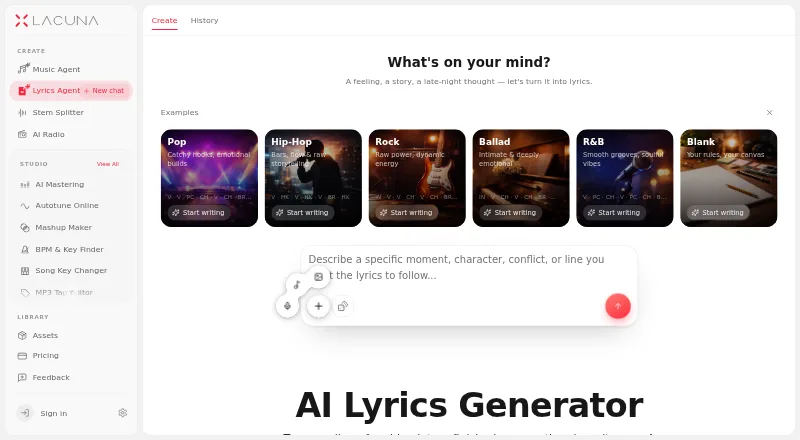
The Lyrics Agent drafts and revises lyrics through chat, with an editor for changing a line or section. The editor also counts syllables, marks rhymes, suggests rhymes by meaning, and saves earlier versions for restoration.
The Music Agent lays out two possible musical approaches, then can build a complete track from a description or lyrics you provide. Other tools can regenerate a selected song section, separate a track into stems such as vocals and drums, and master audio using a genre preset or reference track.
Lacuna also analyzes generated tracks for key, tempo, chords, loudness, and synchronized lyrics. Its MIDI tools create a part from a prompt, let you edit it on a piano roll, and export it.
How it connects
Lacuna runs on the web, iOS, and macOS, and offers an API for connecting other software. Access to the API is available on Pro and Ultra, with credit-based use. The API supports asynchronous music generation, with status checks or completion notices sent to connected software.
For developers, the options include a TypeScript SDK, CLI tools, and an MCP server. The MCP package works with Claude Code, Claude Desktop, Cursor, Zed, and other compatible clients. Vocal API requests need lyrics supplied by the calling app; they do not create lyrics automatically.
The service is proprietary, not open source. Audio exports are MP3. iOS use requires version 17 or later; on a Mac, the minimum is macOS 14 and an Apple M1 chip or newer.
Good fit
The maker describes the lyrics workspace as intended for songwriters, rappers, topliners, producers, and first-time writers. Its lyric editing, rhyme aids, and saved versions suit people who want to develop a draft in stages.
It may also suit creators who want one workspace for making a track, adjusting a section, separating stems, mastering, or working with MIDI. The maker says qualifying songs created during a paid license period come with worldwide, perpetual ownership and usage rights.
Watch for
Before choosing a plan, factor in that each Lyrics AI assistant use takes five credits, and subscription credits reset rather than roll forward. Credit packs do not include audio downloads; downloads require a subscription.
Only Pro and Ultra subscribers can use the API, and those API tasks use credits too. The privacy policy says uploaded material and generated content may be retained while available in the service. The terms place service hosting in the United States; account deletion does not itself remove all stored information or content.
The service is proprietary. Its terms say Lacuna owns or licenses the service intellectual property; Meta Llama 3.2 is identified as a separately licensed component.
Pricing
Free users get 120 credits monthly without providing a credit card, but audio downloads are excluded. Basic is the entry paid tier at $9.50 monthly, charged as a $114 prepaid annual payment.
Pro is $24.50 monthly ($294 prepaid annually), while Ultra is $49.50 monthly ($594 prepaid annually). Each offers commercial use and unlimited audio downloads; upper tiers provide larger monthly credit allowances and more concurrent generations.
The one-off credit packs are priced at $50, $100, and $500. Pack credits have no expiry, but downloads remain subscription-only.
Verdict
Consider Lacuna if you want lyric drafting and AI track creation together, or value having track editing, analysis, and MIDI tools in the same workspace. Its free plan lets you start without a card, while subscriptions add downloads and larger credit allowances.
It is a weaker fit if you need open-source software, want downloads without a subscription, or need API access on a free or Basic plan. Review the credit rules and data-retention terms before putting substantial work into the service.
Our take
Lacuna may suit writers and producers looking to turn a lyric idea into a generated song, with editing and analysis tools close at hand. The free tier offers a way to try the workspace, but it does not provide audio downloads. Regular users may prefer a paid plan; API use is available only on Pro or Ultra and draws on credits. Skip it if open-source software is a must, or if you need to control where content is hosted or ensure account deletion removes all stored content.
- Drafts and revises lyrics, with line and section editing.
- Supports nine languages and rhyme help in five named languages.
- Can generate tracks and regenerate selected sections.
- Offers stem separation, mastering, track analysis, and MIDI tools.
- The no-cost plan provides 120 credits monthly and does not ask for a credit card.
- Audio downloads require a subscription.
- API access requires Pro or Ultra and uses credits.
- Unused subscription credits do not carry over.
- The service is proprietary.
- Account deletion does not automatically erase all stored account information or content.
- Pick it ifSongwriters and producers who want lyrics and track creation together; Writers who want lyric revisions, rhyme aids, and saved versions
- Skip it ifAudio downloads without a subscription are essential; You need open-source software or API access on a free or Basic plan; You require account deletion to erase all stored content
Pricing
The free plan provides 120 monthly credits but no audio downloads. One-time credit packs do not expire, but still require a subscription for audio downloads.
- Basic$114 prepaid yearly · 2,500 monthly credits · ≈100 songs · commercial use · unlimited audio downloads · 5 concurrent generations$9.50/mo
- Pro$294 prepaid yearly · 7,500 monthly credits · ≈300 songs · commercial use · downloadable license PDF · unlimited audio downloads · 10 concurrent generations$24.50/mo
- Ultra$594 prepaid yearly · 25,000 monthly credits · ≈1,000 songs · commercial use · downloadable license PDF · unlimited audio downloads · unlimited sheet music to MIDI · 20 concurrent generations$49.50/mo
- Free120 credits per month; no credit card required · Free starting credits · audio downloads require subscriptionFree
- Credit Pack SOne-time purchase · 3,500 credits · ≈70 generations · credits never expire · audio downloads require subscription$50 one-time
- Credit Pack MOne-time purchase · 8,000 credits · ≈160 generations · credits never expire · audio downloads require subscription$100 one-time
- Credit Pack LOne-time purchase · 50,000 credits · ≈1,000 generations · credits never expire · audio downloads require subscription$500 one-time
As lacuna.fm lists them, checked 15 Oct 2026.
Questions
Can I use Lacuna for free?
Yes. The free tier grants 120 monthly credits and does not require a credit card. Audio downloads require a subscription.
What are Lacuna's subscription prices?
The starting subscription works out to $9.50 a month, paid as $114 upfront for a year. Pro is $24.50 a month and Ultra is $49.50 a month, both billed yearly.
Can Lacuna turn lyrics into a song?
Yes. The Music Agent can produce a complete track based on a description or lyrics you supply. Vocal API requests, however, need the calling app to provide lyrics.
What languages does Lacuna support?
The lyrics workspace supports nine languages. Phonetic rhyme support is available for English, Spanish, Chinese, Japanese, and Korean.
Can I download songs from Lacuna?
Audio downloads require a subscription. Buying a credit pack alone does not include downloads.
Does Lacuna have an API?
Yes. API access requires Pro or Ultra and uses credits. Developer options include a TypeScript SDK, CLI tools, and an MCP server.
Which devices are compatible with Lacuna?
It is available on the web, iOS, and macOS. iOS 17 or later is needed for the app; Mac use needs macOS 14 or later and an Apple M1 chip or newer.
Is Lacuna open source?
No. Lacuna is proprietary.