Langflow: Open-Source AI Workflow Builder Review
langflow.org · checked 30 Sept 2026
Open-source visual toolkit for assembling AI apps, agents, and MCP projects.
How it plugs in
Signal on Multi Agent Systems6.4#1 of 19
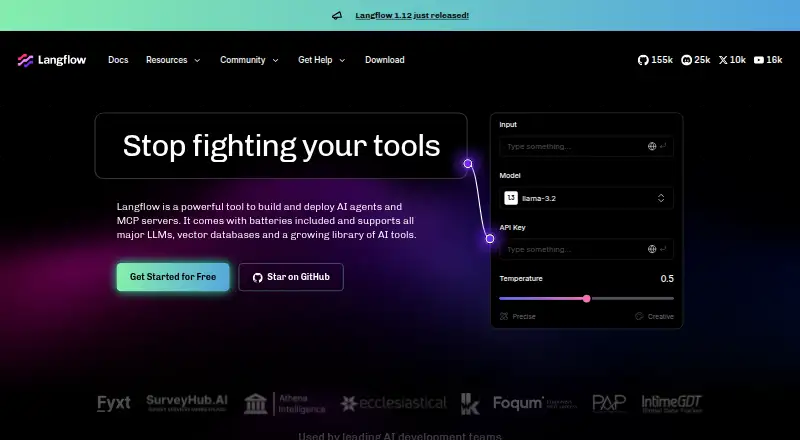
Langflow provides a Python-based, open-source environment where developers design customizable AI applications. Its editor lets you arrange connected components, test the result, and call flows through an API or deployed server. Agents, MCP connections, custom Python components, and numerous model and data-service options are supported. Langflow is free and available on desktop, web, Linux, Windows, macOS, and self-hosted deployments.
Review
In a line
Langflow gives developers a Python-based, open-source way to create tailored AI applications. Visual tooling also covers agent and MCP application designs.
What it does
In the visual editor, drag component nodes into place, link them, and adjust their settings. Workflows can be built and tested there, while the Playground provides interactive trials with immediate feedback.
Langflow supports AI agents, multi-agent setups, knowledge grounding, voice agents, and human handoff. Flows and components can also serve as tools for agents.
How it connects
You can choose large language models and vector stores without being required to use a particular one. The homepage names Anthropic, Azure, OpenAI, Hugging Face, Ollama, Qdrant, Pinecone, Slack, and Google Drive among its integrations.
Langflow may operate as an MCP server or link to external MCP servers. Python components can be authored for your own projects or shared with other Langflow users.
Application code can incorporate flows through the Langflow API, or a deployed Langflow server can provide them. The installation guide covers Langflow Desktop, Docker, a Python package, and source setup.
Good fit
Langflow suits developers who want a visual way to assemble and test AI workflows while keeping Python customization available. It can fit projects that need agents, MCP connections, or knowledge-grounded applications.
It runs through API, web, self-hosted, Linux, macOS, and Windows options. The open-source code and broad model and vector-store choice suit people who do not want to be tied to one provider.
Watch for
Langflow can run developer-provided Python with access to the host backend, filesystem, and network. A single process does not isolate users, so operators must handle tenant separation at the infrastructure level in multi-tenant deployments.
Built-in authentication and API keys are documented, and authentication is recommended, especially for production use. Langflow Desktop does not include Shareable Playground or Voice Mode.
The Python package guide lists Python 3.10 through 3.14 as supported prerequisites. Langflow Desktop supports macOS 13 or later and Windows.
Pricing
Langflow is free, with a free plan. The official site also describes a free cloud account for deployment.
The facts list no paid plan or usage charge, so buyers should confirm any later changes before deploying at scale.
Verdict
Choose Langflow if you want an open-source visual builder that can connect different AI services, expose flows through an API, and extend workflows with Python. Its agent and MCP features make it relevant to application builders exploring those patterns.
Our take
Langflow is a practical choice for developers who want to assemble AI workflows visually without being locked to a specific model or vector store. Its free access, API, self-hosting options, agent support, and MCP connections cover a wide range of prototypes and applications. The main decision point is operational responsibility: Python execution, network and filesystem access, and tenant isolation require careful control. Check the desktop feature gaps and Python requirements before choosing it for a desktop-led process.
- Open-source visual builder for AI workflows
- Works with many model, vector, and app services
- Agent, MCP, and custom Python support
- Free plan and free cloud account for deployment
- API and self-hosted deployment options
- Developer-provided Python can access the host system
- No user isolation within one process
- Desktop lacks Shareable Playground and Voice Mode
- Operators handle tenant isolation in multi-tenant deployments
- Pick it ifDevelopers building visual AI workflows and agents; Projects needing model and vector-store flexibility; Teams that can manage self-hosted security
- Skip it ifYou need built-in user isolation within one process; You require Voice Mode or Shareable Playground on desktop; You want a setup without operator-managed infrastructure security
Pricing
Langflow is free and includes a free plan. The site also offers a free cloud account for deployment; no paid tiers are listed in the facts.
Questions
Is Langflow free?
Yes. Langflow has a free plan, and its site describes a free cloud account for deployment.
Which platforms support Langflow?
Langflow supports API, web, Linux, macOS, Windows, and self-hosted deployment. Desktop is available for macOS and Windows.
Can Langflow use different AI models?
Yes. You can select among large language models and vector stores rather than being required to use a particular one. Listed integrations include OpenAI, Anthropic, Azure, Hugging Face, and Ollama.
Does Langflow support MCP?
Yes. Langflow can act as an MCP server, connect with external MCP servers, and make flows or components available as agent tools.
Can I add my own components?
Yes. Custom Python components can be developed for personal projects or shared with other Langflow users.
How can applications call Langflow flows?
Applications can embed flows using the Langflow API, or call flows served by a deployed Langflow server.
What security issue should operators know?
Langflow can execute developer-provided Python with access to the backend process, filesystem, and network. Users are not isolated inside one process, so operators are responsible for infrastructure-level isolation in multi-tenant deployments.