
Lara Translate Review: Features, Plans and Pricing
laratranslate.com · checked 28 Sept 2026
Lara Translate handles text, documents and websites through web, mobile apps and developer tools.
How it plugs in
Signal on Translation Software7.8#5 of 156
Lara Translate is a freemium translation service from Translated, based in Rome. It handles text, documents and websites, with glossary and translation-memory tools. The service runs on the web, iOS and Android, and offers an API, SDK, CLI and MCP server. Plans measure use in characters and include a free tier, while listed paid tiers use annual billing.
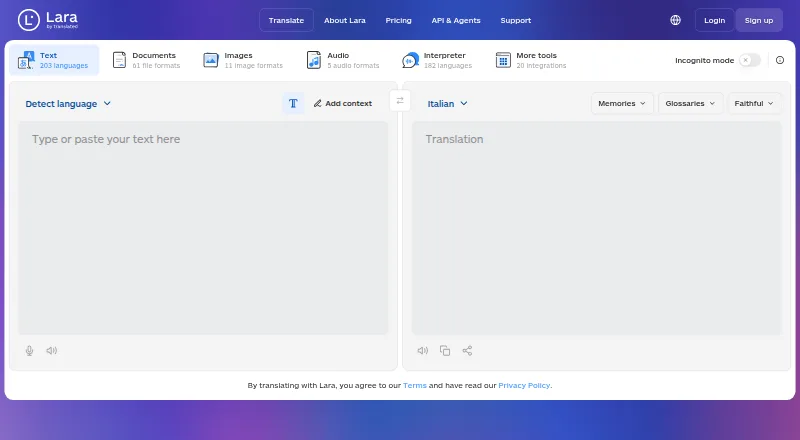
Review
In a line
Lara Translate comes from Translated, headquartered in Rome, Italy. It offers web and mobile apps plus developer access for translating content.
What it does
The service translates text, documents and websites, and also measures use for interpretation, audio and images. It supports more than 200 languages, depending on the stated service limit.
Across over 70 supported formats, document handling retains the original layout. Translation memory saves earlier translations for reuse, while glossaries keep preferred terms consistent. For sensitive or business-critical content, professional linguists can review and refine the AI output.
How it connects
Lara offers 20 integrations, CAT-tool connections, a browser extension, API and SDK access, plus CLI and MCP server options. Its full API is available on every plan with production-ready authentication. See other translation software options if you need a different connection set.
You can use Lara in a browser, while iOS and Android apps are offered with Pro and above. Enterprise adds data sovereignty, residency, compliance, single sign-on and dedicated account management. In incognito mode, content is never stored, logged or used for training.
Good fit
Lara suits individuals, teams and organizations that translate recurring content or files and need shared quotas, glossaries or translation memory. Its website and document options cover common publishing and business workflows.
Team plans allow unlimited free users, shared quotas, centralized billing and advanced privacy settings. Professional linguist review is available when automated output needs an additional check.
Watch for
Usage is counted in characters across text, documents, interpretation, audio and images. Each document is charged for at least 20,000 characters, so small files can still reach that minimum.
The free plan has a monthly character allowance and a separate API allowance, with no extra usage. Pro or a higher plan is needed for mobile apps, and the paid prices shown here use annual billing. Check your expected volume and document sizes before choosing a tier.
Pricing
Lara has a free plan with 60,000 characters per month, one user, documents up to 10 MB and 10,000 API characters per month. It requires no credit card and does not add extra usage.
Pro costs $9.99 a month when billed annually. It includes 500,000 characters, one user, documents up to 200 MB, one glossary and extra usage at $0.30 per 10,000 characters.
Team 1.5M costs $29.99 a month billed annually; Team 3M $54.99; Team 9M $149.99; Team 20M $269.99; Team 60M $799.99. These tiers include shared monthly quotas, unlimited users and unlimited glossaries, with extra usage at $0.25 per 10,000 characters. Enterprise pricing is by request. Annual billing can save up to 21%.
Verdict
Choose Lara if you want one service for website and document translation, recurring terminology and API-based workflows. The free tier gives individuals a way to start without payment details, while paid levels cover larger shared workloads.
Look elsewhere if your volume is too low for the document minimum, you need mobile apps on the free plan, or annual billing does not suit your budget. Compare it with tools such as DeepL Translator or Google Cloud Translation when their plans or connections fit better.
Our take
Lara Translate makes sense for people who need translation across files, websites and automated workflows, especially when terminology must stay consistent. Its free entry point and API on every plan lower the barrier to trying it. Team quotas and enterprise controls address larger organizations. The main buying checks are character-based billing, the 20,000-character document minimum, annual billing on the listed paid tiers and the Pro-level requirement for mobile apps. Smaller users with occasional short documents may find those rules less suitable.
- The free tier requires no credit card and provides 60,000 characters each month.
- Supports document and website translation with layout preservation.
- API access is included across all plans.
- Glossaries and translation memory help keep terms consistent.
- Team plans offer shared quotas and unlimited free users.
- Documents are charged for at least 20,000 characters each.
- Listed paid plan prices use annual billing.
- Mobile apps require Pro or a higher plan.
- Free usage has no extra-usage allowance.
- Character billing also covers audio, images and interpretation.
- Pick it ifTeams translating websites, documents and recurring content; Developers needing an API, SDK, CLI or MCP connection; Organizations needing enterprise privacy and compliance controls
- Skip it ifYou need mobile apps while staying on the free plan; Your documents are usually below the 20,000-character minimum; You prefer pricing that is not tied to annual billing
Pricing
Free includes 60,000 characters per month and 10,000 API characters with no extra usage. Enterprise pricing is by request. Annual billing may save up to 21%.
- Free60,000 characters per month · 1 user · Up to 10 MB document size · 10,000 API characters per monthFree
- ProBilled annually · 500,000 characters per month · 1 user · Up to 200 MB document size · $0.30 per 10,000 characters extra usage · 1 glossary$9.99/mo
- Team 1.5MBilled annually; best for 2–3 users · 1.5M shared characters per month · Unlimited users · Up to 200 MB document size · $0.25 per 10,000 characters extra usage · Unlimited glossaries$29.99/mo
- Team 3MBilled annually; best for 4–6 users · 3M shared characters per month · Unlimited users · $0.25 per 10,000 characters extra usage · Unlimited glossaries$54.99/mo
- Team 9MBilled annually; best for 7–18 users · 9M shared characters per month · Unlimited users · $0.25 per 10,000 characters extra usage · Unlimited glossaries$150/mo
- Team 20MBilled annually; best for 19–40 users · 20M shared characters per month · Unlimited users · $0.25 per 10,000 characters extra usage · Unlimited glossaries$270/mo
- Team 60MBilled annually; best for 41–120 users · 60M shared characters per month · Unlimited users · $0.25 per 10,000 characters extra usage · Unlimited glossaries$800/mo
- EnterpriseCustom character quota · Custom extra usage pricing · Custom SLA and 99.9% uptimeOn request
As app.laratranslate.com lists them, checked 28 Sept 2026.
Questions
Does Lara Translate have a free plan?
Yes. The free tier provides 60,000 characters per month, 10,000 API characters per month, one user and documents up to 10 MB. No credit card is required.
How is Lara usage measured?
Lara counts characters across text, documents, interpretation, audio and images. A document is subject to a 20,000-character minimum charge.
Can I use Lara through an API?
Yes. Full API access is available on every plan with production-ready authentication. Lara also offers SDK, CLI and MCP server access.
Which platforms support Lara?
The service is available on the web; iOS and Android apps come with Pro and higher plans. API, CLI and MCP server use are supported too.
What does Pro cost?
Pro is priced at $9.99 a month with annual billing. The tier provides 500,000 characters monthly; extra usage costs $0.30 per 10,000 characters.
Does Lara preserve document layout?
Yes. More than 70 file formats are supported, with document layout preserved.
What privacy features are available?
Incognito mode means content is never stored, logged or used for training. Enterprise adds data sovereignty, residency, compliance and single sign-on.