LimaxLock Secure Browser
limaxlock.com · checked 8 Oct 2026
Controlled Android browsing with approved-site access and cloud administration.
How it plugs in
Signal on Android Kiosk Software5.6#6 of 17
LimaxLock Secure Browser sets up enrolled Android phones, tablets, rugged handhelds, and POS terminals for web-kiosk use. A cloud console manages allowed sites, browser rules, startup pages, and profiles. Standard pricing is quoted on request, and a 14-day trial is offered.
Review
In a line
LimaxLock Secure Browser makes enrolled Android phones, tablets, rugged handhelds, and POS terminals function as managed web kiosks. It limits browsing to sites an administrator approves.
What it does
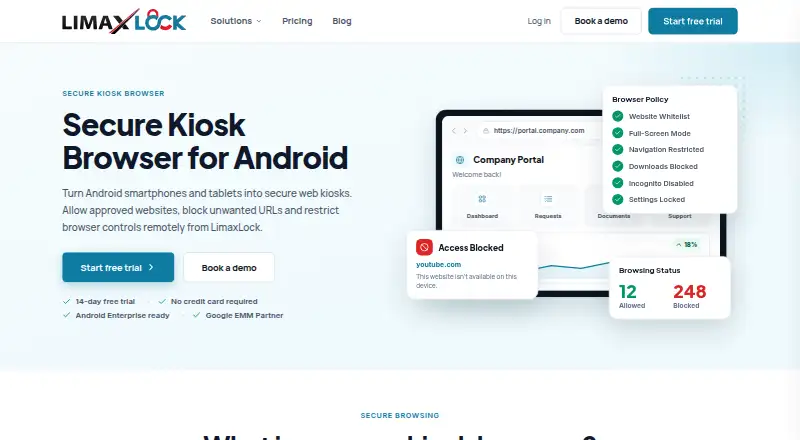
Administrators create an allowlist, meaning a set of permitted websites. Everything outside that list is denied by default. Each profile can set full-screen presentation, address-bar access, navigation, downloads, and browser options.
A chosen website can open during startup, fill the screen, and reopen after reboot or power loss. Sessions can be reset, while Chrome and other installed browsers may be blocked to leave a single web route.
With kiosk mode enabled, an administrator password or one-time exit code is needed to leave it.
How it connects
LimaxLock is deployed through the cloud. Administrators can push URL changes, assign browser profiles across devices, and check device status from its console.
Shortcuts shown on the product page include HubSpot CRM, Outlook, Teams, Drive, and Zoom. The browser works on enrolled Android devices and is described as Android Enterprise ready and a Google EMM Partner.
Good fit
This browser suits organizations that need a fixed web task on shared Android hardware. Listed uses include retail and POS, restaurants, healthcare, education, warehousing, and hospitality.
It can fit teams that need one approved web app, remote URL changes, bulk profile updates, or device-status monitoring.
Watch for
LimaxLock supports Android only, and devices must be enrolled before use. Check that your phones, tablets, handhelds, or POS terminals meet that requirement.
The allowlist blocks every other URL, so confirm all required websites before deployment. Users also cannot leave kiosk mode without the administrator password or a one-time code.
Pricing is not published. The Standard plan is described as per-device pricing, so request a quote before committing.
Pricing
LimaxLock Secure Browser is paid software. The Standard plan has a price on request and is described as per-device pricing.
The maker offers a 14-day trial with no credit card requirement.
Verdict
Choose LimaxLock if you need Android hardware to open a controlled set of websites and want cloud-based administration. Its startup launch, remote profile changes, browser blocking, and exit controls address shared-device kiosks.
Look elsewhere if you need iPhone, Windows, or other non-Android support, or if you require a published price before contacting sales. You may also prefer a different option if your users need broad, unrestricted browsing.
Our take
LimaxLock Secure Browser is a focused choice for organizations running shared Android devices at counters, stations, classrooms, or work areas. It combines strict website allowlisting with startup launch, remote administration, profile controls, and protected kiosk exit. The main buying checks are Android enrollment, the effect of blocking all unapproved sites, and per-device pricing that is available only on request. A credit-card-free 14-day trial gives teams time to confirm device behavior and required websites before seeking a quote.
- Allows only approved websites by default
- Cloud console supports remote URL and profile updates
- Supports site launch again after restart or power loss
- Blocks other browsers and protects kiosk exit
- Runs on Android devices only
- Standard pricing is available only on request
- Devices must be enrolled before use
- Unapproved URLs are blocked by default
- Pick it ifShared Android kiosks in retail, healthcare, education, and hospitality; Teams needing remote control of approved web apps
- Skip it ifYou need support for platforms other than Android; You require public pricing or unrestricted web access
Pricing
Paid Standard plan with per-device pricing on request. The 14-day trial does not require a credit card.
- StandardPricing not stated on the maker’s pages opened · per-device pricing described; 14-day free trialOn request
As limaxlock.com lists them, checked 8 Oct 2026.
Questions
What devices can run LimaxLock Secure Browser?
Enrolled Android phones, tablets, rugged handhelds, and POS terminals are supported.
Can LimaxLock restrict websites?
Yes. Administrators approve websites, and the browser denies URLs outside that allowlist by default.
Can admins manage devices remotely?
Yes. From the cloud console, they can push approved-URL changes, assign profiles in bulk, and check device status.
Can users exit kiosk mode?
Kiosk exit is protected by an administrator password or a one-time exit code.
Does it block other browsers?
The product page says Chrome and other installed browsers can be blocked at the app level.
How much does LimaxLock cost?
The Standard plan is priced per device, but the amount is available on request. The 14-day trial requires no credit card.
Which web apps are shown as shortcuts?
Shown shortcuts include HubSpot CRM, Outlook, Teams, Drive, and Zoom.