LitDocket: AI Legal Docketing Software Review
litdocket.com · checked 15 Oct 2026
AI docket management that reviews documents, links deadlines, displays calendars, and requires attorney sign-off.
How it plugs in
Signal on Legal Docketing Software6.3#4 of 26
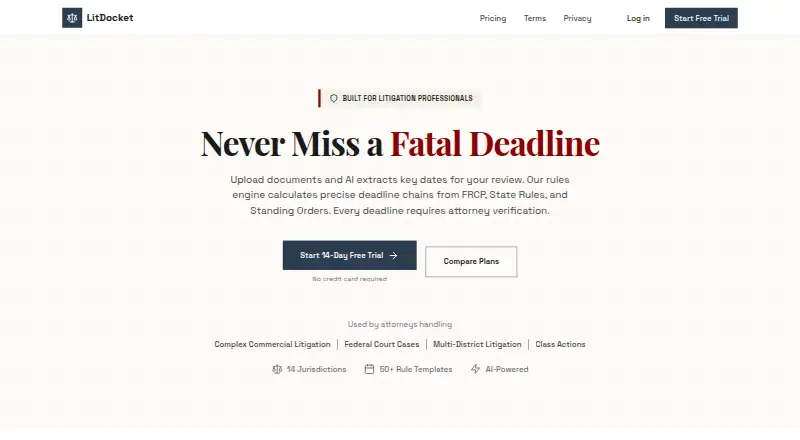
LitDocket combines AI document analysis with rules-based legal deadline calculations. It identifies dates, parties, and deadlines in uploaded files and then creates connected chains of dependent due dates. Attorneys verify each AI-generated date before activation. The service is web-based, lists API access on selected plans, and lets users export in CSV, JSON, and iCal formats.
Review
In a line
LitDocket is legal docketing software that combines document analysis with rules-based deadline calculation.
What it does
Upload legal files so LitDocket can identify important dates, parties, and deadlines for review. A trigger event can create more than 50 linked deadlines, and later changes flow through that chain.
A priority-coded calendar supports drag-and-drop rescheduling. Users can set alerts by priority and days remaining, while a morning dashboard surfaces urgent, overdue, and recommended actions.
Every AI-generated deadline needs attorney approval before activation. The verification process keeps an audit trail. Teams can share cases through role-based controls and view current case viewers in real time.
How it connects
LitDocket runs as a web service and lists API access on Solo and Enterprise plans. The reviewed pages do not link to a public API reference or SDK, and they name no ready-made integrations. Enterprise can include custom integrations and an on-premise deployment option.
Cases, deadlines, and documents can be exported as CSV, JSON, or iCal files. The maker names Firebase for authentication, Railway and Vercel for hosting, and Anthropic for AI processing.
For other docketing options, see Legal Docketing Software.
Good fit
The Solo plan is aimed at solo practitioners and allows as many as 25 active cases. Small firms that need shared cases and presence indicators can use Team, which supports up to five members.
The rules cover federal FRCP and FRAP requirements plus state rules across 14 listed jurisdictions. Each calculated date includes a rule citation and the calculation method.
Watch for
Solo has a ceiling of 25 active cases; Team has unlimited active cases but is capped at five members. Rules are limited to the 14 listed jurisdictions.
AI dates are not active until an attorney verifies them. Check the available jurisdiction coverage and whether your workflow needs a named integration or public API documentation.
According to the maker, data is encrypted both while moving and while stored, with storage in SOC 2 compliant data centers. The privacy policy states that customer data is neither used to train AI models nor shared with third parties for their own purposes.
Pricing
After the 14-day trial, users who do not subscribe retain read-only access through a limited free tier. Solo is priced at $49 monthly or $470 annually, supports up to 25 active cases, and includes email notifications.
Team costs $149 a month or $1,430 a year. It adds unlimited active cases, up to five members, SMS alerts, advanced workload views, real-time presence, and priority support.
Enterprise pricing is custom. It includes unlimited team members, SSO, API access, custom integrations and rules, an on-premise option, a dedicated account manager, SLA coverage, and security audit reports. Legal-aid groups and nonprofits can request a 50% discount with proof.
Verdict
LitDocket suits legal professionals who want to enter deadlines from documents, connect related calculations, and require attorney approval before dates become active. Solo is sized for a small case load; Team is aimed at collaborative small firms.
Consider another option if you need more than the stated jurisdictions, more than five Team users, or ready-made integrations. Enterprise may fit organizations that require custom connections, single sign-on, or on-premise hosting.
Our take
Choose LitDocket when your priority is turning legal documents into traceable deadline chains with an attorney approval step. Its calendar, alerts, morning report, and export formats cover core docket work, while Team adds shared cases and presence. Confirm that your courts fall within the 14 supported jurisdictions and that Solo’s 25-case cap or Team’s five-seat limit fits. Buyers needing a documented public API, named prebuilt integrations, or broader deployment choices should review those requirements before subscribing.
- Uploaded legal documents can be analyzed for dates, parties, and deadlines.
- A single trigger can produce a chain of more than 50 dependent deadlines.
- AI-created deadlines stay inactive until an attorney verifies them, with an audit trail retained.
- Users can export cases, deadlines, and documents as CSV, JSON, or iCal.
- Team includes shared cases, role controls, and real-time viewing status.
- Rules cover only the 14 listed jurisdictions.
- Solo is limited to 25 active cases.
- Team supports no more than five team members.
- The reviewed pages do not link to a public API reference or SDK.
- No named prebuilt integrations are listed.
- Pick it ifSolo practitioners managing as many as 25 active cases; Small firms needing shared docket work for up to five users; Teams working within the 14 supported jurisdictions
- Skip it ifYour matters require rules beyond the 14 listed jurisdictions.; You require named, ready-made integrations or public API documentation.; You need more than five Team members without an Enterprise plan.
Pricing
LitDocket has a read-only free tier after a 14-day trial. Annual billing is $470 for Solo and $1,430 for Team. Enterprise pricing is custom. Nonprofits can request 50% off with proof.
- Limited free tierRead-only access to data after the 14-day trial if not subscribedFree
- Solo$49/month · Up to 25 active cases · AI document analysis · Deadline chain generation · Calendar view with drag & drop · Email notifications · 14 jurisdictions · Morning report · Basic analytics · Team collaboration · API access$49/mo
- Team$149/month · Unlimited active cases · AI document analysis · Deadline chain generation · Calendar view with drag & drop · Email and SMS notifications · 14 jurisdictions · Morning report · Advanced analytics and workload · Up to 5 team members · Case sharing and collaboration · Real-time presence · Priority support$149/mo
- Solo annual$470/year (Save $118/year) · Up to 25 active cases · AI document analysis · Deadline chain generation · Calendar view with drag & drop · Email notifications · 14 jurisdictions · Morning report · Basic analytics · Team collaboration · API access$470/yr
- Team annual$1,430/year (Save $358/year) · Unlimited active cases · AI document analysis · Deadline chain generation · Calendar view with drag & drop · Email and SMS notifications · 14 jurisdictions · Morning report · Advanced analytics and workload · Up to 5 team members · Case sharing and collaboration · Real-time presence · Priority support$1,430/yr
- EnterpriseCustom; contact sales · Unlimited team members · SSO (SAML/OIDC) · API access · Custom integrations · Dedicated account manager · Custom rule templates · On-premise deployment option · SLA guarantee · Security audit reportsOn request
As litdocket.com lists them, checked 15 Oct 2026.
Questions
Does LitDocket have a free plan?
Yes. If you do not subscribe after the 14-day trial, the limited free tier leaves your data accessible in read-only mode.
How many jurisdictions are covered?
LitDocket covers federal FRCP and FRAP rules and state rules in 14 listed jurisdictions, among them California, Florida, New York, Texas, and Washington.
Can I export my data?
Yes. Cases, deadlines, and documents can be exported as CSV, JSON, or iCal files.
Does LitDocket offer an API?
Solo and Enterprise list API access, but the reviewed pages do not link to a public API reference or SDK.
How does LitDocket handle AI deadlines?
An attorney must review and approve every AI-generated deadline before it activates; the workflow also keeps an audit trail.
What is the Solo case limit?
Solo permits up to 25 active cases, while archived and closed matters are excluded from that count.
Can a nonprofit get a discount?
Legal-aid organizations and nonprofits may request 50% off by providing proof of nonprofit status.