MagicAnimate: Open-Source Human Image Animation
showlab.github.io · checked 8 Oct 2026
Open-source framework that turns a reference human image and motion sequence into an animation.
How it plugs in
Signal on AI Animation Makers5.7#20 of 23
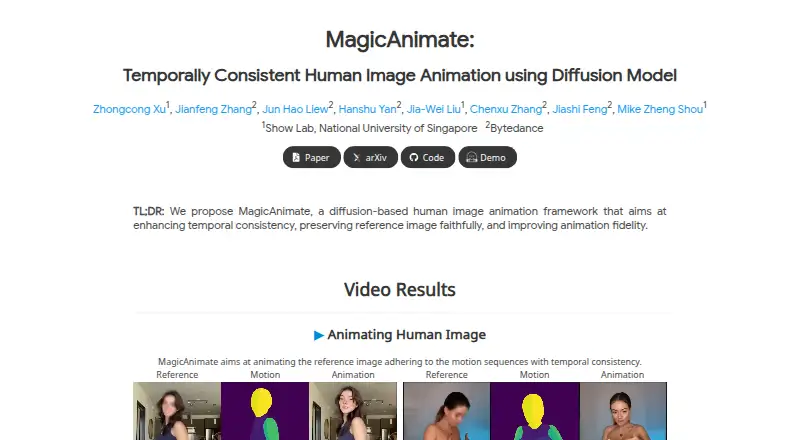
MagicAnimate is a free, open-source framework for animating human images. It takes a reference image and a DensePose motion sequence, aiming to keep identity and motion consistent. You can try its web demo or run it locally with Gradio. Local use requires Python, CUDA, ffmpeg, downloaded model files, and one or more GPUs.
Review
In a line
MagicAnimate is a diffusion-based framework for turning a human reference image into an animation while preserving the person’s appearance.
What it does
You provide a reference image and a target DensePose motion sequence, which describes body movement. An appearance encoder helps retain the reference identity while the animation follows that motion.
Its project examples include cross-identity, unseen-domain, multi-person, and text-to-image-generated reference animation. A video-fusion method is intended to keep transitions smooth in longer animations.
How it connects
MagicAnimate is available as self-hosted software and through a web demo built with Gradio on Hugging Face. The project is open source under the BSD-3-Clause license.
For local use, the README gives commands for running Gradio on one GPU or multiple GPUs. You must download Stable Diffusion v1.5, an MSE-finetuned VAE, and MagicAnimate checkpoint files.
Good fit
It suits people who need image-to-animation or motion transfer while keeping a reference person recognizable. It can also fit projects involving multiple people or generated reference images.
If you are comparing tools in this area, see AI animation makers.
Watch for
Local installation requires Python 3.8 or later, CUDA 11.3 or later, and ffmpeg. The documented setup also requires downloading several model files.
GPU inference is documented for a single GPU or multiple GPUs, so check your hardware before choosing local use.
Pricing
MagicAnimate is free and open source. There is a free plan, with no paid plan listed in the facts.
Verdict
Choose MagicAnimate if you want an open-source way to animate human images from a motion sequence and are comfortable with a model-based setup. The web demo offers a simpler starting point, while local use gives you a self-hosted option.
Avoid committing to a local workflow if your computer cannot meet the Python, CUDA, ffmpeg, model-download, and GPU requirements.
Our take
MagicAnimate is a sensible option for creators or researchers who need reference-image animation with motion transfer and identity retention at no software cost. Its open-source license and web demo lower the barrier to trying it, but local deployment still involves model downloads, CUDA, ffmpeg, and GPU hardware. The project focuses on human-image animation rather than a broad editing suite, so people seeking a general video editor or ready-made production platform should look elsewhere.
- Free and open source under the BSD-3-Clause license
- Supports image-to-animation and motion transfer
- Designed to preserve reference-image identity
- Web demo and self-hosted options
- Supports single-GPU or multi-GPU inference
- Local setup needs Python, CUDA, ffmpeg, and model downloads
- GPU hardware is required for documented inference
- Uses DensePose motion sequences as input
- Pick it ifAnimating human reference images with transferred motion; Users who want open-source, self-hosted software; People comparing identity-preserving motion tools
- Skip it ifYou cannot meet the documented Python, CUDA, ffmpeg, and GPU requirements; You need a general-purpose video editor instead of an animation framework
Pricing
MagicAnimate is free, with an open-source license and a free plan. No paid plan is listed.
Questions
Is MagicAnimate free?
Yes. MagicAnimate is listed as free, with a free plan and an open-source BSD-3-Clause license.
Can I run MagicAnimate online?
Yes. The project links to a Gradio demo hosted on Hugging Face.
What does MagicAnimate need as input?
It uses a reference image and a target DensePose motion sequence describing the movement to apply.
What do I need for local installation?
The documented prerequisites are Python 3.8 or later, CUDA 11.3 or later, and ffmpeg. You also need model files and GPU inference.
Does it preserve a person’s identity?
Its pipeline uses an appearance encoder for identity preservation and is designed to keep the reference appearance consistent.
Can it animate longer videos?
A video-fusion strategy is used to create smoother transitions during inference for long video animation.