MailDrop Disposable Email Review
maildrop.cx · checked 14 Oct 2026
Disposable email inboxes on the web, with REST API access.
How it plugs in
Signal on Disposable Email Services6.3#7 of 25
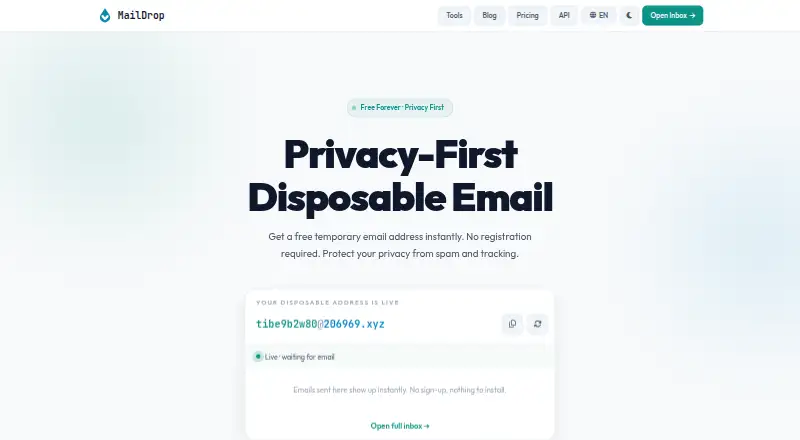
MailDrop creates temporary addresses without registration. Pick an address prefix, read incoming mail and attachments in a browser, and have the inbox cleared after a short period. Its REST interface lets applications create mailboxes and retrieve messages. A free web and API tier is joined by pay-as-you-go and monthly plans.
Review
In a line
MailDrop supplies throwaway inboxes for sign-ups, code checks, downloads, trials, and online forms. You can open one without creating an account, giving a phone number, or sharing personal details.
What it does
An address is available immediately and accepts HTML mail, verification codes, and attachments. The web inbox updates itself every 30 seconds; attachments are available for browser preview or download.
Prefixes are customizable, and several public domains are available. Incoming messages remain only temporarily, then are deleted automatically.
How it connects
MailDrop's REST interface lets software provision temporary mailboxes and read messages that arrive in them. The documentation describes creating mailboxes, listing messages, fetching a single message, and checking account usage.
API keys can be supplied either as Bearer credentials in Authorization or via X-API-Key. After a mailbox is claimed, its creating key is the sole key permitted to read it. Exhausted quotas produce HTTP 429 responses, with limit information in response headers.
The service also lists open-source security and developer utilities. Its developer material shows REST and curl examples but does not name an SDK. For related services, see disposable email services.
Good fit
MailDrop suits people who need a short-lived inbox without installing software or sharing personal details. It can handle one-off registrations, downloads, trials, and verification messages.
Developers can create and read temporary mailboxes through the API. Privacy-conscious users may also use the browser inbox and the service's listed utilities.
Watch for
Because messages and inboxes expire, MailDrop is unsuitable for lasting accounts such as banking. Its sign-up guides caution that anyone who knows an inbox name may read its messages.
Disposable domains are rejected by some services. The ChatGPT guide says OpenAI may block these addresses or ask for phone verification, so MailDrop cannot promise acceptance. UserCheck classifies maildrop.cx as disposable or temporary and advises blocking such domains when checking signup quality.
Review request and mailbox limits before using the API. Free access includes community support, while paid tiers provide email or priority support.
Pricing
MailDrop has a free plan, and its pricing page labels free API access a permanent trial that needs no credit card. That tier covers 300 requests each day, one mailbox per 24 hours, every public domain, and community support.
The pay-as-you-go option charges $1 for each 1,000 requests, with top-ups starting at $5. There is no subscription, funds remain available without expiration, and a monthly spending ceiling applies. Starter costs $5 monthly for 30,000 requests and 10 mailboxes per 24 hours, with email support.
Pro costs $15 monthly for 200,000 requests and 50 mailboxes per 24 hours, adding webhooks and priority support. Business is $49 monthly for 1,000,000 requests and 200 mailboxes per 24 hours, with webhooks, priority support, and an SLA. Unused pay-as-you-go funds may be refunded within 14 days; started subscription periods are nonrefundable.
Verdict
MailDrop is suited to short-lived disposable addresses or applications that need temporary mailboxes through an API. Web access requires no registration, and the available tiers cover light through higher-volume use.
Do not depend on it for permanent identities, sensitive accounts, or sites that reject disposable domains. Before paying, consider mailbox visibility, automatic deletion, quotas, and support terms.
Our take
MailDrop is a practical temporary-email option with immediate, no-registration access. Its browser inbox handles basic sign-ups and verification, while the REST API supports automated mailbox and message operations. Free limits fit light usage, and paid tiers increase capacity, support, and webhook access. Messages expire, guessed inbox names may expose mail, and some sites reject disposable domains or require phone checks. Use it for short-lived tasks rather than lasting or sensitive accounts.
- Open an inbox without registering or providing contact details
- Choose a prefix and select from several public domains
- Receives HTML email, codes, and attachments
- REST API for mailbox and message access
- Free plan and no-credit-card API trial
- Messages are temporary and deleted automatically
- Anyone who knows an inbox name may view its messages
- Disposable domains may be refused or trigger phone checks
- API quotas vary by plan
- Pick it ifShort-lived sign-ups, trials, downloads, and verification mail; Developers automating temporary inboxes through a REST API; Users wanting a disposable inbox without registration
- Skip it ifYou need a permanent address for banking or other long-term accounts; Your target service blocks disposable domains; You require private inboxes that cannot be guessed
Pricing
Free access covers 300 requests per day and one mailbox in a 24-hour period. Pay-as-you-go is $1 per 1,000 requests, with $5 minimum top-ups.
- Free300 requests / day · 1 mailbox per 24h · all public domains · community supportFree
- Pay as you go$1 / 1,000 requests; top up from $5 · No subscription · balance never expires · monthly spending cap$1 one-time
- Starter$5/month · 30,000 requests / month · 10 mailboxes per 24h · all public domains · email support$5/mo
- Pro$15/month · 200,000 requests / month · 50 mailboxes per 24h · webhook notifications · priority support$15/mo
- Business$49/month · 1,000,000 requests / month · 200 mailboxes per 24h · webhook notifications · priority support & SLA$49/mo
As maildrop.cx lists them, checked 14 Oct 2026.
Questions
Is registration required to open a MailDrop inbox?
No. The website says an inbox can be opened without an account, phone number, or personal information.
Can I customize the address?
Yes. Choose a prefix and pick from several public domains; custom domains are not offered.
Which message types does MailDrop handle?
It receives HTML email, verification codes, and attachments, which can be previewed or downloaded in the browser.
What is the message retention period?
Messages stay available temporarily before automatic removal.
Are developer endpoints available?
Yes. REST endpoints create temporary mailboxes and retrieve incoming messages. Supply credentials as a Bearer token or through X-API-Key.
Does MailDrop provide free API access?
Yes. The free tier covers 300 requests daily, one mailbox per 24 hours, all public domains, and community support; the trial requires no credit card.
Might a website refuse a MailDrop address?
Yes. The service says OpenAI blocks many disposable domains and may require phone verification, so acceptance is not guaranteed.