Memoth: AI Voice Notes, Transcripts, and Tasks
memoth.com · checked 15 Oct 2026
Memoth records or imports voice conversations and turns them into searchable notes, summaries, transcripts, and tasks.
How it plugs in
Signal on AI Voice Note Apps6.4#7 of 27
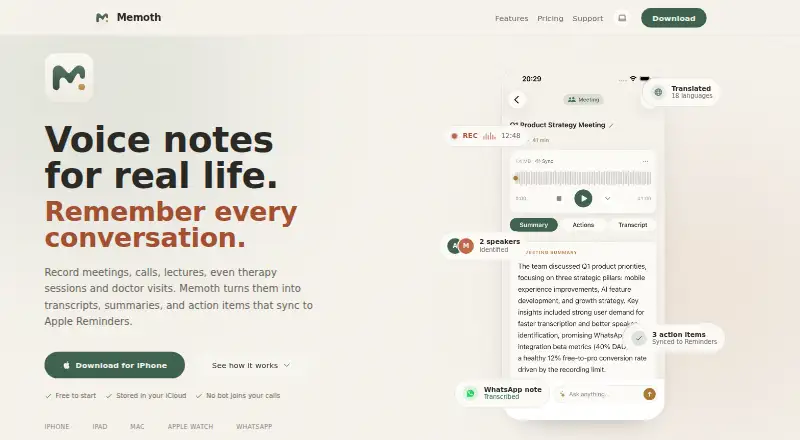
Memoth is a voice-notes app for iPhone, iPad, Mac, and Apple Watch. It records meetings or imports audio, then creates transcripts, summaries, speaker labels, translations, highlights, and action items. Notes sync through your iCloud. A free plan is available, while paid plans add Mac meeting capture, WhatsApp processing, Reminders sync, and larger monthly allowances.
Review
In a line
Memoth is a personal AI voice-notes app for Apple devices. It records or imports conversations and turns them into transcripts, summaries, searchable notes, and action items.
What it does
You can record on an iPhone, iPad, Mac, or Apple Watch, import audio files, or send WhatsApp voice messages to the Memoth bot. The app can transcribe speech, identify speakers, add word-level timestamps, translate alongside the original, and mark highlights.
It also extracts dated action items, organizes recordings by topic, person, or project, and lets you search with folders and favorites. For a meeting, you can ask questions using the transcript, summary, speakers, and tasks as context.
The Mac app detects audio from meetings in Zoom, Microsoft Teams, Google Meet, Webex, FaceTime, Slack huddles, and other Mac sources. It records locally without a bot, calendar access, or a meeting invitation.
How it connects
Memoth works with Apple iCloud, Apple Reminders, Siri and Shortcuts, WhatsApp, and the listed meeting apps. Pro plans can sync extracted tasks to Apple Reminders, and Pro and Pro Plus users can process WhatsApp voice messages in the same chat.
Recordings, transcripts, summaries, and notes stay in your device library and sync through your private iCloud instead of a Memoth database. Audio sent for transcription travels over an encrypted connection and is kept as an encrypted backup for up to 30 days before deletion.
Good fit
Memoth suits students, freelancers, founders, researchers, journalists, professionals, sales teams, client-facing workers, and people who keep personal voice notes.
It is useful when you need searchable records of conversations, speaker-labeled transcripts, translated text, meeting questions, or action items that can reach Apple Reminders.
Watch for
Memoth is built for Apple devices. The maker said Android support would depend on future demand, so Android users should check availability before choosing it.
Recording, playback, and browsing work offline, but transcription and AI summaries need an internet connection. AI results may contain errors, missing details, inaccuracies, or made-up information, so verify important output.
Imported audio and WhatsApp messages use the same monthly recording allowance as app recordings. Unused allowance resets on the first day of each calendar month in UTC and does not roll over.
Pricing
Memoth has a free plan and paid access from $9.99 a month. The Free plan includes 10 minutes per month, iPhone and iPad recording, AI transcription and summaries, audio import, and up to three folders.
Guest access is free for one recording of up to three minutes and does not require an account. Pro costs $89.99 a year and includes 15 hours per month, Mac meeting detection, Apple Watch recording, the WhatsApp bot, Reminders sync, audio export and sharing, and unlimited folders.
Pro Plus costs $189.99 a year and includes 40 hours per month, all Pro features, and recording every meeting.
Verdict
Memoth is a practical choice for Apple users who want one place for recordings, transcripts, summaries, and follow-up tasks. Its private iCloud sync, local Mac meeting capture, and WhatsApp workflow cover several common ways to collect audio.
Choose a paid plan only if its monthly allowance and Apple integrations match your routine. If you need Android support, offline transcription, or guaranteed accuracy, check those requirements first. If Apple-only support is a blocker, compare other entries such as Voicenotes or AudioPen.
Our take
Memoth fits people already using Apple devices who want voice recordings converted into organized notes and tasks. The free tier lets you try core recording, importing, transcription, and summaries with a small monthly limit. Paid plans add Mac meeting detection, Apple Watch support, WhatsApp processing, Reminders sync, and more hours. Be cautious if you need Android, offline AI processing, rollover minutes, or error-free transcripts. Audio and AI processing depend on an internet connection, and important results still need checking.
- Free plan includes 10 minutes each month
- Records on iPhone, iPad, Mac, and Apple Watch
- Searches notes by topic, person, or project
- Mac meeting capture works without a bot or calendar access
- Tasks can sync to Apple Reminders on Pro plans
- Apple-focused; Android support depends on future demand
- Transcription and summaries require an internet connection
- AI output can contain errors or omissions
- Unused monthly minutes do not roll over
- Imported audio and WhatsApp messages share the same allowance
- Pick it ifApple users who want searchable voice notes and meeting summaries; People who turn conversations into dated tasks; Users needing WhatsApp voice-message transcription
- Skip it ifYou need Android support or offline transcription and summaries; You require unused recording minutes to carry forward; You cannot review AI output for possible mistakes
Pricing
Memoth offers a free tier with 10 minutes per month. Guest access covers one three-minute recording.
- Free10 minutes/month · iPhone and iPad · AI transcription and summaries · import audio · 3 foldersFree
- Guestone recording · 3 minutes · no account · full AI transcriptionFree
- Promonthly; also $89.99/year or $2.99/week · 15 hours/month · Mac meeting detection · Apple Watch · WhatsApp bot · Reminders sync · audio export · unlimited folders$9.99/mo
- Pro Plusmonthly; also $189.99/year or $5.99/week · 40 hours/month · all Pro features$24.99/mo
As memoth.com lists them, checked 15 Oct 2026.
Questions
Does Memoth have a free plan?
Yes. The Free plan gives 10 minutes per month, iPhone and iPad recording, AI transcription and summaries, audio import, and up to three folders.
Which devices can record with Memoth?
Memoth records on iPhone, iPad, Mac, and Apple Watch. The listed requirements include iOS 18 or later, iPadOS 18 or later, macOS 15 or later, visionOS 2 or later, and watchOS 26 or later.
Can Memoth record Zoom or Teams meetings?
The Mac app detects and records audio from Zoom, Microsoft Teams, Google Meet, Webex, FaceTime, Slack huddles, and other Mac sources without a bot or calendar connection.
Does Memoth work with WhatsApp voice messages?
Pro and Pro Plus users can forward WhatsApp voice messages to the Memoth bot and receive a transcript, summary, and action items in the same chat. This uses the monthly allowance.
Where are Memoth notes stored?
Recordings, transcripts, summaries, and notes remain in your device library and sync through your own iCloud. Uploaded audio is kept as an encrypted backup for up to 30 days, then deleted.
Does Memoth transcribe without internet?
No. Recording, playback, and browsing work offline, but transcription and AI summaries require an internet connection.