MinerU: Open-Source Document Parsing and Conversion
opendatalab.github.io · checked 15 Oct 2026
Open-source tools for parsing and converting documents, managing a local library, and supporting agents locally or through hosted services.
How it plugs in
Signal on PDF Converter Software7.7#1 of 47
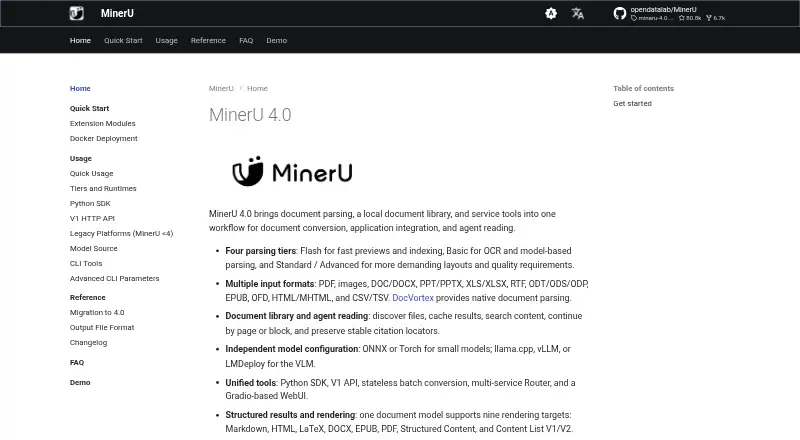
MinerU 4.0 handles PDFs, images, office documents, ebooks, web pages, and tabular files. Results can be exported as Markdown, HTML, LaTeX, DOCX, EPUB, PDF, or structured content. You can run it locally, self-host its services, use its APIs, or access a hosted plan. A free tier and open-source edition are available.
Review
In a line
MinerU 4.0 is an open-source toolkit for turning many document types into usable text and structured files. It combines parsing, a local document library, conversion services, and tools for application and agent workflows.
What it does
It accepts PDFs, images, DOC and DOCX, presentation and spreadsheet files, RTF, OpenDocument files, EPUB, OFD, HTML, MHTML, CSV, and TSV. OCR is supported for image-based content, and batch conversion can process multiple files.
Its common document representation can render Markdown, HTML, LaTeX, DOCX, EPUB, PDF, Structured Content, or Content List V1/V2. Flash, Basic, Standard, and Advanced parsing tiers let users choose different quality and computing needs.
Its document library can find files, cache results, search text, resume work by page or block, and keep citation locations.
How it connects
Developer tooling comprises a Python SDK, V1 HTTP API, command-line utilities, stateless batch conversion, a multi-service Router, and a Gradio web interface. It also supports the MCP protocol, agent frameworks, and exports to Dify and Notion.
The WebUI and API can run locally, and the SDK can point to a self-hosted API. By default, the local WebUI listens on port 7860, while the API server uses port 8000 and exposes OpenAPI documentation. Small models can run with ONNX or Torch; visual-language model processing can use llama.cpp, vLLM, or LMDeploy.
Local documents are not automatically sent to MinerU's official service. Remote parsing happens only when you configure it. Docker instructions target Linux NVIDIA GPUs and Windows WSL2; macOS Docker does not have MPS acceleration.
Good fit
MinerU suits people who need to convert mixed document collections, extract OCR text, or feed structured content into applications and agent workflows. It can run on the web, Windows, macOS, Linux, through an API, or on your own servers.
The open-source edition is useful when local processing, self-hosting, or control over document storage matters. Higher-throughput local deployments should have at least 16 GB of system memory; Apple Silicon guidance calls for at least 16 GB of unified memory.
Watch for
Setup depends on the environment. MinerU 4.0 supports Python 3.10 through 3.14, with Python 3.12 recommended. Optional packages add Torch-based runtimes or Linux vLLM and Windows LMDeploy.
Hosted APIs have file and page limits. The lightweight agent API handles one file up to 10 MB and 20 pages, while the precision API accepts files up to 200 MB and 600 pages, batches up to 200 files, and needs a token. Hosted create-task requests may time out when source URLs are on GitHub, AWS, or other overseas services.
The custom license allows commercial use, but a separate commercial license is required above 100 million monthly active users or $20 million in monthly revenue. Online services based on MinerU must provide attribution.
Pricing
The Free plan costs $0 a month and includes five pages each day, web access only, files up to 10 MB, images up to 5 MB, and PDFs up to five pages. It does not include API access.
MinerU open-source software is free under its project license. Pro is offered at a one-time $9.90 monthly payment or a one-time $59.90 annual payment. Each option supplies 1,000 pages per month, files up to 200 MB, images up to 50 MB, PDFs up to 500 pages, and API access.
The On-premise plan has pricing available on request and keeps models and data inside your network with dedicated support.
Verdict
Choose MinerU if you want broad document input and output formats, local or self-hosted processing, and developer interfaces without paying for the open-source edition. The hosted plans add simple web use and API access with clear page and file limits.
Consider another PDF Converter Software option if you only need a small, browser-based PDF conversion task and do not want to install runtimes, manage hardware, or check license thresholds.
Our take
MinerU is a strong match for teams handling varied documents that need OCR, structured exports, searchable local files, or agent connections. Its free open-source edition supports local and self-hosted control, while paid plans add hosted pages and API access. The trade-offs are setup work, hardware needs for faster local processing, and detailed limits on hosted files, pages, and requests. Review the license thresholds and attribution rule before commercial deployment.
- Open-source edition is free to use under its project license
- Supports many document inputs and exports
- Runs locally, through APIs, or on self-hosted servers
- Includes OCR and batch conversion
- Offers a free hosted plan and paid API plans
- Setup requires Python and optional runtime packages
- Hosted tiers limit pages, file sizes, or API access
- Docker GPU workflow is limited by platform
- Commercial use can trigger a separate license requirement
- Pick it ifMixed document conversion and OCR; Local or self-hosted document workflows; Agent and application integrations
- Skip it ifYou need only a simple browser PDF converter; You cannot provide the required local hardware or setup; Your commercial scale may exceed the license thresholds
Pricing
A free hosted tier offers five pages per day without API access. The open-source edition is free under its license. Pro is $9.90 for a one-time monthly payment or $59.90 for a one-time annual payment, with 1,000 pages each month and API access. On-premise pricing is available on request.
- Free$0/ month · 5 free pages every day · files up to 10 MB · images up to 5 MB · PDFs up to 5 pages · web access only, no APIFree
- MinerU open-source softwareFree to use under the project license · Commercial license required above 100 million monthly active users or USD 20 million monthly revenue · online services must attribute MinerUFree
- Pro · MonthlyUSD · one-time payment · 1,000 pages every month · files up to 200 MB · images up to 50 MB · PDFs up to 500 pages · API included$9.90 one-time
- Pro · AnnualUSD · one-time payment · 1,000 pages every month · files up to 200 MB · images up to 50 MB · PDFs up to 500 pages · API included$59.90/yr
- On-premiseTalk to us about deployment · models and data run inside your network · dedicated supportOn request
As mineru.io lists them, checked 15 Oct 2026.
Questions
Is MinerU free?
Yes. The open-source edition is free under the MinerU Open Source License. A hosted Free plan also costs $0 a month but has daily page, file-size, page-count, and web-only limits.
Can MinerU run on my computer?
Yes. Documentation covers Linux, macOS, and Windows, plus local WebUI and API servers. Higher-throughput local deployments should have at least 16 GB of system memory.
Does MinerU have an API?
Yes. Its tooling includes a V1 HTTP API, Python SDK, command-line tools, and API servers that can run locally or be self-hosted. The hosted Free plan does not include API access.
What files can MinerU read?
Inputs include PDFs, images, office files, OpenDocument files, EPUB, OFD, HTML, MHTML, RTF, CSV, and TSV.
What can MinerU export?
The available export set covers Markdown, HTML, LaTeX, DOCX, EPUB, PDF, Structured Content, and Content List V1/V2.
Are documents uploaded automatically?
No. Local documents are not automatically uploaded to the official service. Remote parsing requires explicit configuration.
What are the hosted Pro limits?
The monthly and annual Pro options each provide 1,000 pages per month, files up to 200 MB, images up to 50 MB, PDFs up to 500 pages, and API access.