MSI Afterburner: GPU Overclocking and Monitoring
us.msi.com · checked 15 Oct 2026
Free Windows software for GPU tuning, fan management and real-time hardware monitoring, with an Android remote.
How it plugs in
Signal on System monitoring tools6.4#1 of 12
MSI Afterburner is a free Windows desktop utility for tuning and monitoring discrete graphics cards made by any vendor. It provides controls for clocks, voltage, power, temperature and fans, along with five profile slots and live gaming metrics. A separate Android app can operate the desktop utility over local Wi‑Fi. Warranty coverage may exclude overclocking damage, while laptop fan curves are often controlled by firmware.
Review
In a line
MSI Afterburner is free graphics-card software for overclocking and real-time hardware monitoring. It runs as a Windows desktop utility, with a separate Android app for remote control.
What it does
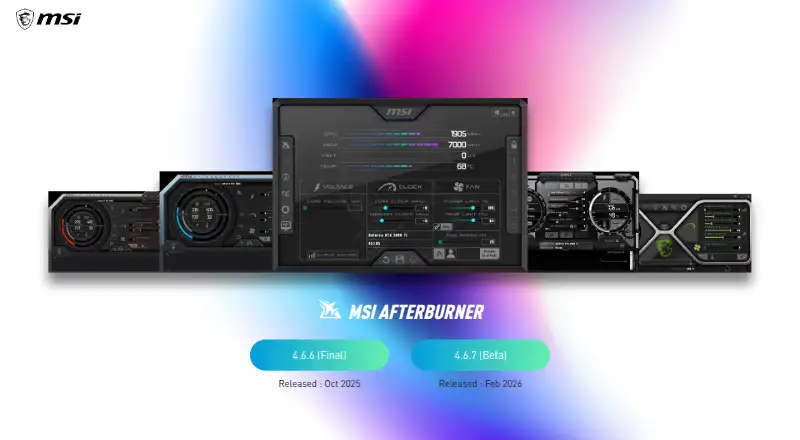
The utility exposes GPU core and memory frequencies, core voltage, power and temperature limits, as well as fan speed. OC Scanner finds the highest stable overclock for a card, while five profile slots save and recall configurations.
Its monitoring panel reports GPU and VRAM frequencies, voltage, temperature, driver version and related hardware details. The in-game On Screen Display supplies live performance information. Predator records games or overclocking in H.264, WMV or AVI formats.
A temperature-to-speed graph lets you place points and create a software-controlled fan curve.
How it connects
MSI says Afterburner works with graphics cards from every brand, including non-MSI models. The software is not open source.
In-game monitoring overlays depend on RivaTuner Statistics Server running with Afterburner. MSI's free Android companion can monitor and adjust the desktop utility over a local 802.11b/g/n wireless network; Bluetooth is unsupported, and the desktop program must remain active.
MSI directs users to msi.com and Guru3D for downloads and cautions that phishing sites can provide altered installers or steal information.
Good fit
This suits Windows users who want manual GPU tuning, automatic overclock discovery, custom cooling curves, saved settings and live readings while gaming. It also fits people with mixed-brand graphics cards.
It belongs with GPU overclocking software, GPU tuning software and hardware monitoring software.
Watch for
MSI states that overclocking damage falls outside its warranty, so voltage, power and temperature adjustments call for care. Laptop GPUs generally cannot use custom fan curves because manufacturers set those curves in firmware.
The Android companion works only with the desktop utility running on a local 802.11b/g/n network. Overlay monitoring also depends on RivaTuner Statistics Server.
The official page lists version 4.6.6 Final and version 4.6.7 Beta, both released in September 2026.
Pricing
Afterburner costs nothing, and there is no separate trial tier. Its free offering includes GPU overclocking and undervolting, hardware monitoring, custom fan control and an on-screen display.
The listed MSI Afterburner plan is also free, covering GPU overclocking and monitoring, graphics cards from all brands and the Windows desktop utility.
Verdict
Choose MSI Afterburner if you need broad graphics-card support and direct control over clocks, voltage, power, temperature and cooling. Its live overlay, profile slots and OC Scanner cover common tuning tasks without a purchase.
Look elsewhere if you need open-source code, Bluetooth control or dependable custom fan curves on a laptop. Anyone changing settings should accept the warranty warning and obtain the installer only from MSI.com or Guru3D.
Our take
MSI Afterburner is a practical no-cost choice for Windows owners who want detailed graphics-card tuning and monitoring across brands. The OC Scanner, saved profiles, fan graph and in-game overlay make it useful for both first adjustments and repeated setups. Key limits remain: overlays need RivaTuner Statistics Server, the Android remote depends on a local wireless network, and laptop fan control is commonly unavailable. Overclocking-related damage is outside warranty coverage, so cautious users should treat every setting change as their responsibility.
- Free plan includes overclocking, monitoring, fan control and on-screen display
- Works with graphics cards from all brands
- OC Scanner finds a card's highest stable overclock
- Five profile slots save and load configurations
- Android app offers local wireless remote control
- Overclocking damage is excluded from warranty coverage
- Laptop custom fan curves generally cannot be used
- In-game overlays depend on RivaTuner Statistics Server
- Android control needs local Wi‑Fi and excludes Bluetooth
- Phishing download sites may distribute modified installers
- Pick it ifWindows users tuning graphics cards from different brands; Gamers who need live readings and custom fan curves; People wanting a free Android remote companion
- Skip it ifYou need open-source code or Bluetooth control; You need custom laptop fan curves set by software; You cannot accept warranty risk from overclocking
Pricing
The complete MSI Afterburner plan is free. There is no separate trial; the listed free plan includes tuning, monitoring, fan control and the on-screen display.
- FreeGPU overclocking and undervolting · Hardware monitoring · Custom fan control · On-screen displayFree
- MSI AfterburnerGPU overclocking and monitoring · works with graphics cards from all brands · Windows desktop utilityFree
As us.msi.com lists them, checked 20 Sept 2026.
Questions
Is MSI Afterburner free?
Yes. MSI describes Afterburner as completely free, including GPU tuning, monitoring, custom fan control and the on-screen display.
Will it run with graphics cards made by other vendors?
Yes. MSI says Afterburner works with graphics cards from every brand.
What does OC Scanner do?
OC Scanner finds the highest stable overclock settings for a graphics card automatically.
Can I control Afterburner from Android?
Yes, with MSI's free Android app. The Windows desktop program must be running, and both devices need a local 802.11b/g/n wireless network. Bluetooth is not supported.
Why is RivaTuner Statistics Server needed?
Afterburner's in-game monitoring overlays require RivaTuner Statistics Server to be installed and running alongside it.
Can laptops use Afterburner fan curves?
Generally no. Laptop fan curves are usually set in firmware by the manufacturer.
Where should I download Afterburner?
MSI recommends MSI.com or Guru3D and warns that phishing sites may distribute modified installers or steal data.
Near it
All alternatives →- CTCore Temp#2 on this board
- HHWiNFO#3 on this board
- AM
 Argus Monitor#4 on this board
- MFMacs Fan Control#5 on this board
- NC
 NZXT CAM#6 on this board
- FCFan Control#7 on this board
- LHLibre Hardware Monitor#8 on this board
- S
 Speccy#9 on this board
- H
 HWMonitor#10 on this board
- OH
 Open Hardware Monitor#11 on this board