NAPS2 Open-Source Scanner Review
naps2.com · checked 18 Nov 2026
Open-source document scanning for Windows, macOS and Linux at no cost.
How it plugs in
Signal on Photo Scanning Software7.6#1 of 29
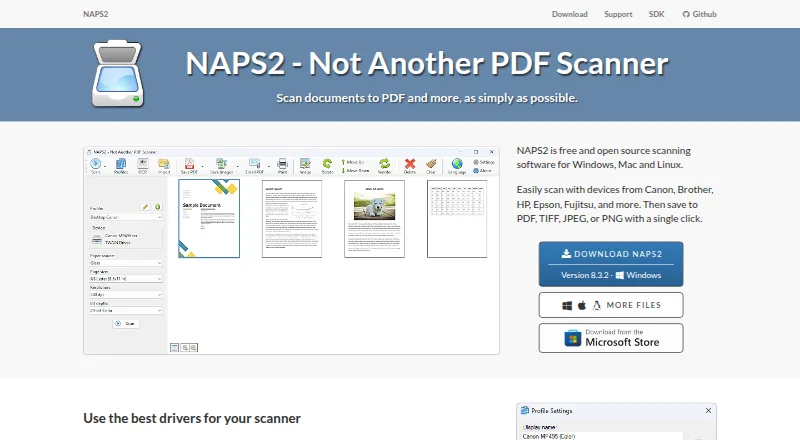
Use NAPS2 with a flatbed or automatic feeder to create PDF, TIFF, JPEG or PNG files from paper documents. Duplex capture, page editing, searchable PDFs and OCR for over 100 languages are included. The free, open-source app also offers network scanner sharing, scripted workflows and a .NET library for developers.
Review
In a line
NAPS2 provides no-cost, open-source document scanning on Windows, macOS and Linux. Output can be saved in PDF, TIFF, JPEG or PNG format.
What it does
You can scan from a flatbed, automatic document feeder or duplex feeder, then reorder, interleave, rotate, crop and deskew pages. Brightness and contrast controls help adjust each scanned page.
OCR turns scans into searchable PDFs and supports more than 100 languages. Imported PDFs can receive recognized text as well, although NAPS2 does not save that result as a standalone text file. The app has more than 40 interface languages and supports batch scanning.
How it connects
Depending on the platform, NAPS2 can use WIA, TWAIN, SANE, ESCL or Apple scanner interfaces. Canon, Brother, HP, Epson and Fujitsu are among the compatible hardware examples. See other Scanner Software options if you need a different tool.
A scanner can be made available to another computer or phone on the local network, with Android and iPhone clients using ESCL. Sharing normally starts over HTTPS with a generated certificate; HTTP fallback is possible, and settings can require HTTPS or a trusted certificate.
For scripted work, the optional command-line tool can scan, import, convert, run OCR, create PDF/A files, encrypt, split, interleave and send email. Developers can use the free NAPS2.Sdk C#/.NET 6+ library on Windows, Mac and Linux. The main app is GPL-2.0-or-later; the SDK and related libraries use LGPL-2.1-or-later, with MIT-licensed samples.
Good fit
NAPS2 suits people who want a no-cost desktop scanner app for home, office or managed deployments. It fits jobs such as making searchable PDFs, scanning batches, cleaning page order and exporting common image formats.
For managed installations, organizations can use the Windows MSI package and application-level configuration. Portable ZIP archives are also offered for use without a standard installation.
Watch for
Network scanner access ends when the NAPS2 server application closes; service operation is planned but is not currently supported. Check that your scanner and driver use a supported interface before choosing it.
The current release line runs on Windows 10 and 11, macOS 12 or later, and Linux builds requiring GTK 3.20+, glibc and libsane. Windows 7, 8 and 8.1, plus macOS 10.15 and 11, are limited to version 7.5.3.
Recognized OCR content remains in the PDF, so copy it out with a PDF viewer if you need plain text. Gmail and Outlook sending keeps the address and secure token on your computer and transmits them only to the selected provider.
Pricing
NAPS2 has a free plan for individuals and businesses, without advertising or feature limits. A trial is unnecessary because the available plan costs nothing. The desktop app runs on Windows, Mac and Linux, and donations are optional.
Verdict
NAPS2 is suitable when you want uncomplicated scanning, searchable PDFs and standard export formats without a license fee. Its open-source code, portable downloads, network sharing and automation tools add flexibility for technical or managed setups.
Our take
NAPS2 is a sensible choice for anyone who wants free scanning software with broad scanner-driver support and standard file exports. It covers everyday document work, batch jobs, page cleanup and searchable PDFs, while its command-line tool and .NET library support more advanced workflows. The main trade-offs are that network sharing stops when the server app closes, OCR cannot export a text file directly, and older operating systems require an earlier release. Check your scanner interface and operating-system version before installing.
- No-cost use for individuals and businesses without ads or feature limits
- Works with flatbeds, automatic feeders and duplex feeders
- OCR handles more than 100 languages
- Open-source project with command-line and .NET SDK options
- Available on Windows, macOS and Linux
- The server application must remain open for network sharing
- OCR output stays in the PDF instead of becoming a text file
- Windows 10/11 or macOS 12+ is needed for current releases
- HTTPS sharing can use HTTP fallback unless configured differently
- Pick it ifHome and office document scanning; Searchable PDFs and batch scanning; Organizations needing open-source deployment options
- Skip it ifYou need scanner sharing to run as a background service; You require direct OCR text-file export; Your computer uses an older operating-system version
Pricing
The desktop application costs nothing for individuals and businesses and has no ads or feature restrictions. Donations are optional, and no trial period is offered.
- FreeFree for individuals and businesses · no ads or restrictionsFree
- NAPS2Windows, Mac and Linux desktop · no ads or restrictions · donations optionalFree
- NAPS2 FreeNo ads or restrictionsFree
As naps2.com lists them, checked 29 Sept 2026.
Questions
Is NAPS2 free?
Yes. Individuals and businesses can use NAPS2 without charge, advertising or feature limits. Donations are optional.
Which operating systems does NAPS2 support?
The current release line supports Windows 10 and 11, macOS 12 and newer, plus Linux builds meeting the stated GTK, glibc and libsane requirements.
Can NAPS2 make searchable PDFs?
Yes. OCR handles more than 100 languages and can place searchable text in scans and imported PDFs.
Can I share a scanner over my network?
Yes. ESCL sharing lets compatible computers, Android applications and iPhone applications use a scanner, provided the server application stays open.
Does NAPS2 export OCR text files?
No. The recognized text is kept in the PDF; copy it using your PDF viewer.
Does NAPS2 have automation tools?
Yes. Its optional command-line interface can automate scanning, conversion, OCR, PDF/A, encryption, splitting, interleaving and email operations.
Which scanner drivers work with NAPS2?
Depending on the platform and scanner, it supports WIA, TWAIN, SANE, ESCL and Apple scanner interfaces.
Near it
All alternatives →- GP
 Google Photos#2 on this board
- FBFilmBox by Photomyne#3 on this board
- F
 FilmLab#4 on this board
- BIBrother iPrint&Scan#5 on this board
- P
 PhotoScanner#6 on this board
- P
 PaperScan#7 on this board
- N
 Nostalgia#8 on this board
- SSilverFast#9 on this board
- RBReimagine by MyHeritage#10 on this board
- MMMyHeritage Mobile App#11 on this board