Neiro: Local Audio Worksuite
github.com · checked 30 Sept 2026
A no-cost audio workspace that runs locally for separation, repair, transcription, editing, and practice.
How it plugs in
Signal on Audio Restoration Software6.4#6 of 24
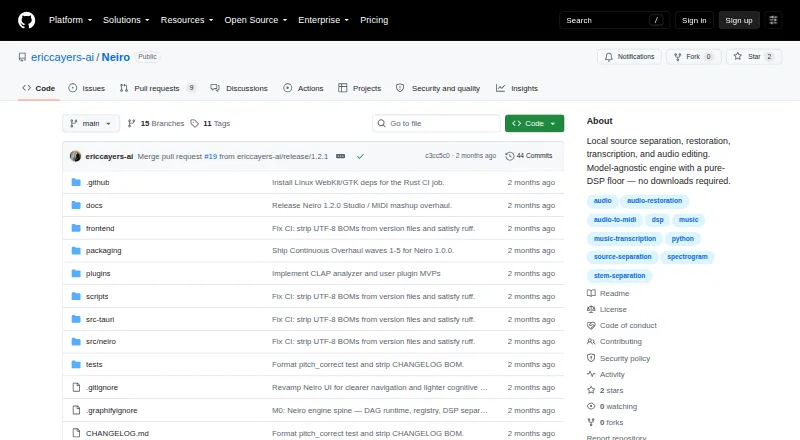
Neiro is a free worksuite that runs locally on Linux, macOS, Windows, the web, or a self-hosted setup. It separates stems, repairs common audio problems, transcribes sound to MIDI and other formats, and provides editing and practice tools. Audio stays on your machine. Optional neural models add capabilities but bring separate downloads and licensing terms.
Review
In a line
Neiro brings audio source separation, restoration, transcription, and editing together in a local worksuite. It runs on Linux, macOS, Windows, the web, or as a self-hosted service.
What it does
Neiro can separate vocals, instrumentals, harmonic and percussive parts, four- or six-stem mixes, and drum kits. Each result includes a residual for checking what remains after separation.
Declipping, hum removal, denoising, dereverberation, bandwidth extension, and reference mastering are among its restoration functions. It can transcribe audio to MIDI, then export MusicXML, ASCII tablature, or LRC lyrics.
Studio offers edits that do not overwrite the source waveform. Learn adds loop regions, count-in, metronome, step mode, WebMIDI, and DAW wait mode. Batch processing is supported.
How it connects
A Tauri desktop app and a browser interface launched with `neiro ui` provide access to Neiro. Shared-window VST2 and CLAP injectors bring DAW audio into its interface; a VST2 effect can also serve as a pass-through injector.
The core signal-processing layer works without downloading models. Optional neural backends include Demucs, Basic Pitch, and AudioSR. Model files download when needed and are checked against manifest SHA-256 values.
Audio is processed on your machine. The interface listens on 127.0.0.1, and outbound network activity is off by default except for downloads and updates that you start. A local Python adapter plugin is documented, but adapters run inside Neiro without a sandbox.
Good fit
Neiro suits people who want one local tool for stem separation, cleanup, transcription, waveform editing, and music practice. It also fits DAW users who need shared-window capture through VST2 or CLAP.
Windows installers come as MSI or EXE files, macOS as DMG, and Linux as AppImage or DEB. WAV and FLAC inputs work without extra media tools.
Watch for
The Python package requires Python 3.10 through 3.12. Compressed or video inputs need ffmpeg available on your system; WAV and FLAC do not.
Desktop releases do not include neural weights, so first use may require a model download. Each model has its own license, and some are limited to non-commercial or research use. Third-party weights can be dangerous.
The local adapter plugin runs without isolation. Full MUSDB18-HQ and MAESTRO evaluation figures require you to provide those datasets. For other audio tools, see Audio Restoration Software.
Pricing
The software is available at no cost through a free plan. Optional model downloads are separate from the desktop release.
Verdict
Choose Neiro if keeping audio on your own machine matters and you want separation, repair, transcription, editing, and practice in one application. Its DAW injectors add a direct capture route, while the browser and desktop interfaces cover different workflows.
Check model licenses before commercial work, and plan for ffmpeg if you handle compressed or video files. Users who need sandboxed extensions or bundled neural models should look elsewhere.
Our take
Neiro is a sensible free choice for musicians, archivists, and producers who prefer local audio processing over cloud services. It covers a broad set of tasks, from stem splitting and noise repair to MIDI transcription and practice features, with DAW capture options. The main trade-offs are setup details, optional model downloads, and model-specific licenses that may restrict commercial use. Its unsandboxed adapter system also deserves caution. If those limits fit your workflow, Neiro offers a wide local toolset without a subscription.
- Free plan with local audio processing
- Separates vocals, instruments, drums, and multi-stem mixes
- Restoration includes denoising, hum removal, and declipping
- Transcribes to MIDI and exports MusicXML, tablature, and LRC
- Desktop, browser, self-hosted, and major desktop platforms
- Neural models download separately on first use
- Model terms can limit commercial or research use
- Compressed and video inputs require ffmpeg
- Python package requires versions 3.10 through 3.12
- Adapter extensions run in Neiro without sandboxing
- Pick it ifLocal stem separation and audio restoration; DAW users needing VST2 or CLAP capture; Musicians practicing or transcribing parts
- Skip it ifYou need cloud processing or bundled neural models; You require sandboxed third-party extensions; Your workflow cannot accommodate ffmpeg or Python requirements
Pricing
Neiro costs nothing through its free plan. Neural model files are optional downloads, and each model has separate license terms that may limit commercial use.
Questions
Is Neiro free?
Yes. The project offers a free plan.
Does Neiro send audio online?
Audio is processed on your machine and does not leave it. The local interface uses 127.0.0.1, with network activity off by default except downloads and updates you start.
Which systems can run Neiro?
Neiro supports Linux, macOS, Windows, web use, and self-hosted setups. Desktop releases list Windows MSI/EXE, macOS DMG, and Linux AppImage/DEB installers.
Can Neiro work with a DAW?
Yes. Documented VST2 and CLAP injectors capture audio through a shared window, and a VST2 effect can act as a pass-through injector.
Which output formats can transcription produce?
It transcribes audio to MIDI and can export MusicXML, ASCII tablature, and LRC lyrics.
Do I need ffmpeg?
Only for compressed or video inputs. WAV and FLAC files work without ffmpeg.
Are Neiro's models included?
Neural weights are not bundled with desktop releases. They download on first use, and each model keeps its own license.
Near it
All alternatives →- VRVinyl Restoration Suite#5 on this board
- CCathar#7 on this board
- VVinylRest#4 on this board
- ACAntinode Clear (formerly Supertone Clear)#8 on this board
- AD
 @audio/denoise#3 on this board
- WAWave Arts Master Restoration Suite 6#9 on this board
- PCPD Cleaner#2 on this board
- WCWave Corrector#10 on this board
- AAvidemux#1 on this board
- ASAlgorithmix Sound Rescue#11 on this board