
NetBox
netboxlabs.com · checked 15 Oct 2026
How it plugs in
Signal on Network Management Software7.4#1 of 34
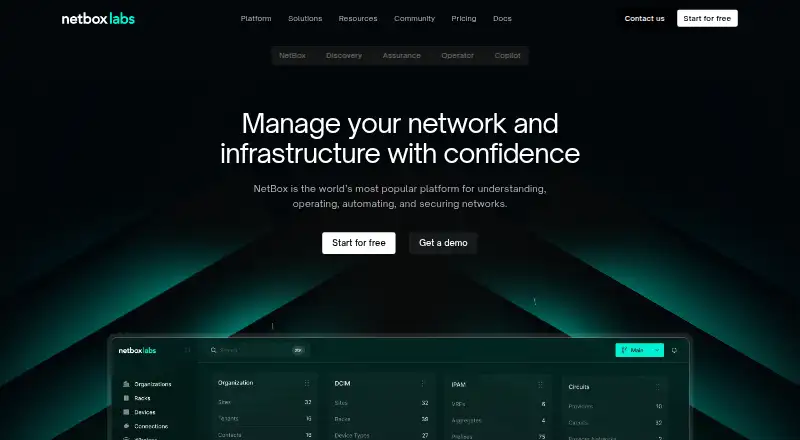
NetBox is positioned as a central source of truth for understanding, operating, automating, and securing network and infrastructure environments.
Review
<p>NetBox is an infrastructure data and automation platform for teams that need one authoritative record of networks, data-center assets and IP resources. It suits network, platform and infrastructure groups that want hosted or self-managed deployment with an API and a durable audit trail. Its strongest case is disciplined infrastructure operations; teams needing a narrowly focused access product or a fully transparent price list should look elsewhere.</p><h2>Overview</h2><p>NetBox Labs has stewarded the open-source NetBox project since 2015. The platform acts as a central source of truth for physical components, virtual assets, IP addresses and VLANs, supporting network source-of-truth work, data-center infrastructure management, IP address management and network automation.</p><p>That central model is valuable when several teams or tools need the same infrastructure picture. Every action is recorded in an audit log, giving operators a history of changes rather than an undocumented collection of spreadsheets and scripts. NetBox is offered as a fully hosted SaaS edition, in a customer-owned environment, or through open-source community use, so deployment policy need not dictate the product choice.</p><h2>Key features</h2><h3>Infrastructure inventory and automation</h3><p>Network discovery, API access and policy automation make NetBox suitable as an operational data layer for automated workflows. Its focus is inventory and intent: it records what exists and supports automation around that record. Configuration management is not included, so teams looking for a system that directly manages device configuration will need another component.</p><h3>Integrations and governance</h3><p>Enterprise integrations include ServiceNow, Splunk, Ansible, Itential, Gluware and VMware. Those connections help NetBox sit between infrastructure records, ticketing, monitoring and automation systems instead of becoming an isolated catalog.</p><p>NetBox Enterprise adds collaborative change management with approval, tracking, review and audit trails. NetBox Labs says the service is SOC 2 Type II compliant and cites IP allow lists, mutual TLS, encrypted production data and annual penetration tests. NetBox Cloud supports common SSO integrations with Azure, Okta and Google, with advanced SSO options available.</p><h2>Pricing</h2><p>NetBox uses a freemium model with a free plan and custom pricing for the paid tiers. The pricing page directs buyers to contact sales for Starter, Professional and Premium rather than publishing amounts, so budget comparisons require a sales conversation.</p><h3>Starter</h3><p>Starter is positioned for infrastructure with hundreds of devices. It includes a fully managed hosted NetBox, a single-tenant application, a shared database cluster, email support and certified plugins. It is the pragmatic hosted entry point, but buyers give up the environments, identity controls and service commitments described for higher tiers.</p><h3>Professional</h3><p>Professional targets infrastructure at scale and automation. It adds one production plus one development or staging environment, SSO group mapping, on-demand major and minor upgrades and compatible plugins. The extra environment is important for teams that must validate automation before production; the plan still does not state a public price.</p><h3>Premium</h3><p>Premium is for scaled infrastructure requiring advanced security, compliance and deployment options. It includes access to SOC 2 and penetration-test materials, enterprise SAML or custom SSO, flexible and high-availability deployment options, and 24×7 support with response-time SLAs. Those controls address regulated or business-critical operations, but the commercial commitment is custom.</p><h3>NetBox Enterprise</h3><p>NetBox Enterprise is the self-managed subscription for running NetBox in your own infrastructure, with an air-gap edition available and 24/7 expert assistance. It fits organizations that cannot place the system in a hosted service or need isolated deployment.</p><h2>Platforms</h2><p>NetBox supports web use, an API and self-hosted deployment. Its hybrid deployment model lets a team choose hosted SaaS, customer infrastructure or open-source community operation. The API is central to automation and integration, while web access serves operators and reviewers.</p><h2>Who it's for</h2><p>Choose NetBox when network and infrastructure data must be shared across operations, automation and governance teams, especially at data-center or multi-device scale. Starter suits organizations with hundreds of devices; Professional is aimed at larger, automation-heavy estates; Premium is for scaled environments with advanced security, compliance and deployment requirements. Enterprise is the fit for self-managed or air-gapped operations. It is less suitable as a standalone configuration-management system, because configuration management is not provided.</p><h2>Pros and cons</h2><ul><li><strong>Pro:</strong> A central record covers physical, virtual, IP and VLAN data, reducing conflicting infrastructure inventories.</li><li><strong>Pro:</strong> API access, discovery and policy automation support repeatable operational workflows.</li><li><strong>Pro:</strong> Audit logging and Enterprise change controls provide approval, review and traceability for sensitive changes.</li><li><strong>Pro:</strong> Hosted, self-managed and open-source deployment options accommodate different control and compliance requirements.</li><li><strong>Con:</strong> Starter uses a shared database cluster and email support, which may be limiting for teams needing stronger isolation or response commitments.</li><li><strong>Con:</strong> Paid-plan prices are custom, making early procurement and side-by-side cost planning harder.</li><li><strong>Con:</strong> No configuration management means another system is required to enforce device settings.</li></ul><h2>Alternatives</h2><p>For broader category comparisons, review <a href="/best/cloud-network-management-software/">Cloud Network Management Software</a>, <a href="/best/it-documentation-software/">IT Documentation Software</a>, <a href="/best/network-management-software/">Network Management Software</a>, <a href="/best/network-documentation-software/">Network Documentation Software</a> and <a href="/best/ip-address-management-software/">IP Address Management Software</a>.</p><p><a href="/platforms/cloudflare-access/">Cloudflare Access</a> is a freemium, multi-platform access product with a free tier under 50 users, so choose it when access control is the primary need. <a href="/platforms/zerotier/">ZeroTier</a> offers freemium overlay networking across major desktop, mobile and self-hosted platforms; choose it when lightweight virtual networking matters more than infrastructure inventory. <a href="/platforms/infoblox-cloud-network-automation/">Infoblox Cloud Network Automation</a> uses token-based paid licensing, fitting organizations that prefer a commercial automation suite. <a href="/platforms/openstack-neutron/">OpenStack Neutron</a> is free and self-hosted, suited to OpenStack networking. <a href="/platforms/efficientip-solidserver-ddi/">EfficientIP SOLIDserver DDI</a> is a paid appliance-oriented DDI option. <a href="/platforms/f5-big-ip-apm/">F5 BIG-IP APM</a> is a paid application-access platform with perpetual licensing and a trial. <a href="/platforms/bluecat-horizon/">BlueCat Horizon</a> is paid DDI orchestration licensed by unique active IP. <a href="/platforms/equinix-fabric/">Equinix Fabric</a> is a paid API and web connectivity service whose charges vary by port, network, bandwidth and term.</p><h2>Verdict</h2><p>NetBox is the right choice for infrastructure teams that need a shared source of truth, automation hooks and an auditable change history, with the freedom to run hosted or self-managed. Choose Professional or Premium as scale, identity, compliance and availability requirements rise; choose Enterprise when your infrastructure must remain under your control. Look elsewhere when direct configuration management is essential or when you need published prices before engaging sales.</p>
Our take
NetBox combines infrastructure data management with deployment choices and an audit trail. Teams should compare the hosted tiers' stated positioning with their deployment and support needs, then contact sales for pricing.
- ["Central source of truth covers assets, IPs, and VLANs.", "Every action is recorded in an audit log.", "Available as hosted SaaS, self-managed, or open source.", "Named integrations include ServiceNow, Ansible, and VMware.", "NetBox Cloud offers SSO with Azure, Okta, and Google."]
- ["Starter, Professional, and Premium prices are not displayed.", "Enterprise is self-managed.", "Advanced SSO options are separate from common integrations."]
- Pick it ifNetBox suits teams managing network and infrastructure data, from hundreds of devices to scaled environments. Deployment choices include hosted SaaS, customer infrastructure, and open source community use.
Pricing
- NetBox Cloud Free Plan100 devices · 500 IP addresses · 2 operational branches · 10,000 API requests/monthFree
- NetBox EnterpriseSelf-managed in your infrastructure · air gap edition available · 24/7 expert assistanceOn request
- PremiumContact sales · Everything in Professional · SOC 2 and penetration-test access · enterprise SAML/custom SSO · high-availability deployment options · 24×7 support with response SLAs · private pluginsOn request
- ProfessionalContact sales · Everything in Starter · 1 production plus 1 development/staging environment · SSO group mapping · compatible plugins · priority public-preview accessOn request
- StarterContact Sales · Single-tenant application · shared database cluster · 1 production environment · automatic upgrades · email support · certified pluginsOn request
As netboxlabs.com lists them, checked 15 Oct 2026.
Near it
All alternatives →- UN
 UniFi Network#2 on this board
- MN
 ManageEngine Network Configuration Manager#3 on this board
- MRMikroTik RouterOS#4 on this board
- SRSynology Router Manager#5 on this board
- VVyOS#6 on this board
- D
 Domotz#7 on this board
- TL
 TP-Link Omada SDN#8 on this board
- O
 OpenWISP#9 on this board
- N
 NetBrain#10 on this board
- GGluware#11 on this board