Nextcloud Talk: Chat and Calls for Nextcloud
nextcloud.com · checked 8 Oct 2026
Nextcloud Talk is a self-hosted service for chat, audio and video calls, meetings, and webinars.
How it plugs in
Signal on Team chat apps7.3#7 of 63
Chat, calls, and webinars are combined in Nextcloud Talk, which organizations can run on their own systems or arrange through a trusted local provider. It connects with Nextcloud tools and can bridge chats to other services. A free single-user account is available, while listed enterprise plans start at 100 users and charge extra for Talk. Its High Performance Backend supports large calls; webinars and public video conferencing with a lobby require it.
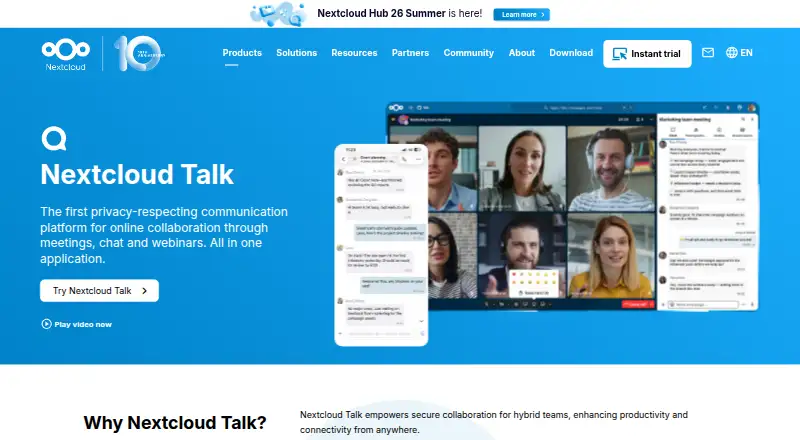
Review
In a line
Nextcloud Talk is a chat and calling service for meetings and webinars. Organizations can host it on their own infrastructure or use a trusted local provider.
What it does
Talk supports private, group, and public calls, with chat that remains available once a call is over. Guests outside the organization can be invited using a URL.
Chats can include shared Nextcloud Files documents and connect with calendars and tasks. Users can also collaborate through online office sidebars.
How it connects
Talk works with Nextcloud Files, Groupware, Calendar, Deck, and Whiteboard. Chat bridges include Slack, Microsoft Teams, Matrix, IRC, Mattermost, and XMPP; Talk also supports chats and calls between Nextcloud servers.
A public API lets other apps access Talk features. As an open-source app, Talk needs to be installed and enabled within Nextcloud. It runs in a browser and has desktop and mobile apps for Windows, macOS, Linux, iOS, and Android.
Good fit
Talk may suit organizations that want chat and calls with Nextcloud files, calendars, and tasks, while keeping communications and related information on their own infrastructure.
Nextcloud says a standard private installation handles calls for 6–10 people. With good network connections and video turned off, it may support as many as 20.
Watch for
The High Performance Backend is required for webinars, public video conferences with a lobby, and SIP phone dial-in. It also supports calls with hundreds or thousands of participants, which need substantial dedicated bandwidth and processing capacity.
Nextcloud describes security features including encrypted calls, protection against repeated login attempts, and detection of suspicious logins. It says self-hosting keeps communications and related information on the organization’s infrastructure, and cites GDPR and CCPA.
Pricing
Single-user accounts from Nextcloud providers are free and come with at least 2 GB of storage. Nextcloud also offers a no-cost 30-day trial of its hosted High Performance Backend.
The listed annual enterprise rates per user are €71.29 for Standard, €104.99 for Premium, and €204.75 for Ultimate; all have a 100-user minimum. Talk is an optional paid extra on each plan.
Verdict
Consider Talk if your organization already uses Nextcloud or wants to host chat and calls on its own infrastructure. Check the extra cost for Talk and the backend needs before choosing an enterprise plan, especially if you need large webinars, public meetings, or phone dial-in. A small private setup may be enough for modest calls, but larger sessions call for dedicated capacity.
Our take
Nextcloud Talk may make sense for organizations already using Nextcloud files and calendars, or those seeking to host their communications themselves. Connections to other chat services can also help teams working across platforms. Consider the added Talk fee and the capacity you can provide: listed enterprise plans have a 100-user minimum, and webinars, public video conferences with a lobby, and phone dial-in require the High Performance Backend. For a small setup, check whether the stated participant limits fit your calls.
- Organizations can run Talk themselves or use a trusted local provider
- Connects with Nextcloud tools and several other chat services
- Chat remains available after calls
- Free single-user provider accounts include at least 2 GB of storage
- Talk is an added cost on the listed enterprise plans
- Listed enterprise plans have a 100-user minimum
- Large calls need substantial dedicated bandwidth and processing capacity
- Webinars, public video conferences with a lobby, and phone dial-in require the High Performance Backend
- Pick it ifOrganizations that use Nextcloud files, calendars, and tasks; Teams that want control over where communications are hosted
- Skip it ifYou need large calls but cannot provide dedicated bandwidth and processing capacity; You need webinars or phone dial-in without the High Performance Backend
Pricing
Nextcloud provider accounts for single users are free and include at least 2 GB of storage. Its listed enterprise plans have a 100-user minimum, with annual per-user pricing; Talk is optional at extra cost. A hosted High Performance Backend is available to try free for 30 days.
- StandardStarting at 100 users for 71.29€/user/year · minimum 100 users · Nextcloud Talk is optional at extra cost€71.29/yr
- PremiumStarting at 100 users for 104.99€/user/year · minimum 100 users · Nextcloud Talk is optional at extra cost€105/yr
- UltimateStarting at 100 users for 204.75€/user/year · minimum 100 users · Nextcloud Talk is optional at extra cost€205/yr
As nextcloud.com lists them, checked 8 Oct 2026.
Questions
Can I use Nextcloud Talk for free?
Nextcloud offers free single-user provider accounts with at least 2 GB of storage. On listed enterprise plans, Talk is an optional extra fee.
Where can I use Talk?
Talk works in a browser, with desktop clients for Windows, macOS, and Linux, and mobile apps for iOS and Android.
Does Talk work with other chat services?
Yes. Its chat bridges include Slack, Microsoft Teams, Matrix, IRC, Mattermost, and XMPP.
How many people can join a private call?
A typical private setup handles 6–10 participants. With good network connections and no video, it may support up to 20.
What do I need for webinars or public video meetings?
The High Performance Backend is required for webinars and public video conferencing with a lobby. SIP phone dial-in also requires it.
What do enterprise plans cost?
Standard costs €71.29 per user per year, Premium €104.99, and Ultimate €204.75. All three have a 100-user minimum, and Talk costs extra.