AI Music Transcription Software
Oh Sheet! for AI Piano Notation
github.com · checked 9 Oct 2026
Oh Sheet! applies AI to arrange songs as piano notation and MIDI you can play.
How it plugs in
Signal on AI Music Transcription Software5.6#27 of 29
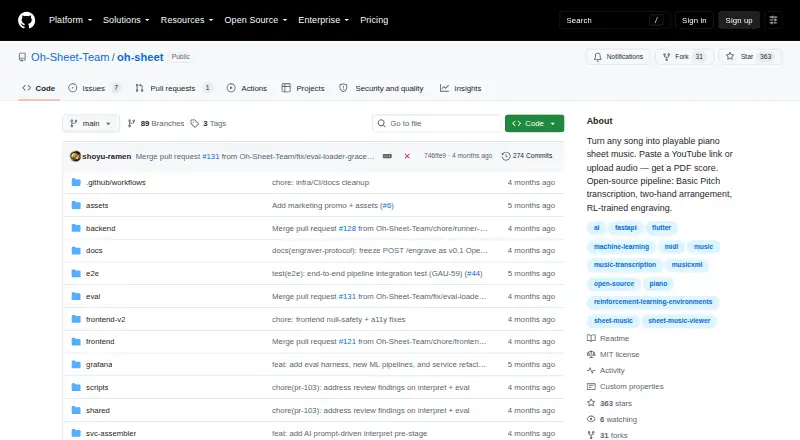
Oh Sheet! converts YouTube links, audio files, and MIDI into piano scores, MusicXML, and playable MIDI. Its arrangements place melody in the right hand and bass and harmony in the left. The project is open source and free. It runs on the web, iOS, Android, and macOS, and can be self-hosted; making PDFs locally requires LilyPond.
Review
In a line
With AI, Oh Sheet! makes piano notation from songs. It can also produce MusicXML and playable MIDI.
What it does
Provide a YouTube URL, audio recording, or MIDI file to get started. Audio uploads support MP3, WAV, FLAC, and M4A. Spotify's Basic Pitch identifies audio notes; optional Demucs separation can isolate instruments before transcription. The resulting arrangement puts melody in the right hand and bass and harmony in the left.
Playback can include small timing shifts, changes in note strength, pedal marks, and articulations. In its browser viewer, notation is rendered with playback, and a cursor stays in sync with the music.
How it connects
Oh Sheet! is open-source software under the MIT license. Its API documentation covers submitting jobs, checking status, retrieving artifacts, and receiving progress events over WebSocket. TuneChat can send files to the API and display MusicXML in shared rooms for collaborative practice.
Frontend scaffolding is provided for the web, iOS, Android, and macOS. The README outlines a Docker Compose deployment on one GCP virtual machine. The local engraving backend needs LilyPond to produce PDFs, but MusicXML remains available without it.
Good fit
Piano players seeking a two-hand score from a song or MIDI, as well as people who need MusicXML or playable MIDI in another workflow, may find it useful. TuneChat users can share results in collaborative practice rooms.
Watch for
Local PDF creation depends on LilyPond, so account for that when planning a self-hosted setup. MusicXML does not depend on it.
The optional remote engraving service is hosted and proprietary, and no public Docker image is available. Self-hosters can choose the local engraving backend instead.
Pricing
Oh Sheet! is free to use and open source. The repository lists an MIT license.
Verdict
Consider Oh Sheet! if you need AI-generated piano notation from audio, a YouTube link, or MIDI, and its supported outputs fit your workflow. It offers web and mobile access, an API, and a self-hosting route. Before relying on PDF output, check the LilyPond setup requirement. If tablature is essential, look elsewhere: the software does not generate it.
Our take
Oh Sheet! is worth considering for piano players and music workflows that need a two-hand score from a song, audio file, or MIDI. This free, open-source project provides MusicXML and playable MIDI, an API, and web, mobile, and self-hosted options. Check the LilyPond requirement if PDF scores matter, and note that tablature is not available. The remote engraving option is proprietary; for a wholly open-source setup, use the local backend instead.
- Free and open source under an MIT license
- Accepts YouTube links, audio uploads, and MIDI files
- Produces PDF scores, MusicXML, and playable MIDI
- API includes job status, downloads, and progress events
- Runs on web, iOS, Android, and macOS
- Local PDF output requires LilyPond
- Tablature output is not supported
- Optional remote engraver is proprietary and has no public Docker image
- Pick it ifPiano players turning songs into two-hand sheet music; People who need MusicXML or playable MIDI from audio or MIDI
- Skip it ifYou need tablature output; You need local PDF output but cannot use LilyPond
Pricing
The software costs nothing and is open source. Self-hosting is an option, but local PDF output requires LilyPond.
Questions
Which inputs does Oh Sheet! accept?
It takes YouTube links, MIDI files, and audio uploads in MP3, WAV, FLAC, or M4A.
Which outputs are available?
It can create PDF scores, MusicXML, and playable MIDI. PDF generation on the local backend needs LilyPond; MusicXML does not.
Does it make guitar tablature?
No. Tablature output is not supported.
Can I use Oh Sheet! through an API?
Yes. The documented API provides job submission, status checks, artifact downloads, and progress updates through a WebSocket event stream.
Can I self-host it?
Yes. The README covers Docker Compose deployment on a single GCP virtual machine. You can use the local engraving backend without the optional remote service.
Is Oh Sheet! free?
Yes. It is free to use and open source under an MIT license.
Near it
All alternatives →- TTremo#26 on this board
- AUAudioScore Ultimate#28 on this board
- SMSheet Music Flow#25 on this board
- C
 capella#29 on this board
- LLoveMyScore#24 on this board
- CA
 Creatune Audio to Sheet Music#23 on this board
- FA
 Fraunhofer Automatic Music Transcription#22 on this board
- MSMatra Studio#21 on this board
- NNutifAI#20 on this board
- SScoreCloud#19 on this board