OpenVoiceChanger: Free Self-Hosted AI Voice Changer
github.com · checked 9 Oct 2026
OpenVoiceChanger provides local, real-time AI voice conversion through a free, open-source browser app.
How it plugs in
Signal on Voice Changer Software6.3#13 of 45
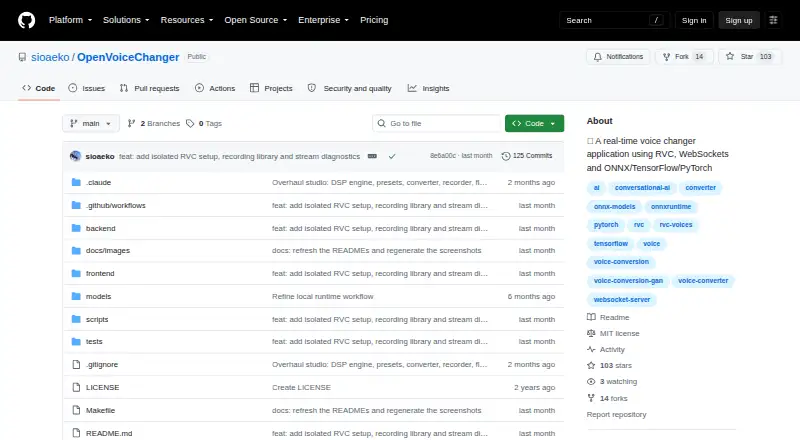
OpenVoiceChanger runs a browser interface and local backend for live microphone voice conversion. Users can load ONNX or RVC models, choose model-free effects, and turn saved audio into WAV files. The MIT-licensed open-source code exposes HTTP and WebSocket interfaces for health checks, models, presets, conversion, and live audio.
Review
In a line
OpenVoiceChanger is a self-hosted web application that changes microphone audio in real time with AI voice models or built-in effects. It runs through a local backend and browser interface.
What it does
Microphone streams may run through ONNX or RVC models, and a DSP-only path adds effects without a model. Pitch and formant shifting, 16 F0 methods, 12 DSP effects, and 16 included voice presets are available in the studio.
You can save the complete Voice Lab setup as a custom preset. For files, the offline converter takes WAV, MP3, FLAC, OGG, or M4A input and renders WAV output. The configured maximum input length is 600 seconds.
How it connects
The project uses an MIT-licensed open-source codebase. Its server exposes HTTP routes for health, models, presets, and conversion, along with a WebSocket channel for live audio. The README names ONNX Runtime, PyTorch, RVC, and GitHub Releases among its software components.
The loader handles ONNX files and RVC PyTorch .pth or .pt files; RVC operation additionally requires a HuBERT content encoder. No third-party conferencing connections appear in the project; see voice changer software for other options.
Good fit
This is suited to people seeking browser-based, local conversion for live microphone use, recorded-audio changes, character voices, or their own model files. It can also fit workflows that need an HTTP or live-audio interface.
The browser UI works on supported browsers, while the listed platforms include Windows, Linux, web, API, and self-hosted setups.
Watch for
Running it calls for Python 3.10 or newer, Node.js 20.19 or newer, and npm. Using RVC additionally calls for a HuBERT encoder file.
The backend binds to 127.0.0.1 by default. Origin checks protect HTTP and WebSocket requests, and the project recommends HTTPS for microphone access over a local network. RVC checkpoints use safe weights-only loading by default; enabling unsafe loading requires an explicit setting.
Recorded takes remain in same-origin browser IndexedDB, which the browser can clear or evict. Updates check public GitHub Releases but require a user action in the managed launcher and a clean main branch.
Pricing
There is no charge for OpenVoiceChanger, which is released under the MIT open-source license. The software itself has no charge, and there is no free trial.
Verdict
Choose OpenVoiceChanger when you want to host a voice-changing web app yourself, use ONNX or RVC files, or process microphone and saved audio locally. Its built-in effects and HTTP/WebSocket endpoints add flexibility for personal setups.
Look elsewhere if you need a listed connection to conferencing services, a hosted service, or a simpler installation path.
Our take
OpenVoiceChanger is a practical choice for technically comfortable users who want a no-cost, self-hosted voice changer with both AI models and ordinary audio effects. It handles live microphone streams and several common file types, while its API can support custom local workflows. The trade-off is setup and maintenance: you supply the runtime tools, model files, and any HuBERT encoder required by RVC. Browser storage can also disappear, and there are no documented conferencing connections. Choose it for control and local operation, not for a managed service.
- No-cost, MIT-licensed open-source software
- Real-time microphone conversion through a browser
- ONNX and RVC model files are supported
- WAV, MP3, FLAC, OGG, and M4A files can be converted to WAV
- The studio provides 12 DSP effects and 16 built-in presets
- Python, Node.js, and npm are needed
- RVC operation additionally requires a HuBERT content encoder
- The project lists no third-party conferencing connections
- Recordings kept in the browser can be cleared or evicted
- Updates need a clean main branch and an explicit user action
- Pick it ifSelf-hosted real-time voice conversion; Users with ONNX or RVC model files; Local workflows using HTTP or WebSocket endpoints
- Skip it ifYou need hosted conferencing integrations; You want installation without runtime and model setup; You require durable browser storage for recordings
Pricing
The software costs nothing, is open source, and uses the MIT license. There is no free trial.
Questions
Is OpenVoiceChanger free?
Yes. It is free, open source, and licensed under MIT.
Which model files can it use?
The app accepts ONNX files and RVC PyTorch .pth or .pt models; RVC also requires a HuBERT content encoder file.
Can it change recorded audio?
Yes. The offline converter accepts WAV, MP3, FLAC, OGG, and M4A files, produces WAV output, and is configured for inputs up to 600 seconds.
Does it offer an API?
Yes. HTTP routes handle health, models, presets, and conversion, and a WebSocket endpoint carries live audio.
What does it integrate with?
The README names ONNX Runtime, PyTorch, RVC, and GitHub Releases. It does not list third-party conferencing integrations.
Where are recordings stored?
The browser keeps recorded takes in same-origin IndexedDB, which it may later clear or evict.
Near it
All alternatives →- EL
 Echo Live#12 on this board
- WOW-Okada Voice Changer#14 on this board
- IMiMyFone MagicMic#11 on this board
- VAVoicemod AI Voice Cleaner#15 on this board
- EVEaseUS VoiceWave#10 on this board
- DA
 Dubbing AI#16 on this board
- FA
 FineVoice AI Voice Changer#9 on this board
- CV
 Clownfish Voice Changer#17 on this board
- AS
 Altered Studio#8 on this board
- VVoxShift#18 on this board