OptiSigns Digital Signage Software Review
optisigns.com · checked 29 Sept 2026
Digital signage software for managing content on screens and TVs.
How it plugs in
Signal on Digital Signage Software8.8#1 of 207
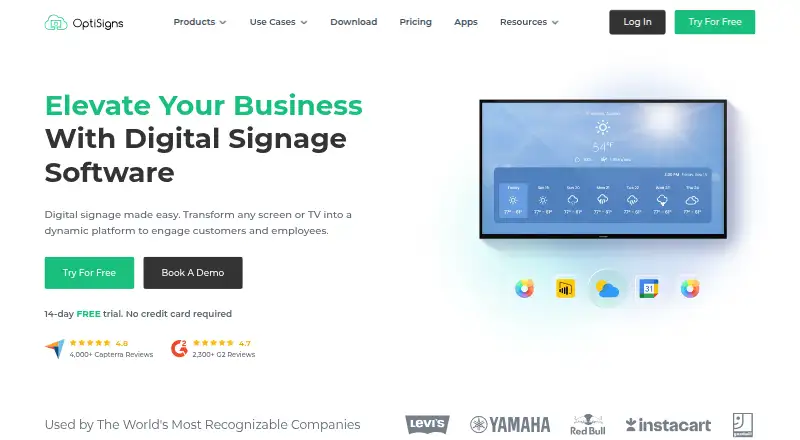
OptiSigns turns TVs and other supported screens into digital signs. Its content manager handles files, playlists, templates, scheduling, and remote updates. It supports many media types, more than 140 apps, mobile administration, and offline playback. Plans are priced per screen, with a free tier and paid plans billed annually.
Review
In a line
OptiSigns is a digital signage platform from OptiSigns Inc., a company based in Houston, Texas. It lets businesses publish content to screens and TVs.
What it does
The content manager uses drag-and-drop publishing, templates, playlists, and schedules. You can display images, videos, documents, presentations, spreadsheets, social posts, websites, and online videos.
Users can control screens and change content from a distance. Playback can continue offline. A mobile admin app manages content and screens remotely. Custom user roles, team workspaces, approval steps, and collaboration tools support shared management.
How it connects
OptiSigns runs on Android, Windows, Linux, Raspberry Pi, browsers, iOS, macOS, and other hardware platforms. It also offers an API, including GraphQL access; Enterprise adds API-to-screen automation.
The service lists more than 140 apps, including weather, Instagram, Power BI, YouTube, and Google Slides. Pro Plus adds Microsoft 365, Google Workspace, Slack, and Teams connections. Supported content includes JPG, PNG, GIF, BMP, MP4, PDF, PowerPoint files, Google Docs, Sheets, Slides, YouTube, Instagram, Twitter, and websites.
Good fit
OptiSigns suits organizations that need to publish messages across screens in places such as retail stores, restaurants, healthcare sites, schools, and offices.
It works well for remote screen control, scheduled playlists, and team approval processes. Paid plans provide unlimited cloud storage, while the free plan includes 1GB.
Watch for
The free plan supports up to three supported screen types, 25 basic apps, and 1GB of storage. It places the OptiSigns logo on screens, and free playlists hold up to 30 items or 200MB.
Pricing is per screen. Engage requires at least five screens, and Enterprise requires at least 25. Check whether your needed app, hardware, role controls, or deployment option is included in the plan you choose.
OptiSigns says it encrypts data, is AICPA SOC 2 Type II certified, and supports GDPR compliance and single sign-on. US-based support is offered by email, phone, or a support system; some plans add Zoom support.
Pricing
A free plan is available forever. It covers up to three supported screen types, 25 basic apps, and 1GB of storage, with OptiSigns branding on screens. A 14-day trial is also available without a credit card.
Paid pricing is per screen and billed annually: Standard is $9 a month; Pro is $11.25 a month ($135.00 paid annually); Pro Plus is $13.50 a month; Engage is $27 a month with a five-screen minimum; Enterprise is $40.50 a month with a 25-screen minimum.
Standard includes 100+ apps and integrations, unlimited cloud storage, and email support. Higher plans add role controls, approvals, Microsoft 365 and Google Workspace links, dashboard apps, secured websites, dedicated support, training, or private deployment depending on the plan.
Verdict
Choose OptiSigns if you need one system to schedule varied content, connect common business apps, and manage screens from different locations. The free option can cover a small setup, while paid tiers add storage, team controls, integrations, and deployment choices.
Look elsewhere if your screen count, playlist size, or required apps do not fit the plan limits. Also check the per-screen cost and minimums before committing to Engage or Enterprise.
Our take
OptiSigns is a practical option for organizations coordinating digital messages across several locations. Its broad device support, offline playback, mobile administration, and app connections cover common signage tasks without requiring one specific screen type. The free tier offers a way to start, but its branding, storage, playlist, and app limits matter. Paid plans scale by screen and add controls such as approvals, integrations, and private deployment. Smaller teams should compare the per-screen annual prices, while larger deployments should review the minimum screen counts and Enterprise requirements.
- Free plan supports up to three supported screen types
- More than 140 app integrations are listed
- Offline playback and remote screen management
- Mobile admin app for content and screens
- GraphQL API access is available
- Free screens show the OptiSigns logo
- Free plan has 1GB storage and 30-item playlists
- Paid pricing is charged per screen
- Engage and Enterprise have screen minimums
- Some features are limited to higher plans
- Pick it ifBusinesses managing digital signs across locations; Teams needing scheduled content and approvals; Users connecting signage to business apps
- Skip it ifYou need more than three screen types on the free plan; You want pricing that is not based on each screen; Your deployment needs fewer than five or 25 screens for Engage or Enterprise
Pricing
OptiSigns has a free-forever plan and a 14-day trial. Paid plans are priced per screen and billed annually: Standard $9/month, Pro $11.25/month, Pro Plus $13.50/month, Engage $27/month, and Enterprise $40.50/month. Engage requires five screens; Enterprise requires 25.
- Freefree forever · up to 3 supported screen types · 25 basic apps · 1GB storage · OptiSigns logo on screensFree
- Standardbilled annually · per screen · 100+ apps and integrations · unlimited cloud storage · email support$9/mo
- Pro$135.00 Paid Annually · per screen · advanced roles · approval workflow · proof of play · unlimited users$11.25/mo
- Pro Plusbilled annually · per screen · Microsoft 365 and Google Workspace integrations · dashboard apps · secured websites · Slack and Teams integration$13.50/mo
- Engagebilled annually · per screen · minimum 5 screens$27/mo
- Enterprisebilled annually · minimum 25 screens · per screen · dedicated customer success manager · onboarding and training · on-premise or private cloud option · priority support$40.50/mo
As optisigns.com lists them, checked 29 Sept 2026.
Questions
Does OptiSigns have a free plan?
Yes. The free plan is available forever and supports up to three supported screen types, 25 basic apps, and 1GB of storage. It shows the OptiSigns logo on screens.
Is there a free trial?
Yes. OptiSigns offers a 14-day free trial and says no credit card is required.
What devices can run OptiSigns?
It supports Android, Windows, Linux, Raspberry Pi, browsers, iOS, macOS, and other hardware platforms.
Can OptiSigns work offline?
Yes. OptiSigns supports offline playback.
Does OptiSigns offer an API?
Yes. It provides API access, including GraphQL. Enterprise adds API-to-screen automation.
How is OptiSigns priced?
Pricing is per screen. Annual billing starts at $9 a month for Standard, with higher plans at $11.25, $13.50, $27, and $40.50 per month.
What integrations does it offer?
The platform lists more than 140 apps, including weather, Instagram, Power BI, YouTube, and Google Slides. Pro Plus adds Microsoft 365, Google Workspace, Slack, and Teams.