Small Business Website Builders
Oxygen: A Visual Builder for WordPress
oxygenbuilder.com · checked 15 Oct 2026
A WordPress plugin for designing sites yourself or using compatible AI agents.
How it plugs in
Signal on Small Business Website Builders7.8#1 of 91
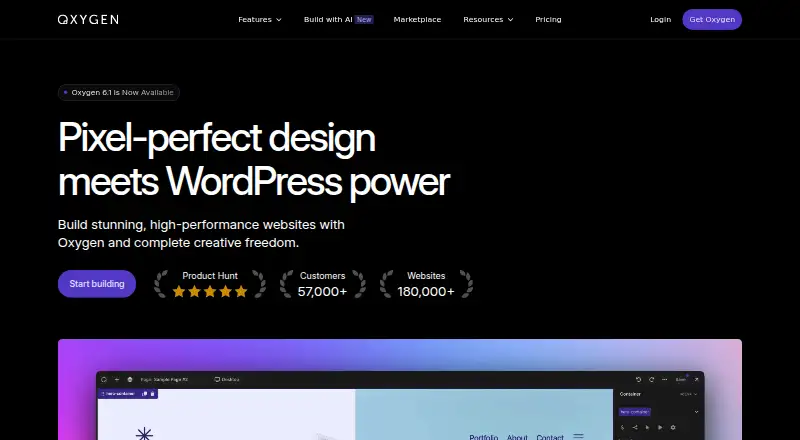
Build WordPress sites from headers to footers with Oxygen. Its editor covers layouts, styling, reusable components, dynamic content and animations. Compatible AI agents can also create pages and other WordPress content. Try the editor and AI tools for free, or add the plugin to a WordPress site you host.
Review
In a line
Oxygen adds a visual site-building editor to WordPress. Work in the editor yourself or use a compatible AI agent.
What it does
Design a full WordPress site, including its headers and footers. Visual controls cover layouts, styling, animations and interactions; you can also work more directly with HTML, CSS, JavaScript and PHP.
Reusable components let you apply a shared update across a site. Dynamic fields and query loops can use ACF, Meta Box and ACPT content. Contact forms and blogging are supported.
How it connects
Add Oxygen to an existing WordPress installation, whether local, staging or live; your hosting remains with you. You can also test it in a hosted demo, which ends after four hours.
Compatible agents named by the maker are Claude, Codex, Cursor and OpenCode. Oxygen provides an MCP server and WordPress Abilities API support. You need an account or plan from the agent’s vendor; Oxygen says it does not sell AI credits.
Documented WordPress integrations include WooCommerce, Yoast SEO, Rank Math, SEOPress, FacetWP and WP Grid Builder. Public developer APIs and hooks are available too. Oxygen’s PHP code is GPL-licensed, while compiled parts use their applicable licenses.
Good fit
The maker positions Oxygen for professionals who value control over WordPress site structure and styling. It may suit people working with reusable elements, dynamic content or custom code, as well as those interested in agent-assisted site building.
Watch for
Oxygen depends on WordPress rather than operating as a separate hosted site builder. Local setup requires Node.js and Docker; the documentation also lists PHP extensions and suggests 512 MB of memory.
PHP code blocks can execute arbitrary PHP, the maker warns. Its guidance also notes risks associated with SVG uploads and content filtering. Review those cautions before granting access or changing site settings.
Pricing
Free access includes the visual editor and AI tools, with no account required. Try Oxygen using a downloadable plugin, local setup or hosted demo; the demo ends after four hours, and beta features may change.
Basic is listed at $129 a month, WooCommerce at $149 a month and Ultimate at $179 a month. All three are marked “billed lifetime” and allow unlimited sites. The separate Lifetime License costs $199.50 once and includes lifetime updates and support, plus a 60-day money-back guarantee.
Verdict
Consider Oxygen if you use WordPress and want detailed visual controls, dynamic content or the option to work with compatible AI agents. Free access lets you explore the editor before selecting a paid plan. Check the billing labels carefully: three plans pair monthly prices with “billed lifetime,” while the Lifetime License has a one-time price. Choose another type of builder if you need one independent of WordPress.
Our take
Oxygen may suit WordPress users seeking close control over layouts and styles, reusable components or AI-assisted page building. Its free option lets you test the editor, though beta features may change. Compare billing carefully: three plans show monthly amounts alongside “billed lifetime,” while a separate Lifetime License is priced once. It is not a fit for building without WordPress.
- Free access to the visual editor and AI tools, with no account required.
- Can be used on local, staging and live WordPress sites.
- Supports reusable components and dynamic content from ACF, Meta Box and ACPT.
- Documented integrations include WooCommerce and several SEO plugins.
- Includes public developer APIs and hooks.
- Requires an existing WordPress site.
- Local setup requires Node.js and Docker.
- Hosted demo access ends after four hours.
- Free beta features may change.
- PHP code blocks can run arbitrary PHP, according to the maker.
- Pick it ifWordPress site builders working with dynamic content or reusable components; People exploring AI-assisted WordPress site building
- Skip it ifYou need a site builder independent of WordPress.; You do not want to manage hosting or local setup requirements.; You need unambiguous monthly billing terms before choosing a plan.
Pricing
Free access lets you try the editor and AI tools; the hosted demo ends after four hours. Paid plans show monthly amounts but are also marked “billed lifetime.” A separate Lifetime License is listed at $199.50 one-time.
- Basiclifetime · Unlimited sites$129 one-time
- WooCommercelifetime · Unlimited sites$149 one-time
- Ultimatelifetime · Unlimited sites$179 one-time
- Free OxygenFull visual editor and AI tooling · no account required · hosted demo expires after 4 hours · free feature set subject to beta changesFree
- Lifetime LicensePaid once · Every Oxygen feature and AI tooling · unlimited personal, client, staging and local sites · lifetime updates and support · no renewals or seats · 60-day money-back guarantee$200 one-time
As oxygenbuilder.com lists them, checked 20 Sept 2026.
Questions
Can Oxygen work without WordPress?
No. Oxygen is installed on an existing WordPress site, including local, staging or live installations.
Can I try Oxygen for free?
Yes. Free access includes the visual editor and AI tools, with no account required. Use a downloadable plugin, local setup or hosted demo; the hosted demo ends after four hours.
Which AI agents does Oxygen list as compatible?
The listed agents are Claude, Codex, Cursor and OpenCode. You need an account or plan from the agent’s vendor; Oxygen says it does not sell AI credits.
What does Oxygen cost?
Basic is listed at $129 a month, WooCommerce at $149 a month and Ultimate at $179 a month, each marked “billed lifetime.” The separate Lifetime License is $199.50 one-time.
Does Oxygen integrate with other WordPress tools?
Documented integrations include WooCommerce, ACF, Meta Box, Yoast SEO, Rank Math, SEOPress, FacetWP and WP Grid Builder.
Where can I run Oxygen?
It can be installed on local, staging or live WordPress sites. Local setup instructions cover macOS, Windows and Linux and require Node.js and Docker Desktop.