Parallel Antidetect Browser Review
parallel-browser.com · checked 21 Oct 2026
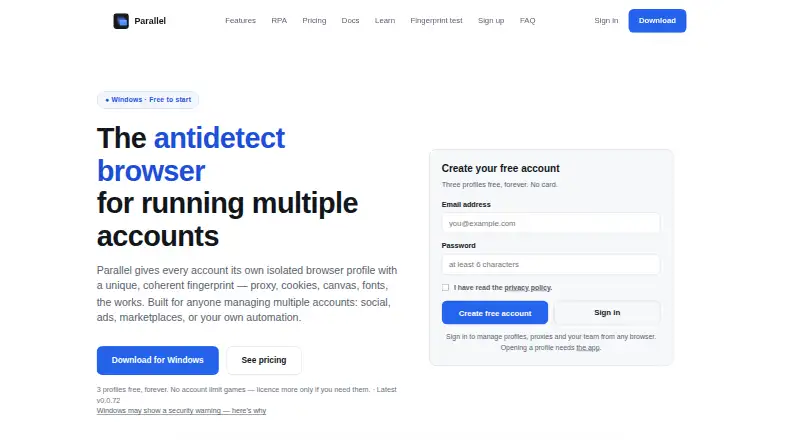
Parallel separates accounts into isolated browser profiles, with proxy support and visual, no-code automation.
How it plugs in
Signal on Anti-Detect Browser Software6.4#10 of 26
Separate browser profiles let Parallel keep account cookies, storage, proxies, and fingerprint settings apart. It works through a Windows app, web controls, and a local API. Profiles can sync across machines, and built-in RPA automates tasks without scripting. The free plan includes three profiles; paid tiers raise the limits and add team access.
Review
In a line
Parallel gives each online account its own isolated browser profile, keeping sessions separate. Cookies, storage, proxy settings, and coordinated fingerprint data remain distinct within every profile.
What it does
Each profile gets a consistent fingerprint built from canvas, WebGL, audio, fonts, timezone, and user-agent signals. Up to ten platform accounts fit inside one profile; each uses a separate tab where credentials are entered but not submitted automatically.
You can create, group, tag, search, filter, launch, stop, move, or delete profiles in batches. Profiles sent to trash remain there for 30 days. Several open profiles can repeat actions including typing, clicking, scrolling, and navigation.
The visual RPA builder creates workflows that run on isolated profiles without scripts. It offers 58 command types, scheduled runs, conditional rules, and four kinds of loops, plus run history, replay, and JSON import or export.
How it connects
Parallel offers a Windows desktop client, browser-based controls for profiles, proxies, and teams, plus a local HTTP API. The API returns a Chrome DevTools Protocol WebSocket URL for Puppeteer, Playwright, and Selenium CDP drivers. It listens only on the local machine and uses token authentication.
RPA connects with Google Sheets, 2Captcha, OpenAI, IMAP inboxes, and two-factor authentication codes. The free plan includes the local API, an MCP server, and no-code RPA.
Profile data and encrypted cookies can sync across machines; a lock prevents one profile from being opened in two places at once. You can transfer profiles to another account or export them as encrypted files.
Good fit
Parallel suits people managing multiple platform accounts that need separated browser sessions, proxies, and saved login details. Its bulk tools and mirrored window actions fit repetitive account work.
Teams can use paid accounts with up to five members, individual logins, roles, and profile or group permissions. Users who want visual automation rather than scripts can build scheduled workflows.
Watch for
The desktop app supports Windows 10 or 11 64-bit. It needs at least 4 GB of RAM, about 500 MB plus 50–200 MB per profile, and network access for the first engine download and sign-in. The web app manages profiles, proxies, and teams but is not the desktop browser.
Paid licenses are bought with USDT, do not renew automatically, and freeze profiles above the free limit after expiry. There is no free trial. The API is local-only, and no vendor SDK is listed.
Saved platform logins stay in the operating-system keychain and browsing data stays on disk. Synced cookies are encrypted before leaving the machine, but encrypted cookie blobs are stored server-side for syncing.
Pricing
Parallel offers a free plan that does not expire, but no trial period. It comes with three isolated profiles, the full fingerprint engine, proxies, cloud sync, and RPA.
A six-month Starter license is $396 for up to 25 profiles. Pro is $1396 for six months and up to 100 profiles, while Scale is $3796 for six months and up to 500 profiles. Every successive tier contains the features of its predecessor.
The site also lists paid access from $8 a month. Paid accounts add team features for up to five members.
Verdict
Choose Parallel if you need many isolated account sessions on Windows, want proxy and fingerprint controls in one place, or need visual workflows that can run on a schedule. The local API also suits users connecting existing browser-automation tools.
The free tier is useful for three profiles, while larger operations should compare the six-month one-time plans with their profile limits. Check the Windows requirement, USDT payment method, and local-only API before committing. It is a poor match if you need a macOS or Linux desktop app, automatic renewal, or a hosted API reachable from another machine.
Our take
Parallel is a fit for Windows users who separate many online accounts and need proxy handling, profile controls, and no-code automation together. Its free plan covers three profiles, while paid tiers expand capacity to 25, 100, or 500 profiles and add team access. Before buying, confirm that USDT payment and six-month one-time licenses suit your budget. Also check the Windows-only desktop requirement and the API’s local-machine boundary. People needing another desktop operating system, a remote hosted API, or a free trial should look elsewhere.
- Three-profile free plan with fingerprinting, proxies, sync, and RPA
- A profile can hold up to ten platform accounts
- No-code RPA includes scheduling, conditions, loops, and 58 commands
- The local API supports Puppeteer, Playwright, and Selenium CDP drivers
- Paid teams support up to five members with access controls
- Desktop app is for Windows 10 or 11 64-bit
- Paid licenses use USDT and do not auto-renew
- Profiles above the plan limit freeze after paid expiry
- No free trial is offered
- The API can be reached only from the local machine
- Pick it ifManaging separate accounts with isolated profiles and proxies; Windows users automating repeat tasks without writing scripts; Small teams sharing controlled profile access
- Skip it ifYou need a macOS or Linux desktop browser; You require a remotely hosted API or automatic renewal; You want a free trial before choosing a paid plan
Pricing
Free lasts forever with three profiles. Paid plans are six-month, one-time licenses: Starter $396 for 25 profiles, Pro $1396 for 100, and Scale $3796 for 500.
- FreeForever — no trial, no expiry · 3 isolated profiles · full fingerprint engine · proxies · cloud sync · RPAFree
- StarterMonthly · Up to 25 profiles · everything in Free$8/mo
- ProMonthly · Up to 100 profiles · everything in Starter$29/mo
- Starter$5.75/month billed yearly · Up to 25 profiles · everything in Free · also $8/month or $39/6 months$69/yr
- ScaleMonthly · Up to 500 profiles · everything in Pro$79/mo
- Pro$19.92/month billed yearly · Up to 100 profiles · everything in Starter · also $29/month or $139/6 months$239/yr
- StarterSix-month term · Up to 25 profiles · everything in Free$396 one-time
- Scale$54.08/month billed yearly · Up to 500 profiles · everything in Pro · built for agencies · also $79/month or $379/6 months$649/yr
As parallel-browser.com lists them, checked 21 Oct 2026.
Questions
Is there a no-cost Parallel tier?
Yes. The free option never expires and includes three isolated profiles, the full fingerprint engine, proxies, cloud sync, and RPA.
Where can Parallel’s desktop software run?
Its desktop app runs on Windows 10 or 11 64-bit. A separate web app manages profiles, proxies, and teams in a browser.
Which automation clients can connect through the API?
The local API exposes a Chrome DevTools Protocol WebSocket URL for Puppeteer, Playwright, and Selenium CDP-based drivers.
What services are built into the RPA integrations?
Google Sheets, 2Captcha, OpenAI, IMAP inboxes, and two-factor authentication codes are included.
What is the account capacity of a single profile?
One profile can keep as many as ten platform accounts, each opened in its own tab with saved username and password details.
Are Parallel’s paid plans recurring subscriptions?
No. USDT purchases cover the paid licenses without automatic renewal, and profiles over the free allowance freeze after expiry.