Playpass Website Builder Review
playpass.com · checked 14 Oct 2026
A hosted website builder for sports organizations, leagues, and clubs.
How it plugs in
Signal on Sports Website Builders6.6#4 of 40
Organizers can select among 11 designs, apply their branding, and build pages of their own. A no-cost tier is available, while paid tiers raise some usage caps and reduce Playpass’s payment charges. A custom domain is available for an added fee, and Stripe charges its own processing fees.
Review
In a line
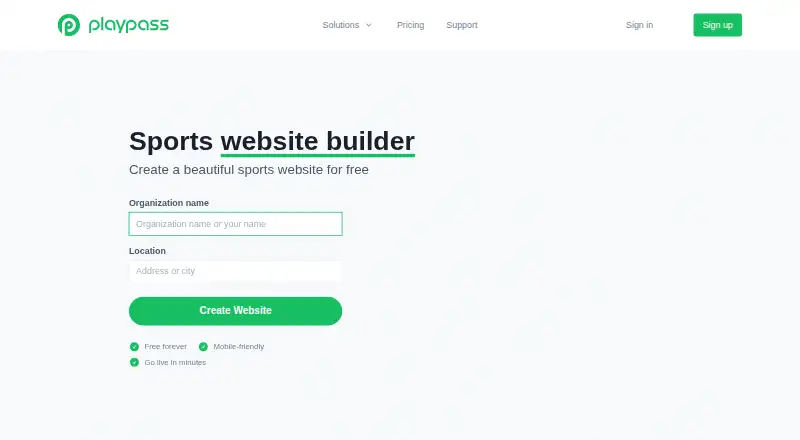
Playpass Website Builder provides hosted websites for clubs, leagues, and other sports organizations. The sites display sports information and activities and are designed for phones, with support for tablets and computers too.
What it does
They can add custom pages, upload documents and forms, and arrange homepage sections.
Organizers can pick from 11 site designs and add logos, banner images, and brand colors. The editor shows desktop and phone previews before users save; published content remains in place when they switch designs.
The site has a store for online sales of items such as merchandise, uniforms, extras, and donations.
How it connects
Stripe handles payments, while Playpass names Google Calendar, Apple Calendar, and Outlook as calendar sync options. Stripe's processing fees are charged separately from Playpass fees. Existing sites can use copied HTML snippets to show Playpass schedules, registration activities, or waivers.
An API and command-line tool can automate reading and updating website content. The API has a proprietary license and rate limits. Playpass hosts the service, and it does not describe a self-hosting package.
Each site comes with a playpass.com web address. Paid plans allow an add-on custom domain, for which Playpass automatically manages the SSL certificate.
Good fit
The included free plan can serve organizations with modest limits.
The editor’s style choices, branding controls, and phone preview help organizers set up a site without rebuilding content when changing styles. For other options, see sports website builders.
Watch for
Each plan sets its own allowances for schedules, teams, games, pages, uploads, and managers. Free includes one custom page and one upload, so compare the allowances with your organization’s requirements.
Custom domains cost extra, and Playpass fees do not cover Stripe processing. Uploaded files must be under 5 MB and cannot be edited after they are added.
Pricing
Free costs nothing per month and includes one schedule, one custom page, one upload, one manager, and a 3% Playpass payment charge.
Plus costs $9 monthly, Pro $19, and Max $99. The Playpass payment charges for those plans are 2.5%, 2%, and 1%, respectively. Paid plans offer a custom domain add-on for $99 per year, while Stripe processing fees are additional.
The pricing note also lists a 14-day trial.
Verdict
Consider Playpass if your sports group needs one place for a public site, schedules, registrations, and related activities, and its plan limits fit.
Review the schedule, team, page, upload, and manager caps before settling on a plan. Remember to budget for Stripe processing fees and, if needed, the $99 yearly custom-domain add-on.
Our take
The no-cost tier gives smaller groups an entry point, and paid tiers raise limits while lowering Playpass payment charges. Compare the relevant caps with your needs, and account for Stripe processing costs; adding a custom domain to a paid plan costs $99 per year.
- The site can include schedules, registrations, memberships, bookings, and waivers.
- Organizers can change among 11 styles without rebuilding published content.
- A store is included for selling merchandise, uniforms, extras, and donations.
- Playpass offers calendar synchronization with Google Calendar, Apple Calendar, and Outlook.
- Copied HTML snippets can place Playpass schedules, registration activities, or waivers on existing websites.
- Free allows one schedule, one custom page, one upload, and one manager.
- A custom domain costs $99 a year as an add-on to paid plans.
- Stripe charges processing fees in addition to Playpass fees.
- Uploads must be under 5 MB and cannot be edited in place.
- Pick it ifSports leagues and clubs seeking a hosted website with schedules and sign-up tools
- Skip it ifYou need a self-hosted product; Playpass does not describe a self-hosting package.; You need a custom domain included in the paid plan price.
Pricing
Free has no charge; Plus is $9 per month, Pro is $19 per month, and Max is $99 per month. Playpass's payment charges decline across paid tiers, from 2.5% on Plus to 1% on Max. Stripe processing costs are separate. Paid plans offer a custom domain add-on for $99 per year. The pricing note also lists a 14-day trial.
- Free1 schedule · 64 teams/schedule · 2,500 games/schedule · 1 custom page · 1 upload · 1 manager · 3% payment feeFree
- Plus$9 /mo · 3 schedules · 128 teams/schedule · 5,000 games/schedule · 3 custom pages · 3 uploads · 3 managers · $99/yr custom-domain add-on · 2.5% payment fee$9/mo
- Pro$19 /mo · 10 schedules · 1,000 teams/schedule · 10,000 games/schedule · 10 custom pages · 10 uploads · 10 managers · $99/yr custom-domain add-on · 2% payment fee$19/mo
- Max$99 /mo · Unlimited schedules · 1,000 teams/schedule · 10,000 games/schedule · unlimited custom pages, uploads and managers · $99/yr custom-domain add-on · 1% payment fee$99/mo
As playpass.com lists them, checked 14 Oct 2026.
Questions
Is there a free plan?
Yes. Free includes one schedule, one custom page, one upload, one manager, and a 3% Playpass payment charge.
How much do the paid plans cost?
Plus is $9 per month, Pro is $19 per month, and Max is $99 per month. Stripe processing costs are separate.
Can I use my own domain?
Paid plans offer a custom domain add-on for $99 per year. Playpass says it automatically manages the domain's SSL certificate.
What calendars does Playpass sync with?
Calendar synchronization is listed for Google Calendar, Apple Calendar, and Outlook.
Can I add Playpass activities to an existing website?
Yes. Copied HTML snippets can embed Playpass schedules, registration activities, or waivers on another site.
What kinds of files can I upload?
PDF, DOC, XLS, CSV, JPG, PNG, and GIF files are supported, up to but not including 5 MB. Uploaded files cannot be edited in place.