
Previs Pro: 3D Previsualization for Filmmakers
previspro.com · checked 14 Oct 2026
A 3D previsualization space for laying out scenes, cameras, characters, and editorial timing.
How it plugs in
Signal on Storyboard Software6.6#3 of 30
Previs Pro lets filmmakers develop screenplays into 3D environments, camera plans, boards, animatics, and timelines. It accepts several screenplay formats, sends work to image, video, PDF, and editing outputs, and supports AR location blocking. It runs on Apple devices, supports offline project work, and has free, subscription, credit, and lifetime options.
Review
In a line
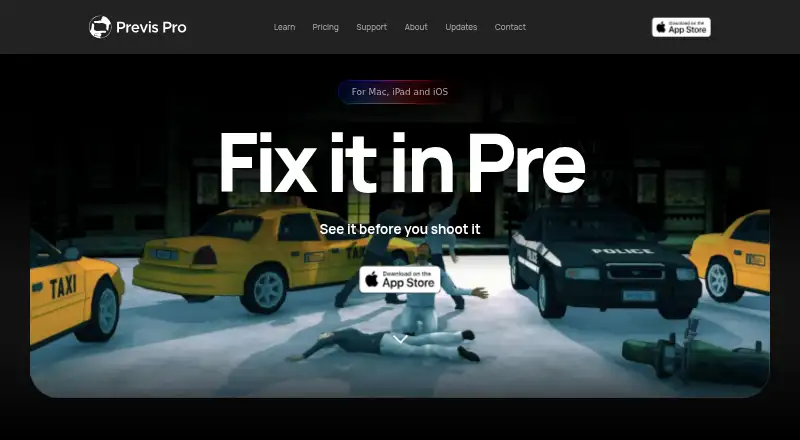
Previs Pro is a 3D previsualization app for filmmakers. It helps build virtual sets, place characters and props, plan camera angles, and arrange shots before production.
What it does
You can import a screenplay, create 3D scene layouts, and position cameras, characters, props, and lights. In the 3D simulation, sensor dimensions and focal lengths set the framing according to physical optics instead of a flat drawing surface.
The app creates boards and animatics, with keyframes for movement and precise shot durations. Its timeline supports shot sequencing, duration control, transitions, playback, and four audio lanes covering dialogue, music, sound effects, and voiceover.
AR mode places virtual characters and props into physical locations for scouting and on-location blocking. LiDAR scans can be imported as location backdrops. AI tools can generate or enhance images and video, create dialogue, music, and sound effects, and produce 3D props and characters.
How it connects
Screenplay files from Final Draft, Fountain, Open Screenplay Format, Fade In, and Celtx can be imported, as can plain text and text-based PDFs on Mac. For editing handoff, the app creates a Final Cut Pro 7 XML project compatible with Adobe Premiere Pro and DaVinci Resolve.
Projects are stored as .previs files with SQLite data and cached media. They can open in the standalone browser mode, and projects can be edited offline. AI generation, review links, purchases, and some character and prop creation need an internet connection.
Subscribers can share password-protected browser review links that expire after a set time and support comments, drawing annotations, and approval statuses. The public documentation does not list an API, SDK, or self-hosting package. The software is proprietary, not open source, and licensed through Apple’s App Store.
Good fit
Previs Pro suits filmmakers who want one workspace for screenplay breakdowns, 3D blocking, lens planning, storyboards, animatics, and editorial timing.
It can fit teams that need review links and annotations, or filmmakers working between a Mac and iPad. One purchase works on up to five personal devices using the same Apple ID.
Watch for
It runs only on Apple platforms: iOS/iPadOS 17 and macOS 12 are supported, with no Windows or Android version or roadmap. The maker lists 4 GB of RAM as a minimum, recommends 6 GB or more for comfortable use, and recommends Apple silicon on Mac.
On the free tier, exports are watermarked, each project allows one animatic and 20 images, and team sharing is unavailable. AI generation uses credits, so those tools can add one-time costs.
Imported screenplays stay in the local .previs project file and are not sent to Previs Pro servers by importing. Ghostwheel says prompts, scripts, scenes, and images are not used to train its own models, but AI generation relies on third-party providers.
Pricing
The free option provides watermarked exports, one animatic per project, up to 20 images per project, and no team sharing. A free trial is also available.
AI credit packs cost $4.99 one-time for 100 credits, $14.99 one-time for 400 credits, or $39.99 one-time for 1,200 credits. Full access costs $39.99 a month, $119.99 a year, or $359.99 one-time for lifetime access. Monthly, annual, and lifetime plans provide unlimited animatics and exports without watermarks; AI uses credits.
Verdict
Choose Previs Pro if you work on Apple hardware and need detailed 3D camera planning, screenplay imports, animatics, AR blocking, and an editing handoff. The free plan can cover basic trials, while paid access removes export and animatic limits.
Look elsewhere if you need Windows or Android support, an open-source product, a public API, self-hosting, or built-in AI without separate credit use.
Our take
Previs Pro is a reasonable match for Apple-based filmmakers who want screenplay-to-shot planning in a 3D environment. Its imports, optics-based cameras, AR blocking, animatics, timeline, and NLE export cover a broad planning workflow. The free tier gives a way to explore it, while paid plans unlock full exports and unlimited animatics. Budget separately for AI credits. The main deal-breakers are its Apple-only support, proprietary license, lack of a documented public API or self-hosting option, and dependence on connectivity for several online features.
- Sensor dimensions and focal lengths drive camera framing in its 3D workflow
- Screenplay files from formats such as Final Draft and Fountain can be imported
- The Final Cut Pro 7 XML handoff works with Premiere Pro and DaVinci Resolve
- AR mode supports blocking in real locations
- Offline project editing is supported
- Windows and Android are unsupported, with no roadmap listed
- The free tier watermarks exports and permits one animatic per project
- AI generation consumes credits from third-party providers
- No documented public API, SDK, or self-hosting package
- Requires 4 GB RAM minimum; 6 GB or more is recommended
- Pick it ifApple-based filmmakers planning shots, scenes, and animatics; Teams needing browser review links and annotations; Users who want AR location blocking and NLE handoff
- Skip it ifYou need Windows, Android, open-source code, or self-hosting; You want a documented public API or SDK; You need unlimited free animatics and unwatermarked exports
Pricing
The free plan is limited and watermarked. Paid access is available monthly, annually, or for life, while AI credits are sold separately in one-time packs.
- Freewatermarked exports · one animatic per project · up to 20 images per project · no team sharingFree
- Starter credit packone-time in-app purchase · 100 AI credits$4.99 one-time
- Standard credit packone-time in-app purchase · 400 AI credits$14.99 one-time
- Monthlymonthly · full access · unlimited animatics · unwatermarked exports · AI uses credits$39.99/mo
- Pro credit packone-time in-app purchase · 1,200 AI credits$39.99 one-time
- Annual$119.99/year · full access · unlimited animatics · unwatermarked exports · AI uses credits$120/yr
- Lifetimeone-time purchase · permanent access · unlimited animatics · unwatermarked exports · AI uses credits$360 one-time
As wiki.previspro.com lists them, checked 14 Oct 2026.
Questions
Does Previs Pro run on Windows or Android?
No. Previs Pro supports macOS and iOS/iPadOS, and no Windows or Android version or roadmap is listed.
Can I use Previs Pro offline?
Projects can be opened and edited offline. AI generation, review links, purchases, and some character and prop creation require connectivity.
What screenplay files can it import?
It accepts Final Draft, Fountain, Open Screenplay Format, Fade In, Celtx, plain text, and text-based PDFs on Mac.
Does it export to Premiere Pro or DaVinci Resolve?
The editing handoff creates a Final Cut Pro 7 XML project for use with Adobe Premiere Pro and DaVinci Resolve.
Is there a free version?
Yes. The free tier provides watermarked exports, one animatic per project, up to 20 images per project, and no team sharing. A free trial is also available.
Does Previs Pro have a public API?
The published documentation does not list a public API, SDK, or self-hosting package.
How does its AI pricing work?
AI generation uses credits. Packs cost $4.99 one-time for 100 credits, $14.99 one-time for 400, or $39.99 one-time for 1,200.