Process Lasso: Windows Process Automation Review
bitsum.com · checked 14 Oct 2026
Windows tooling that applies automated rules to process priorities, CPU resources, power plans, and related controls.
How it plugs in
Signal on PC Optimization Software6.7#11 of 97
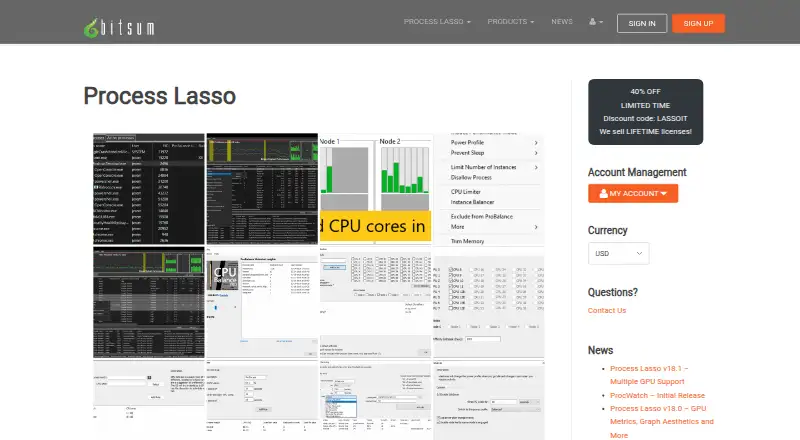
Process Lasso provides Windows process automation through a free edition and paid Pro licenses. Matching programs or system conditions can trigger changes to priorities, CPU affinities, CPU sets, power plans, and selected actions. A background Process Governor service applies those rules, with the graphical interface optional. It is proprietary rather than open source.
Review
In a line
Process Lasso is an automated task manager for Windows. It changes process settings and power behavior according to rules you define.
What it does
ProBalance adjusts running programs’ priorities during heavy CPU use to help keep the system responsive. When matching programs launch, saved rules can restore CPU affinity, preferred CPU sets, and CPU, I/O, or memory priorities.
Power-plan rules may respond to running programs, idle periods, or configured CPU-load thresholds. Keep Awake can hold off sleep for a specified duration or while chosen programs are active.
Other controls include CPU Limiter, Instance Balancer, Group Extender, Efficiency Mode settings on Windows 11, activity logging, and Watchdog actions. Watchdog can react to CPU or memory thresholds by logging, restarting, ending processes, running commands, or changing their settings.
How it connects
Process Lasso runs on Windows 7 through 11 and Windows Server 2012 through 2025. Its standalone Process Governor service applies algorithms and process rules while the graphical interface can remain closed.
There is no listed public SDK, and the software is not open source. Administrators can deploy the service silently, import INI configuration files, use a network share, and trigger external commands through Watchdog rules.
Bitsum says activation and update checks communicate with its servers, while the software does not send personal files, documents, or managed process contents. Installers are signed by Bitsum Technologies (Bitsum LLC).
Good fit
Windows users seeking repeatable handling of processor use, process priorities, power plans, or sleep behavior may find it suitable. Separate configuration profiles can keep different rule sets in their own files.
Administrators can use the background service for managed deployments. The public manual documents rule syntax, thresholds, actions, configuration keys, and deployment details.
Watch for
In the Free edition, CPU Limiter, Instance Balancer, power-plan automation, Process Watchdog, and several other advanced features are trial-only; Pro makes them available.
This is proprietary Windows software, not an open-source tool. Check the Windows version, license type, number of PCs, and whether commercial use applies before choosing a plan.
Pricing
Most users can continue with the Free edition indefinitely, although some features become limited after their trial period. Commercial deployment requires purchase within 30 days. Paid plans include a 30-day trial.
For one PC, listed plans cost $4.95 per month, $24.95 per year, or $39.95 a month for Lifetime. Five-PC Entire Home plans are listed at $5.95 per month, $36.95 per year, or $59.95 a month for Lifetime.
Discounted Pro choices list $2.97 monthly or $14.97 annually for one PC, $3.57 monthly or $22.17 annually for up to five home PCs, and a $23.97 one-time single-PC Lifetime license. The discounted monthly and annual options recur; the discounted Pro Single PC Lifetime plan includes all updates forever.
Verdict
Choose Process Lasso if you want Windows rules that keep applying to selected programs, CPU resources, power plans, or sleep behavior. It also fits administrators who need a background service, imported configuration, and silent deployment.
Skip it if you require open-source code, a public SDK, or software for non-Windows systems. Review the feature limits in Free and the license terms for home, commercial, one-PC, or five-PC use before paying.
Our take
Process Lasso is a focused option for Windows users seeking automatic management of CPU, memory, and power use by programs. Its service can apply detailed rules without the main interface, while administrators have deployment and configuration-file tools. Limitations include Windows-only availability, proprietary code, and restricted Free features. Device count, subscription length, lifetime licensing, and commercial status all affect the price, so check the applicable plan conditions.
- Automated handling for priorities, CPU controls, power plans, and sleep behavior
- Background Process Governor can apply rules without the interface
- Supports Windows 7–11 and Windows Server 2012–2025
- Free edition and 30-day trial are available
- Detailed logging, Watchdog rules, and configuration profiles
- Windows only; no open-source edition
- Advanced Free features become trial-limited
- No public SDK is listed
- Commercial Free use requires purchase within 30 days
- Lifetime plan prices are listed with monthly billing terms
- Pick it ifWindows users managing CPU and process behavior; Administrators deploying repeatable process rules; Households needing coverage for up to five PCs
- Skip it ifYou need macOS, Linux, or another non-Windows platform; You require open-source code or a public software SDK; You cannot accept trial limits or commercial licensing conditions
Pricing
The Free edition is indefinite for most users but limits some features after trial periods; commercial use needs purchase within 30 days. Paid choices range from recurring monthly or annual subscriptions to Lifetime licenses, with one-PC and five-PC options and discounted Pro plans.
- Single PC MonthlyRecurring subscription; cancel at any time · 1 PC$4.95/mo
- Single PC AnnualRecurring subscription; cancel at any time · 1 PC$24.95/yr
- Single PC Lifetime1 PC$39.95/mo
- Entire Home MonthlyRecurring subscription; cancel at any time · 5 PCs$5.95/mo
- Entire Home AnnualRecurring subscription; cancel at any time · 5 PCs$36.95/yr
- Entire Home Lifetime5 PCs$59.95/mo
- Process Lasso FreeMost users may use it indefinitely; some features are limited by a trial period; commercial use requires purchase within 30 days of deploymentFree
- Process Lasso Pro Single PC Monthlydiscounted from $4.95 monthly · 1 PC · home or commercial use$2.97/mo
As bitsum.com lists them, checked 21 Sept 2026.
Questions
What is Process Lasso?
It is Windows software that automates process priorities, CPU settings, power plans, and related resource controls.
Which Windows versions are supported?
The maker lists Windows 7, 8, 10, and 11, plus Windows Server 2012 through 2025.
Does Process Lasso have a free plan?
Yes. Most users may use the Free edition indefinitely, but some features are limited by a trial period. Commercial deployment requires purchase within 30 days.
Is Process Lasso open source?
No. It is proprietary software, and no public SDK is listed.
Can it run without its graphical interface?
Yes. The Process Governor background service enforces algorithms and rules while the graphical interface remains optional.
What does ProBalance do?
During high CPU loads, ProBalance adjusts running programs’ priorities to help maintain system responsiveness.
What are the cheapest listed paid options?
Discounted Pro plans begin at $2.97 monthly for one PC or $3.57 monthly for up to five home PCs. A Free edition is also available.
Near it
All alternatives →- WD
 Wise Disk Cleaner#10 on this board
- SSysManager#12 on this board
- AB
 Auslogics BoostSpeed#9 on this board
- PM
 PC Matic#13 on this board
- MPMicrosoft PC Manager#8 on this board
- DDriversCloud#14 on this board
- GUGlary Utilities#7 on this board
- NU
 Norton Utilities Ultimate#15 on this board
- K
 Kudu#6 on this board
- WWindowsCleaner#16 on this board