
Provenance emulator review
provenance-emu.com · checked 15 Oct 2026
Open-source multi-system retro game emulator frontend for Apple devices.
How it plugs in
Signal on Nintendo 64 Emulators7.4#2 of 24
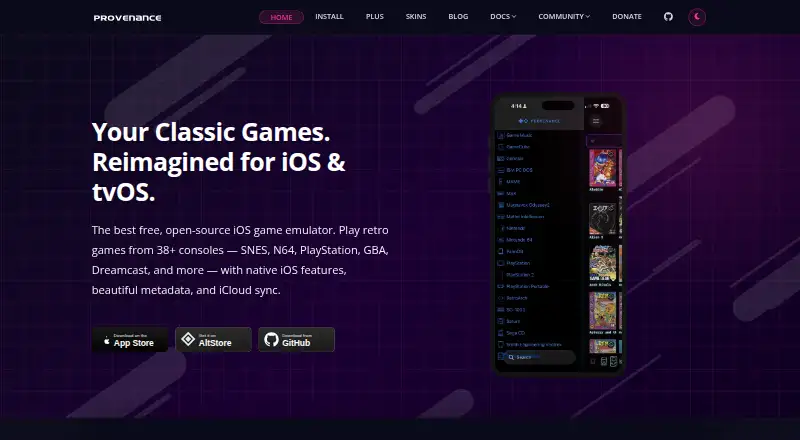
Provenance is a free, open-source emulator frontend for Apple platforms. It covers more than 50 classic systems, including Atari, Nintendo, Sega and Sony consoles. Its library organizes games with artwork and manuals, while features include save states, cheats, shaders, controller support and local multiplayer. A paid Plus plan adds iCloud syncing and priority support.
Review
In a line
Provenance is an open-source front end for playing games from more than 50 classic console systems on Apple devices. It covers platforms from Atari, Nintendo, Sega and Sony.
What it does
The app runs games from systems such as NES, SNES, Nintendo 64, GameCube, Wii, 3DS, PlayStation, PSP, Saturn and Dreamcast. It also supports arcade games and online netplay.
Its library can fetch box art, screenshots, release details, ratings and scanned manuals. Save states include thumbnail previews, and a screenshot browser helps you review them.
Free emulation features include cheats, fast forward, visual filters, shaders, controller support, RetroAchievements and local multiplayer for up to four controllers.
How it connects
You can bring in game files through WebDAV, AirDrop, the Files app, Safari downloads or an in-app web server. Nearly all CD-based cores support CHD disc images.
The native tvOS app works with Apple TV TopShelf and Siri Remote. Other Apple features include Spotlight search, Siri shortcuts and iCloud sync through Provenance Plus. Apple TV accepts MFi, Xbox and PlayStation gamepads.
Installation is available from the App Store, through AltStore or SideStore, or by building the open-source project from source. Its custom license permits redistribution with attribution, while banning commercial use of the branding; bundled cores have separate licenses.
Good fit
Provenance suits Apple users who want one library for many retro systems. It is useful for organizing game files, using save states, applying display effects and playing with several local controllers.
Plus is aimed at people who want libraries, saves, settings, skins, BIOS files and artwork synchronized across Apple devices. Family Sharing covers up to six members.
Watch for
Some systems have device-specific limits because of performance requirements. Review reports also mention crashes, corrupted saves, lag, slow GameCube performance and occasional sound problems.
Reported control issues include clumsy navigation, limited remapping, Joy-Con button mismatches and inaccurate touch input. Some PlayStation and 3DS games may fail to start or crash.
BIOS files are required. Building from source needs macOS 13.5 or later, Xcode 15 or later, iOS or tvOS 16 SDKs and an Apple Developer account. The App Store listing requires iOS 16 or later, iPadOS 16 or later, macOS 13 with an Apple M1 or later Mac, or visionOS 1 or later.
The privacy policy says personal or identifying information is not collected, though anonymous device-model and iOS-version analytics may be recorded.
Pricing
The Free plan costs free and includes all emulation features, more than 50 systems, save states, cheats, fast forward, shaders, controller support and a local library. A free trial is available.
The Monthly plan costs $3.99 a month. The Annual plan costs $39.99 a year. Lifetime costs $99.99 one-time. All paid plans add iCloud sync, priority support and Family Sharing.
Beta access through Patreon is separate from Plus.
Verdict
Choose Provenance if you use Apple hardware and want broad system coverage, built-in library details and many emulation controls in one app. The free tier covers the core playing features, so you can judge device performance before paying.
Look elsewhere if you need consistently stable emulation, precise touch controls or reliable compatibility for every PlayStation and 3DS game. People comparing options can also review Game Gear emulators, Sega CD emulators or SNES emulators.
Our take
Provenance is a reasonable pick for Apple owners who want one open-source app spanning many Atari, Nintendo, Sega, Sony and other systems. Its free plan includes the main emulation tools, while Plus is mainly for iCloud syncing, support and family use. Device performance and game compatibility vary, and reports cite crashes, save-file problems and control quirks. Check the required BIOS files and your device version first. Users focused on a single console, flawless stability or highly dependable PlayStation and 3DS support should consider a narrower emulator instead.
- Supports more than 50 classic systems
- Free plan includes all listed emulation features
- Library fetches artwork, ratings and scanned manuals
- Open-source project with several installation options
- Local multiplayer supports up to four controllers
- Some systems are limited by device performance
- Reports cite crashes and corrupted save files
- Some PlayStation and 3DS games may fail to boot
- Controls and touch input can be inconsistent
- BIOS files are required
- Pick it ifApple users wanting one library for many retro systems; Players who need save states, cheats and display filters; Families sharing synced libraries across Apple devices
- Skip it ifYou need guaranteed stability across every supported game; You do not want to manage BIOS files or game imports; You need precise touch controls and extensive remapping
Pricing
The free tier covers emulation. Paid plans cost $3.99 a month, $39.99 a year or $99.99 one-time, adding iCloud sync, priority support and Family Sharing.
- FreeAll emulation features · 50+ systems · save states · cheats · fast forward · shaders · controller support · local libraryFree
- Monthlymonthly · iCloud sync · priority support · Family Sharing$3.99/mo
- Annualannually · iCloud sync · priority support · Family Sharing$39.99/yr
- Lifetimeone-time · iCloud sync · priority support · Family Sharing$99.99 one-time
As provenance-emu.com lists them, checked 15 Oct 2026.
Questions
What devices can run Provenance?
The listing requires iOS 16 or later, iPadOS 16 or later, macOS 13 with an Apple M1 or later Mac, or visionOS 1 or later. There is also a native tvOS app.
How many systems does Provenance support?
The project advertises more than 50 systems, including NES, SNES, Nintendo 64, GameCube, Wii, 3DS, PlayStation, PSP, Saturn and Dreamcast.
Is Provenance free?
Yes. The Free plan includes the emulation features, more than 50 systems, save states, cheats, shaders, controller support and a local library. A free trial is available.
What does Provenance Plus add?
Monthly, annual and lifetime Plus plans add iCloud sync, priority support and Family Sharing for up to six members.
How can I import games?
Import options include WebDAV, AirDrop, the Files app, Safari downloads and an in-app web server. Nearly all CD-based cores support CHD disc images.
Does Provenance support multiplayer?
It supports online netplay and local multiplayer. The documentation describes local play with up to four controllers.
Do I need BIOS files?
Yes. Provenance lists BIOS files as required.
Is Provenance open source?
Yes. You can install it from the App Store, sideload it with AltStore or SideStore, or build it from source under its custom license.
