Receiptly Mobile Receipt and Expense Tracker
receipttrackerapp.com · checked 7 Oct 2026
Mobile receipt capture and expense records for Android, iPhone, and iPad.
How it plugs in
Signal on Receipt Scanner Apps6.4#5 of 30
Receiptly scans receipts, organizes purchases, tracks personal or business expenses, records warranties, and creates reports. The app works on Android and iOS, keeps information on the device, and can optionally sync through iCloud on Apple hardware. A free download and 7-day trial are available, with paid Plus or Pro features for reports, exports, and Smart Scan.
Review
In a line
Receiptly puts receipt capture and expense tracking on iPhone, iPad, and Android. It helps organize purchases, expenses, warranties, and reports.
What it does
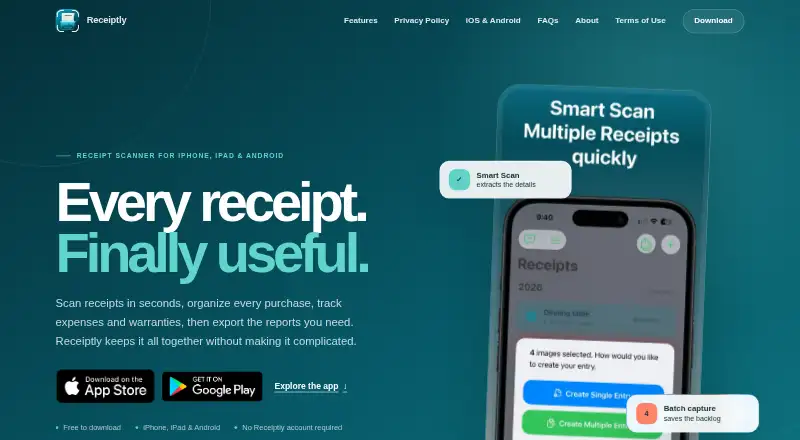
Receiptly's on-device recognition reads the full line-item detail on receipts. An optional Smart Scan can process receipts, while batch creation makes individual entries from multiple images.
The app records personal and business spending along with income, credits, and reimbursements. Reporting can be set for daily, monthly, category-based, or custom date ranges.
Purchases are searchable using merchant, category, tag, or product filters. A product can be linked to a receipt so its warranty date and expiry reminder stay with that record. You can also save the receipt currency and an exchange rate for later conversion into a home-currency report.
How it connects
On iPhone and iPad, Receiptly supports read-only receipt imports from Gmail and Apple Shortcuts. Gmail import is not available on Android.
Receipt information is kept on the device. iOS users can enable optional iCloud sync; Android does not sync with iCloud or iPhone. The Android receipt library is excluded from Android Auto Backup and device-transfer backups.
With Pro on iOS or Plus on Android, receipt and expense files can be exported as PDF, CSV, or Excel. The facts list no accounting integrations. An optional Smart Scan can send a reduced receipt image to Google AI services.
Good fit
Receiptly is aimed at people who want a mobile home for personal or business spending, searchable receipts, warranty reminders, and records they or financial helpers can use.
It is a practical fit when you need line-item scanning, custom-period reports, multiple currencies, or exports in common file formats.
Watch for
Android keeps its receipt records on the device, outside Android Auto Backup and device-transfer backups. Cross-device syncing is limited because Android does not sync with iCloud or iPhone.
Smart Scan is optional but may send a reduced receipt image to Google AI services. Check whether that fits your privacy needs.
A paid tier is needed for complete reports and exports: Pro on iOS or Plus on Android.
Pricing
Receiptly uses a freemium model. It is free to download, has a free plan, and offers a 7-day trial.
Receiptly Plus is the Android plan. It adds Smart Scan, receipt additions, reports, and export, and may include a 3-day trial. Receiptly Pro is the iOS plan and unlocks Smart Scan, exports, full reports, and Gmail import.
Verdict
Receiptly works for phone-based receipt capture and expense records, including warranty reminders and downloadable reports. iPhone and iPad users get Gmail import, Shortcuts, and optional iCloud sync, while Android users should plan for device-local storage. The app can suit both household and business spending, but it is less suitable if you need accounting connections, automatic Android backup, or clear published prices before subscribing. Review Smart Scan's data sharing and the paid-plan requirements before committing.
Our take
Receiptly is a sensible choice for mobile users who need receipt scanning, expense categories, warranty dates, and reports in PDF, CSV, or Excel. Its support for personal and business spending adds flexibility, and Apple users get Gmail import plus optional iCloud sync. Android storage limitations matter: the library stays on one device and is excluded from transfer backups. Smart Scan can send a reduced image to Google AI services, and the paid plan prices are not shown. Pick it when these limits fit your workflow; look elsewhere for accounting integrations or cross-platform syncing.
- Captures complete receipt line items on the device
- Handles personal and business spending
- Keeps warranty dates and expiry reminders with products
- Provides PDF, CSV, and Excel report exports
- Offers Gmail import and Apple Shortcuts on iOS
- Android receipt information remains on one device
- Android has no iCloud or iPhone synchronization
- Smart Scan may transmit a reduced image to Google AI
- Reports and exports are available only with Plus or Pro
- Pick it ifMobile receipt and expense tracking; Warranty reminders for purchases; Personal or business spending records
- Skip it ifYou need accounting integrations; You require Android backup or iPhone syncing; You want published prices before choosing a plan
Pricing
Free download and free plan are available, with a 7-day trial.
- Free downloadFree to download; optional in-app purchasesFree
- Receiptly PlusAndroid; unlocks Smart Scan, adding receipts, reports, and export; may include a 3-day trialOn request
- Receiptly ProiOS; unlocks Smart Scan, exports, full reports, and Gmail importOn request
As receipttrackerapp.com lists them, checked 7 Oct 2026.
Questions
Which phones and tablets run Receiptly?
Receiptly is available for Android, iPhone, and iPad.
Can Receiptly export reports?
Yes. Pro on iOS and Plus on Android provide PDF, CSV, and Excel exports.
Does Receiptly sync between Android and iPhone?
No. Android has no sync with iPhone or iCloud; its receipt records stay on that device and are left out of device-transfer backups.
Does Receiptly connect to Gmail?
Read-only Gmail receipt importing works on iPhone and iPad. Android does not offer Gmail import.
What happens when I use Smart Scan?
Smart Scan is optional and may transmit a reduced receipt image to Google AI services, so consider that setting in light of your privacy needs.
Near it
All alternatives →- OR
 OCR Receipt#4 on this board
- RReceiptMe#6 on this board
- RR
 Receipt Reader AI#3 on this board
- B
 Bonro#7 on this board
- VI
 Veryfi Invoices OCR API#2 on this board
- FForeceipt#8 on this board
- OOpenReceipts#1 on this board
- SRSmart Receipts#9 on this board
- A
 AutoEntry#10 on this board
- RSReceipt Scanner#11 on this board