
AI Image Segmentation Software
Roboflow: Features, Integrations, and Pricing
roboflow.com · checked 21 Oct 2026
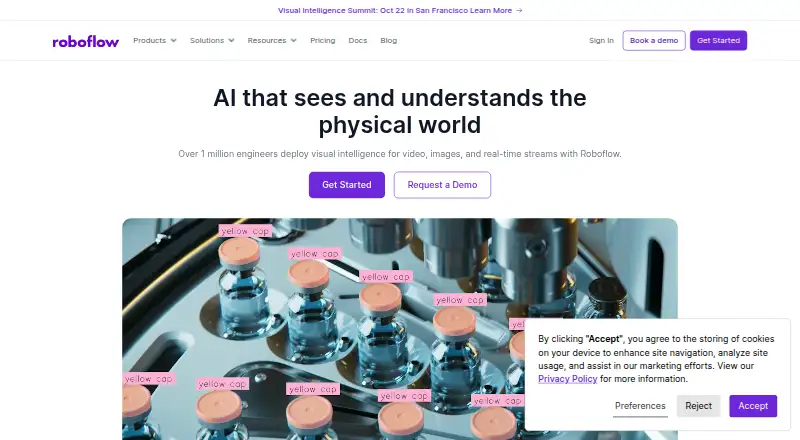
Roboflow brings together tools for preparing data, training computer vision models, and putting applications into use.
How it plugs in
Signal on AI Image Segmentation Software6.7#1 of 33
Roboflow brings image labeling, dataset preparation, model training, and deployment tools into one computer vision platform. Teams can build visual workflows, run models in Roboflow Cloud, or deploy them on supported devices and their own infrastructure. It has a free tier, paid plans, a REST API, a Python SDK, and open-source inference software. Model licenses and cloud credit use are important to check before choosing a deployment.
Review
In a line
Roboflow helps teams create, deploy, and monitor computer vision applications. Its tools span dataset preparation and model training, with options to run models in the cloud or on supported infrastructure.
What it does
Teams can label images with boxes, polygons, masks, classification labels, or keypoints. Roboflow also supports video frame extraction, image preparation, and data augmentation, which creates modified training examples. Export options include JSON, XML, CSV, TXT, and over 30 additional formats.
The platform offers hosted training for multiple model types, along with model evaluation and neural architecture search. Its visual Workflows builder connects models, image-processing steps, and conditional rules. Teams may run Workflows through Roboflow Cloud or host them on their own hardware. They can also save images and predictions to datasets for later training.
Roboflow Cloud provides a GPU-backed service for running models and Workflows. Images sent to the Serverless Cloud API can be up to 20 MB; the documentation recommends resizing larger files before upload.
How it connects
Developers can use Roboflow through its REST API or Python SDK. Its inference client can connect to Roboflow Cloud or a self-hosted server. The open-source Roboflow Inference deployment product is licensed under Apache-2.0; the hosted platform is sold through subscriptions.
Listed integrations include AWS S3, Google Cloud, Azure, Zapier, Kubernetes, NVIDIA Jetson, iOS, Android, Amazon SageMaker, and Google Colab. Deployment choices also include roboflow.js for web, Luxonis OAK, VPC, and on-premise setups. See AI image annotation tools and CVAT for related options.
Roboflow supports web, Android, iOS, Linux, macOS, API, and self-hosted use. Running Roboflow Inference locally carries no charge on any plan.
Good fit
The platform is aimed at developers and enterprises working on computer vision, particularly those managing annotated image datasets and deploying models across cloud and edge environments.
Its annotation tools, exports, hosted training, and workflow builder cover several stages of that work. Team collaboration is supported, and enterprise plans add priority support and data-sovereignty choices for the US or EU.
Watch for
Credits are consumed by cloud inference, dedicated deployments, and certain cloud-based Workflow steps. Included credits renew each billing period, while prepaid credits bought separately expire after a year. AI labeling also uses credits. The Serverless Cloud API has a 20 MB upload limit.
Model licenses vary by model and deployment method. YOLOv8, YOLOv11, and some other models are under AGPL-3.0, which may mean obtaining a separate commercial license, depending on use. Check the applicable model license before deployment.
Roboflow Inference has specific system requirements: its package requires Python 3.10–3.12. GPU use needs a CUDA-compatible GPU and suitable drivers. Stable GPU support is listed for Ubuntu 22.04 and 24.04; JetPack support varies by version and device.
Pricing
Free Tier comes with 10 monthly credits, 20 projects, a private workspace and models, and self-hosted inference. Core costs $39 per month with monthly billing; that price adds 10 credits to the 10 included free monthly credits, retains the 20-project cap, and allows unlimited admin team members.
The pricing note also lists paid plans from $79 a month with annual billing and a 14-day trial. Enterprise pricing is on request. It includes Core features plus priority GPU access, volume pricing, an uptime SLA, US or EU data sovereignty, and enterprise support. Check the plan details and credit needs before committing.
Verdict
Roboflow is worth considering if your work involves labeling image data, training computer vision models, and deploying them across cloud and edge environments. Its API, SDK, integrations, exports, and self-hosted inference offer several ways to connect it to an existing workflow.
It may be a poor match if you want cloud costs that do not depend on credit tracking, or if a model's license conflicts with your intended use. Confirm upload limits, hardware compatibility, and model terms for your intended deployment.
Our take
For teams developing computer vision applications, Roboflow combines image annotation, dataset export, model training, and multiple deployment paths. Teams can start with the free tier and local inference without paying for cloud inference, while Core and Enterprise offer paid capacity and support. Before adopting it, estimate credit use for cloud features, verify device and software requirements, and review the license for each model you plan to deploy.
- Image annotation includes boxes, polygons, masks, labels, and keypoints.
- Dataset formats include JSON, XML, CSV, TXT, and more than 30 others.
- Offers a REST API, Python SDK, and open-source inference product.
- Workflows can run in Roboflow Cloud or on self-hosted hardware.
- The free tier comes with 10 credits each month and self-hosted inference.
- Cloud inference and some Workflow steps consume credits.
- Serverless Cloud API uploads are limited to 20 MB.
- Model licenses vary; some may require a separate commercial license.
- Inference software has Python, operating system, and GPU requirements.
- Pick it ifTeams labeling image datasets and training computer vision models; Developers deploying models to cloud, edge devices, or their own servers; Organizations needing dataset exports and vision workflow tools
- Skip it ifYou need cloud inference without credit-based usage limits; Your required device or software setup does not meet Inference requirements; A model's license does not permit your planned deployment
Pricing
Free Tier provides 10 monthly credits and self-hosted inference. Enterprise pricing is on request. Cloud features can consume credits, so estimate usage as well as plan cost.
- Free Tier10 credits included a month · 10 credits/month · 20 projects · private workspace and models · self-hosted inference includedFree
- Corebilled monthly · Starts with 10 free credits/month; $39/month adds 10 credits (20 total) · 20 projects · unlimited admin team members$39/mo
- EnterpriseCustom pricing; contact sales · Core features plus priority GPU access · volume pricing · uptime SLA · US or EU data sovereignty · enterprise supportOn request
As roboflow.com lists them, checked 21 Oct 2026.
Questions
Is there a free Roboflow plan?
Yes. Free Tier comes with 10 monthly credits, 20 projects, a private workspace and models, and self-hosted inference.
How much does Roboflow cost?
Core costs $39 a month with monthly billing. Annual-billing paid plans are also listed from $79 a month. Enterprise pricing is on request.
Can I use Roboflow without cloud inference?
Yes. Roboflow Inference can run locally, and local inference is free on all plans. The inference client can target a self-hosted server.
What export formats does Roboflow support?
JSON, XML, CSV, TXT, and more than 30 other formats are available for dataset exports.
Which services does Roboflow connect to?
Listed integrations include AWS S3, Google Cloud, Azure, Zapier, Kubernetes, NVIDIA Jetson, iOS, Android, Amazon SageMaker, and Google Colab.
Are Roboflow models open source?
Roboflow Inference is open source under Apache-2.0. Model licenses vary; some models, including YOLOv8 and YOLOv11, use AGPL-3.0 and may require a separate commercial license depending on use.
What is the cloud API upload limit?
The Serverless Cloud API allows uploads of up to 20 MB. Resize larger images before sending, as recommended in the documentation.
Near it
All alternatives →- L
 LandingLens#2 on this board
- 3S3D Slicer#3 on this board
- SSupervisely#4 on this board
- NTNVIDIA TAO Toolkit#5 on this board
- C
 CVAT#6 on this board
- UP
 Ultralytics Platform#7 on this board
- TTotalSegmentator#8 on this board
- CVClarifai Visual Search#9 on this board
- CCellpose#10 on this board
- MMMSegmentation#11 on this board