SaaSAssure SaaS Backup Review
saasassure.com · checked 8 Oct 2026
SaaS backup and recovery for organizations, with storage choices and an MSP-focused management console.
How it plugs in
Signal on SaaS Backup Software5.6#9 of 21
SaaSAssure backs up business data from SaaS applications. It offers scheduled and on-demand backups, with recovery to a chosen point in time. Storage destinations include SaaSAssure Cloud Storage, Amazon S3, and compatible S3 services. The platform lists security controls, audit logs, ransomware protection, and a multitenant console for managed service providers.
Review
In a line
SaaSAssure provides browser-based backups for business data in SaaS applications. It serves organizations, with features tailored to managed service providers.
What it does
You can schedule daily or recurring backups, run one when needed, and restore data to a specific point in time. Customers can send backups to SaaSAssure Cloud Storage, Amazon S3, or S3-compatible storage. The service lists ransomware protection and audit logs.
Available security measures include multiperson approval, multifactor authentication, policy-based controls, and AES 256-bit encryption for data in transit and at rest.
How it connects
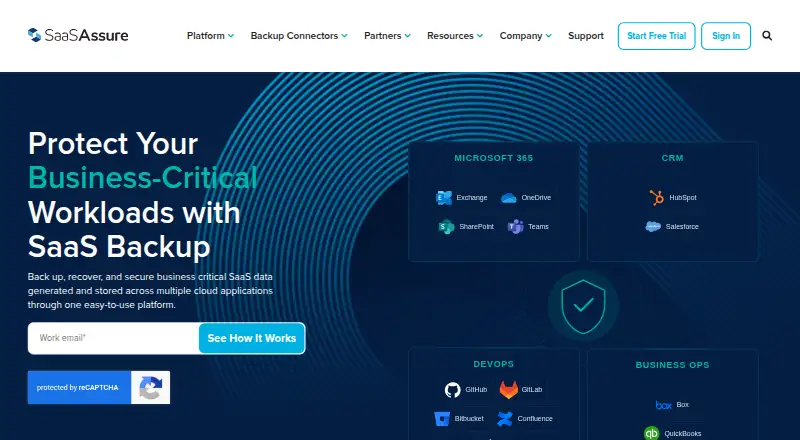
The connector catalog covers Microsoft Exchange, OneDrive, and SharePoint. Other supported apps are Teams, Box, Confluence, HubSpot, Jira, QuickBooks Online, and Salesforce.
Entra ID, ADP, BambooHR, DocuSign, FreshBooks, Freshdesk, Trello, and Zendesk appear as coming soon. You can use SaaSAssure storage or supply Amazon S3 or another S3-compatible cloud storage.
SaaSAssure runs in a browser. Its help center officially supports Chrome and Firefox.
Good fit
This suits organizations that need one place to protect data across several SaaS apps. For MSPs, a shared console provides multiple-tenant management, global administration, and delegated access.
Console tools include account-group tags, dashboards, and activity or event records. The company says setup can go from adding the platform to protection in under 10 minutes.
Watch for
There is no free plan, and fixed prices are not published. What you pay for connectors is based on connector type and how many licensed users are backed up.
The 14-day trial requires no payment details and provides access to adding connectors, running backups, and restoring data. After it ends, the account is restricted and only the upgrade option remains.
Check that your required app is already supported rather than listed as coming soon. Billing counts the average daily number of backed-up licensed users; QuickBooks Online uses the largest backup user count for the daily total.
Pricing
Pricing is on request. SaaSAssure offers a 14-day trial with no payment information required, but no free plan.
Connector charges are determined by connector category and the number of licensed users backed up. Once the trial ends, the account is restricted unless you move to a paid plan.
Verdict
Choose SaaSAssure if your organization needs scheduled or on-demand backups of SaaS data, recovery to a previous point in time, and storage options. It is especially suited to MSPs that manage several customer tenants and need delegated administration and activity records.
Consider another option if you need a published price, a permanent free tier, a connector not yet available, or browser support beyond Chrome and Firefox. Confirm how your licensed-user counts will affect the bill before signing up.
Our take
SaaSAssure is a practical match for organizations that want SaaS backup, recovery to an earlier point, and storage they can host in SaaSAssure Cloud Storage or their own S3-compatible service. MSPs benefit from tenant controls, delegated administration, tagging, dashboards, and logs. The main buying constraints are its request-based pricing, lack of a free plan, and billing tied to backed-up users. Its 14-day trial lets you test connectors and restores; access is restricted when the trial expires. Verify app coverage and browser support first.
- Scheduled or on-demand backups and point-in-time recovery
- Storage choices include SaaSAssure Cloud Storage and S3-compatible options
- Multitenant controls support managed service providers
- Multifactor authentication and AES 256-bit encryption
- Ransomware protection and audit logs
- No free plan and no published fixed prices
- Trial access is restricted after 14 days unless upgraded
- Some connectors are only marked as coming soon
- Official browser support is limited to Chrome and Firefox
- Billing depends on connector type and backed-up licensed users
- Pick it ifOrganizations protecting data across several SaaS apps; Managed service providers running multiple customer tenants; Teams needing point-in-time restore and storage choice
- Skip it ifYou need a permanent free tier or published plan prices; Your required application is listed only as coming soon; You require officially supported browsers beyond Chrome or Firefox
Pricing
Pricing is on request. A 14-day trial is available without payment details, but there is no free plan. Connector fees are based on connector type and licensed users backed up.
Questions
Does SaaSAssure have a free plan?
No. It offers a 14-day trial, then the account is restricted unless you upgrade to a paid plan.
Where can backups be stored?
Destinations include SaaSAssure Cloud Storage, Amazon S3, and S3-compatible storage.
Which applications can it back up?
Connectors include Microsoft Exchange, OneDrive, SharePoint, Teams, Box, Confluence, HubSpot, Jira, QuickBooks Online, and Salesforce.
How does the trial work?
For 14 days, you can add connectors, run backups, and perform restores without providing payment information. Access is restricted after the trial ends.
How is billing calculated?
Fees depend on connector type and licensed users. Monthly billed users use the average daily backed-up count; QuickBooks Online uses the largest daily backup-user count.
Which browsers are supported?
The help center officially supports Chrome and Firefox.
Near it
All alternatives →- SBSysCloud Backup#8 on this board
- AS
 Afi SaaS Backup#10 on this board
- SBSpanning Backup#7 on this board
- CS
 CloudAlly SaaS Backup#11 on this board
- SA
 Synology Active Backup for SaaS#6 on this board
- VB
 Veeam Backup for Microsoft 365#12 on this board
- C
 CubeBackup#5 on this board
- AC
 AvePoint Cloud Backup#13 on this board
- HRHYCU R-Cloud#4 on this board
- ODOdaseva Data Protection#14 on this board