
Scenario AI workspace review
scenario.com · checked 21 Oct 2026
AI workspace for consistent image, video, audio, and 3D asset production.
How it plugs in
Signal on AI Game Asset Generators6.3#5 of 26
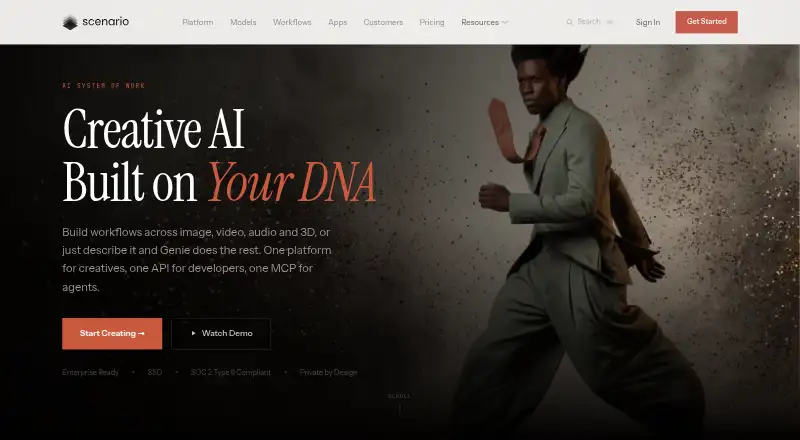
Through its browser app, API, and MCP, Scenario lets users generate and edit visual, video, audio, and 3D content. The service brings together models from over 50 providers with custom training, node-based workflows, batch processing, templates, and the Genie assistant. A free plan is available, with paid plans from $15 a month.
Review
In a line
Scenario is a hosted AI environment for producing and modifying images, video, audio, and 3D assets. Access is available through its web app, API, and MCP for agents.
What it does
You can generate images from text or other images, edit them with inpainting and outpainting, upscale them, and remove backgrounds. Its video features cover creation, editing, first- and last-frame control, plus video-to-video workflows. Prompts or source images can become textured 3D meshes that are then editable and exportable.
Audio tools produce music, speech, sound effects, and video-to-audio results. Private models can be trained on your images or datasets, including custom LoRA models, to keep a selected style or brand consistent.
Node-based visual workflows, batch runs, reusable templates, and the Genie chat assistant coordinate tasks across image, video, audio, and 3D. Genie can select models, configure settings, generate assets, and apply edits from chat instructions.
How it connects
The service offers models from over 50 providers, among them Google, OpenAI, Meta, Microsoft, ElevenLabs, Meshy, and Runway. Through its REST API you can run generations, train models, manage assets, set webhooks, and preview costs before execution. Official helpers exist for TypeScript and Python.
The API is intended for Unity, Unreal, and existing production pipelines. Authentication uses a key and secret with Basic Authentication, while jobs are polled asynchronously. Starter and higher plans allow project and team keys with configurable scopes.
Scenario is browser-accessed SaaS without a desktop installation. Its first-party Blender extension is free software under GPL-3.0-or-later and supplied without warranty. The platform itself is not open-source.
Good fit
Scenario suits creative teams that need repeatable AI assets for games, marketing, e-commerce, education, illustration, photography, architecture, or film. Private model training and style controls are useful when outputs must stay consistent.
It can also fit teams building generation into a product or pipeline through the API, batch jobs, webhooks, Unity, or Unreal. The paid plans include a commercial license, and Enterprise adds custom integrations and team support.
Watch for
Credits are deducted according to the chosen model and output settings, and any remainder expires at the end of the period. Free-plan results are limited to personal and evaluation use; commercial work needs a paid plan.
Scenario is hosted in the cloud, with no documented native desktop setup. Check the API's asynchronous job flow, key permissions, and model-specific credit costs before building a workflow. Enterprise security materials include a SOC 2 report available on request, encryption controls, SSO/SAML, and a promise that customer data is not used to train models.
Pricing
A Free plan provides 50 daily credits, needs no card, and allows personal or evaluation use. The free allowance is billed daily rather than as a monthly credit balance.
Starter is $15 monthly and includes 1,500 credits, private generations, 50 GB storage, and a single-user workspace. Pro is $45 monthly with 5,000 credits, custom model training, a priority queue, and 500 GB storage. Max is $75 monthly for 10,000 credits, up to 25 users, collaboration tools, monitoring dashboards, and 1 TB of storage plus 1 TB per seat.
Enterprise uses quote-based pricing and offers unlimited seats, projects, and workspaces, volume-discount consumption pricing, custom integrations, SSO/SAML, SOC 2, a DPA, audit trails, and dedicated support. Support ranges from community support on Starter to ticket, priority ticket, or dedicated account and Slack support on higher plans.
Verdict
Choose Scenario if your work spans several media types and you want one hosted place for generation, editing, model training, and workflow automation. It is particularly suited to teams that need consistent branded assets or want to connect AI generation to Unity, Unreal, or a custom service.
The free plan is useful for trying personal or evaluation projects, but its usage rights are narrow. Budget for paid credits when outputs are commercial, and monitor consumption because credits expire each period. If you need locally installed software, Scenario is not a match. For a narrower tool, compare options such as Meshy for 3D or Adobe Firefly for image work.
Our take
Scenario is a hosted option for creative groups working with images, video, audio, and 3D, particularly where consistent style, private models, or Unity and Unreal API connections are important. Its free plan offers a low-risk starting point, while paid tiers add commercial rights, storage, collaboration, and support. The trade-offs are credit-based usage, expiring unused credits, and no desktop application. Teams wanting local control or a single-purpose generator should look elsewhere. Those comparing focused 3D tools can also review Tripo AI.
- Handles image, video, audio, and textured 3D creation and editing
- Custom private models help keep a visual style consistent
- REST API, webhooks, SDK helpers, Unity, and Unreal support
- Free plan available with 50 daily credits and no card
- Free outputs are limited to personal and evaluation use
- Unused credits do not roll over
- Cloud-only service with no desktop installation
- Credit use varies by model and output settings
- Pick it ifCreative teams making consistent assets across several media types; Developers connecting generation to Unity, Unreal, or custom pipelines; Teams training private models for a house style
- Skip it ifYou need locally installed software instead of a browser or API service; You need unlimited credit carryover between billing periods; Your project requires commercial rights on a free plan
Pricing
The free tier supplies 50 daily credits for personal or evaluation projects. Credit consumption depends on model and settings, and balances do not carry forward. Enterprise pricing is on request.
- Freedaily · 50 daily credits · no credit card · personal/evaluation useFree
- Free tier50 free daily credits · No credit card required · personal and evaluation use onlyFree
- Startermonthly · 1,500 monthly credits · single-user workspace · private generations · 50 GB storage · Discord support$15/mo
- Promonthly · 5,000 monthly credits · priority queue · custom model training · ticket support · 500 GB storage$45/mo
- Maxmonthly · 10,000 monthly credits · up to 25 users · collaboration tools · monitoring dashboards · 1 TB storage plus 1 TB per seat$75/mo
- Enterprise12-month contract · unlimited seats, projects and workspaces · volume-discount consumption pricing · custom integrations · SSO/SAML · SOC 2 · DPA · audit trails · dedicated supportOn request
As scenario.com lists them, checked 21 Oct 2026.
Questions
Does Scenario have a free plan?
Yes. The Free tier supplies 50 credits each day, needs no card, and is restricted to personal or evaluation use.
How much does Scenario cost?
Starter begins at $15 per month. Pro is $45 monthly, Max is $75 monthly, and Enterprise uses quote-based pricing.
Can Scenario create 3D and audio?
Yes. Images or prompts can be turned into textured 3D meshes, while audio generation covers music, speech, sound effects, and video-to-audio results.
Can I train my own model?
Yes. Private models can be trained on your datasets and styles, including custom LoRA models for consistent outputs.
Does Scenario offer an API?
Yes. The REST API handles generation, model training, asset management, webhooks, and dry-run cost estimates, with TypeScript and Python SDK helpers.
Does Scenario work with Unity or Unreal?
Scenario describes API integrations for Unity, Unreal, and custom production pipelines. Batch generation is supported.
Are Scenario outputs commercial?
Paid plans include a full commercial license. Free-plan outputs are limited to personal and evaluation use.
Does Scenario install on a computer?
No desktop or locally installed software is provided. Access is through the web platform or API.
Near it
All alternatives →- PPixelLab#4 on this board
- PSPocketByte Studio#6 on this board
- A
 AnnoMotion#3 on this board
- DA
 DeepMotion Animate 3D#7 on this board
- TA
 Tripo AI#2 on this board
- MXMasterpiece X#8 on this board
- M
 Meshy#1 on this board
- DADreamForge Asset Studio#9 on this board
- LALayer Audio Cleanup#10 on this board
- LA
 Ludo.ai Sprite Generator#11 on this board