Scribiz: Video and Audio Transcription
scribiz.com · checked 21 Oct 2026
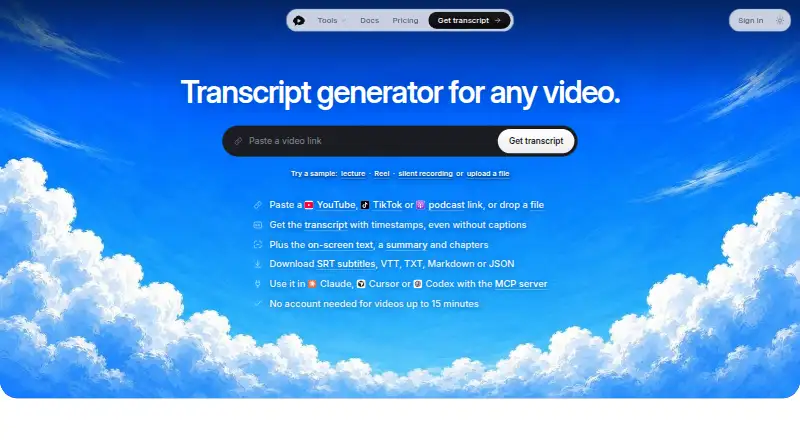
Scribiz turns video and audio into transcripts, screen text, summaries and chapters.
How it plugs in
Signal on AI Video Summarizers6.7#1 of 25
Scribiz processes video or audio links and files, producing transcripts, summaries, chapters and timestamped notes from on-screen text. It works through a web tool, API, CLI and Mac app, with a remote MCP server for several AI assistants and editors. A free plan is available; paid options include monthly and annual subscriptions, one-time credit packs and a Mac lifetime license.
Review
In a line
Scribiz produces transcripts, summaries, chapters and timestamped notes with text shown on screen.
What it does
You can submit a link or upload a file. When captions are missing or poor, Scribiz transcribes the audio; otherwise, it uses available captions. Watch mode examines slides, code and other text on the screen, then places timestamps in the notes. Other modes are Auto, Listen and Both.
If more than one voice is present, Scribiz can identify the different speakers. The output includes transcripts and summaries, and you can save it as SRT, VTT, TXT, Markdown or JSON.
How it connects
You can use the web tool, an HTTP API, a command-line tool or a Mac app. Its remote MCP server brings Scribiz to Claude, Cursor, Codex, VS Code, Claude Desktop and claude.ai. API requests start jobs, whose status, results and progress can be retrieved; because there are no webhooks, clients poll the job or track its event stream.
You can send YouTube or direct media URLs, podcast feeds and uploaded files. TikTok, X and Vimeo links are best effort on the web, while Instagram links usually require a file upload. The CLI can process files, folders and links. Running it requires Node.js 24 or newer plus ffmpeg, and yt-dlp is needed for most links. CLI testing has so far covered macOS only.
The Mac app is for Apple-silicon Macs running macOS 14 or later. Scribiz says its CLI follows an MIT-licensed open-source tool, but Scribiz itself is not identified as open source.
Good fit
Scribiz may fit people seeking transcripts, chapters or slide and other screen text extracted from videos, lectures, podcasts or other audio and video. Its exports and assistant connections may also fit workflows that use Claude, Cursor, VS Code or Codex.
Whisper offers local, offline speech transcription without requiring an account or key. It cannot label speakers, and producing summaries still depends on Scribiz or Gemini.
Watch for
Not every link is reliable: source sites can change or block access, and Instagram links commonly need an upload. Web uploads are capped at 100 MB and roughly 50 minutes of audio, while paid plans list videos as long as six hours.
Scribiz cautions that models can mishear speech, misread text, invent details or omit content, so check the results. Once processing finishes, hosted media is removed; results remain for 24 hours without an account and 30 days for signed-in users. Scribiz says local videos are not uploaded whole, but audio chunks and, for Watch, a small low-resolution video copy may be sent.
The CLI needs several extra tools and has only been tested on macOS. An independent review also describes the Pro allowance as small versus competitors and its minute-based pricing as complicated.
Pricing
The free tier allows 10 anonymous Listen or Watch minutes each day, 30 minutes per month for an account, account videos up to two hours, and a one-time grant of 30 YouTube caption credits.
Pro costs $10 a month or $84 a year. Both subscriptions include 600 minutes monthly, videos up to six hours, video questions and top-ups that do not expire. One-off caption packs cost $3.99 for 200 credits, $11.99 for 1,200 or $23 for 5,000, with credits that never expire.
A one-time $99 Mac Lifetime purchase includes the Mac app, every 1.x update and 300 hosted minutes.
Verdict
Consider Scribiz if you want transcripts alongside chapters, summaries or timestamped text from slides, and its supported sources and limits fit your material. The free allowance gives you a way to try the workflow before paying, while credit packs may work for occasional caption needs.
Look closely at the monthly minute allowance if you process lots of media, and check that your preferred links work. Choose another option if you need webhooks, guaranteed service availability or results that do not need review.
Our take
Scribiz is worth considering when you need more than a transcript, particularly timestamped notes from visible text and exports in common formats. Start with the free allowance if its limits fit your workload. Before choosing a paid plan, estimate how many minutes you process and whether credits or a subscription suit that pattern. Check your video sources first: some links are only best effort, and results can contain errors. People who need webhooks or guaranteed availability should look elsewhere.
- Produces transcripts, summaries and chapters from audio and video.
- Watch mode adds timestamps to text found on screen.
- You can save results as SRT, VTT, TXT, Markdown or JSON.
- Its remote MCP server connects to Claude, Cursor, VS Code and Codex.
- A free tier plus one-time caption credit packs is available.
- Some video sites are best effort, and Instagram links usually need an upload.
- Web uploads are limited to 100 MB and roughly 50 minutes of audio.
- API clients must check jobs or follow events; webhooks are unavailable.
- Results can include misheard speech, misread text, invented details or omissions.
- The independent review describes Pro's minute allowance as low and pricing as complex.
- Pick it ifPeople who need transcripts plus chapters or on-screen text notes; Users whose workflow includes supported MCP apps or JSON and subtitle exports
- Skip it ifYou need webhooks or guaranteed uninterrupted service.; You rely on links from sources that may block Scribiz or need dependable Instagram links.
Pricing
The free plan provides daily anonymous minutes and a smaller monthly account allowance. Pro is $10 a month or $84 a year for 600 minutes monthly; one-time credit packs and a Mac lifetime option are also available.
- Free10 anonymous Listen/Watch minutes per day · 30 account minutes per month · videos up to 2 hours with account · 30 YouTube caption credits onceFree
- Caption pack 200one-time · 200 caption credits · credits never expire$3.99 one-time
- Promonthly · 600 minutes per month · videos up to 6 hours · ask questions about videos · non-expiring top-ups$10/mo
- Caption pack 1,200one-time · 1,200 caption credits · credits never expire$11.99 one-time
- Caption pack 5,000one-time · 5,000 caption credits · credits never expire$23 one-time
- Pro annualyearly · 600 minutes per month · videos up to 6 hours · ask questions about videos · non-expiring top-ups$84/yr
- Mac Lifetimeone-time · Mac app and every 1.x update · 300 hosted minutes once$99 one-time
As scribiz.com lists them, checked 21 Oct 2026.
Questions
Is there a free plan?
Yes. It includes 10 anonymous Listen or Watch minutes daily, 30 account minutes monthly, account videos up to two hours, and 30 YouTube caption credits granted once.
What can Scribiz process?
YouTube and direct media links, podcast feeds and uploaded audio or video work best. On the web, TikTok, X and Vimeo links are best effort; Instagram links usually require an upload.
Which apps connect to Scribiz?
Claude, Cursor, Codex, VS Code, Claude Desktop and claude.ai can connect through the remote MCP server.
Does Scribiz have an API?
Yes. The API starts asynchronous jobs and exposes their status, results and progress events. With no webhooks, clients either poll the job or follow its event stream.
How much does Pro cost?
Pro is $10 a month or $84 a year. Either subscription includes 600 minutes per month, videos up to six hours, questions about videos and top-ups that do not expire.
Does Scribiz upload a whole local video?
Scribiz says it does not upload a whole local video. Processing may send audio chunks and, for Watch mode, a small low-resolution video copy.
Can I run speech transcription offline?
Whisper runs locally and offline without an account or key. It does not label speakers, while summaries still require Scribiz or Gemini.
Where can I compare software in this category?
See AI Video Summarizers for category options.
Near it
All alternatives →- EEightify#2 on this board
- SV
 Summarize Video to Text#3 on this board
- VSVideo Summarizer#4 on this board
- HHelpolos#5 on this board
- YyTeaser#6 on this board
- M
 Mindgrasp#7 on this board
- YYouTubeTLDR#8 on this board
- VVideoHighlighter#9 on this board
- YCYouTubeSummarizer.com#10 on this board
- SCSmooth Clip#11 on this board