
Segra: Free PC Game Recording and Replay
segra.tv · checked 7 Oct 2026
Free, open-source game recorder for Windows and early-alpha Linux.
How it plugs in
Signal on Game recording software7.0#7 of 30
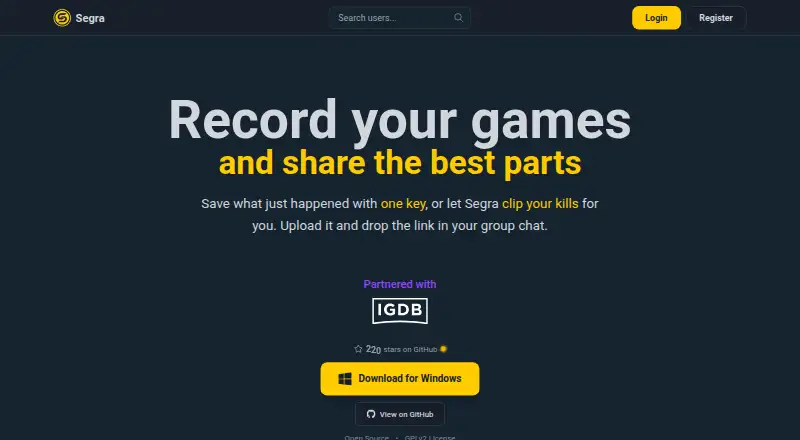
Segra runs game capture in the background, keeps replay buffers, and provides hotkeys for marking moments before editing and uploading clips. In supported titles, it recognizes kills, assists, and deaths for highlight creation. The free, open-source software works on Windows 10/11 and Linux alpha, with recording reaching 4K at 144 FPS.
Review
In a line
This free, open-source application captures PC games while they run in the background. A hotkey bookmarks moments, which users can then edit and upload for sharing.
What it does
The app offers instant replay and several recording modes. It can capture games at up to 4K and 144 frames per second, using the computer’s graphics processor to encode video.
In supported games, Segra can spot kills, assists, and deaths. Those detected kills can be assembled into a highlight video, but automatic clipping is offered only for selected games.
How it connects
OBS forms Segra’s base, while FFmpeg handles video and image encoding. Available media settings cover H.264, HEVC, AV1, multiple audio inputs, distinct tracks, and microphone noise reduction.
The source code is available on GitHub under the GPLv2 license. The download page points users to GitHub and Discord for bug reports, feature requests, and community contact.
Good fit
PC players can use Segra for background capture, replay saving, clip trimming, and sharing from a single free application. Any PC game is recordable, but event-based highlights work only with supported titles.
Windows users get builds for Windows 10 and 11 on x64 systems. Linux users can try the early alpha version.
Watch for
Linux remains at an early-alpha stage, and the project says startup failures or missing and malfunctioning features are possible.
Automatic clipping does not cover every game. Uploads are limited to material captured with Segra. A content delivery network may keep uploaded videos outside the EU, while the main application database is processed in the EU.
Windows builds are signed by SignPath Foundation, but Windows SmartScreen may warn about new releases.
Pricing
Segra has a single Free plan with no charge. It bundles open-source game capture, replay buffering, clip editing, and automatic game highlights.
There is no free trial because the product is already free, and the facts list no paid plan.
Verdict
Segra is worth considering for a free recorder that offers instant replay, editing, and optional highlights based on game events. Its open-source code and privacy policy may appeal to users who prefer fewer advertising and analytics trackers.
Windows is the safer choice because Linux is still alpha. Check whether your games support automatic clipping, and consider the upload-only- Segra rule before building a sharing workflow around it.
Our take
Segra is a sensible pick for players who want recording and replay tools without a subscription. Its free, open-source model removes a cost barrier, while 4K capture, several codecs, and separate audio tracks cover detailed recording needs. The main trade-off is platform maturity: Windows has the listed stable target, but Linux remains early alpha. Highlight creation depends on the game, and uploaded videos may be stored beyond the EU. Users who need broad automatic clipping or flexible upload sources should look elsewhere.
- No-cost access with replay buffering, clip editing, and automatic highlights
- Open-source code under GPLv2
- Captures video at up to 4K and 144 FPS
- Encoding is available in H.264, HEVC, and AV1
- No third-party tracking or advertising cookies
- Linux remains an early-alpha release with potentially faulty features
- Automatic clipping is available only for selected games
- Uploads must be recorded with Segra
- Uploaded videos may be stored outside the EU
- Pick it ifPC players who want free background recording and replay; Windows users needing clip editing and game highlights; Users who prefer open-source recording software
- Skip it ifYou need mature Linux support; You need automatic clipping for every game; You must upload footage made with other software
Pricing
The Free plan has no cost and covers recording, replay buffering, clip editing, and automatic highlights. No paid plan or trial is listed.
- FreeOpen-source game recording · Replay buffer · Clip editor · Automatic game highlightsFree
As segra.tv lists them, checked 20 Sept 2026.
Questions
Is Segra free?
Yes. Segra provides a Free plan at no charge, with open-source recording, replay buffering, clip editing, and automatic game highlights.
Which systems run Segra?
Windows 10/11 on x64 is supported. Linux has an early-alpha build that could fail to launch or lack working features.
What video quality does Segra support?
Segra’s site specifies capture as high as 4K at 144 FPS. The project names H.264, HEVC, and AV1 among its encoding choices.
Can Segra make highlights automatically?
For supported games, Segra detects kills, assists, and deaths, then can combine detected kills into a highlight video. This automatic clipping is offered only for selected games.
Is Segra open source?
Yes. It is free software released under GPLv2, with its source hosted on GitHub.
Where are Segra uploads stored?
The application’s primary database is processed in the EU, but a CDN can place uploaded videos in other locations.