SimpleChex Review
simplechex.com · checked 15 Oct 2026
Browser-based software for producing MICR checks and sending check PDFs by email.
How it plugs in
Signal on Check Printing Software6.3#5 of 28
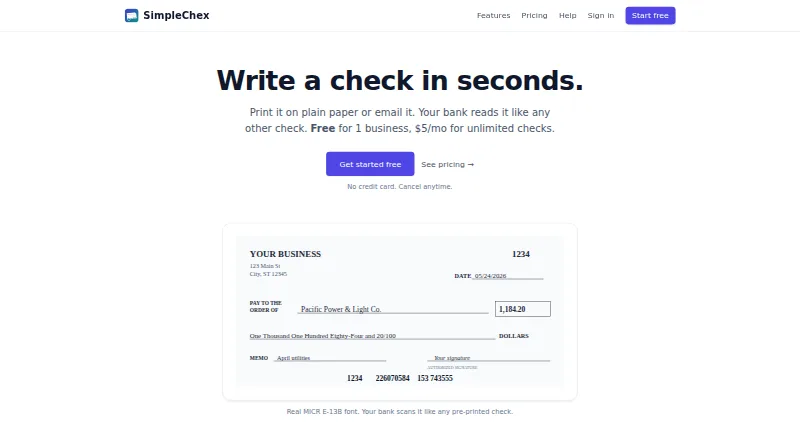
For small businesses and bookkeepers, SimpleChex prepares business checks as PDF files that can be printed or emailed. The files include scanner-readable E-13B MICR details, work with ordinary paper or blank stock, and retain check activity. Pricing includes a restricted no-cost option alongside paid plans with business and team administration.
Review
In a line
SimpleChex serves small businesses and bookkeepers from a web browser, producing checks as PDFs for printing or email delivery. Routing and account numbers are encoded in MICR format.
What it does
You can create checks, save vendor details, and add an uploaded or typed signature. Plain white paper and blank check stock are supported, including Costco NL-VT-compatible stock. The layout can be adjusted for other stock.
A check PDF may be sent to a recipient from [email protected]. The recipient can print it on plain paper and deposit it like a check. Check, batch, and email activity is logged, and earlier checks can be reprinted as PDFs.
For QuickBooks Online payroll, upload a payroll PDF and SimpleChex adds a MICR line while keeping the paystub content and check numbers. Payroll files in other formats need support review.
How it connects
SimpleChex runs in a web browser and does not require installation. Its stated accounting workflow accepts QuickBooks Online payroll PDFs; it does not list accounting imports beyond that.
SimpleChex neither holds nor transmits or processes funds. Checks clear through your existing bank account. The official pages do not state a public API, software development kit, open-source code, or self-hosted option.
A single workspace may include several businesses, with each business keeping its own bank accounts, layouts, payees, and check numbering. Firm users can invite unlimited teammates and limit them to chosen businesses or bank accounts.
Data can be exported as JSON, with account and routing numbers redacted. Data uses TLS 1.3 in transit and AES-256 at rest, with workspace-level database controls.
Good fit
Small businesses and bookkeepers can use SimpleChex to print without pre-printed stock, email eChecks, and organize multiple businesses within one workspace.
The Firm plan fits teams needing unlimited teammates, business and bank-account permissions, and full audit history. The Free and Solo plans are designed for one business and one user.
Watch for
After 90 days, the Free plan permits only 10 checks per calendar month for one business. Solo remains one business and one user, while Firm charges extra for each business beyond 10.
Printing can fail because of incorrect scale, unsuitable paper, damaged MICR lines, or insufficient funds in the issuing account. Check your printer setup and paper before sending checks.
The terms provide no specific uptime guarantee. Cancellations during a partial month receive no prorated refund, and outage or billing-error refunds are discretionary.
Pricing
SimpleChex has a free plan with no free trial. The forever-free option covers one business, unlimited bank accounts, unlimited checks during the first 90 days, then 10 checks each month, along with E-13B MICR, emailed eChecks, signature stamping, and one user.
For $5 monthly, Solo provides one business, unlimited bank accounts and checks, E-13B MICR, emailed eChecks, signature stamping, and one user.
Firm is $19 per month for up to 10 businesses, with unlimited bank accounts and checks, unlimited team members, business and bank-account scoping, full audit history, and emailed eChecks. Each business beyond 10 costs $2 a month.
Verdict
Choose SimpleChex if your business or bookkeeping practice needs browser-based check creation, bank-readable MICR printing, emailed check PDFs, or several businesses organized within one workspace.
The free tier can cover occasional use, but its monthly limit begins after 90 days. Solo is aimed at one operator; Firm is the practical choice when several people need controlled access and audit records.
Look elsewhere if you require a public API, self-hosting, broader payroll-file support without review, or a guaranteed uptime commitment.
Our take
SimpleChex is a focused option for organizations that still issue paper checks and want to produce them from a browser. Its plain-paper MICR support, emailed PDFs, saved payees, signatures, and audit records cover common check workflows. The free tier is useful for trying the process but becomes restrictive after 90 days. Solo keeps costs low for one operator, while Firm adds multi-business administration and team permissions. Buyers should confirm their printer and paper setup, payroll format, and tolerance for the service’s uptime and refund terms.
- Produces MICR checks on ordinary paper or blank stock
- Sends check PDFs that recipients can print and deposit
- Handles multiple businesses within one workspace with scoped team access
- Maintains audit history and supports PDF reprints of earlier checks
- Offers a free plan without requiring installation
- The free allowance falls to 10 checks monthly after 90 days
- No public API, SDK, or self-hosted deployment is stated
- QuickBooks payroll reader is tuned to one paystub layout
- No specific uptime percentage is guaranteed
- Partial-month cancellations are not prorated
- Pick it ifSmall businesses producing checks through a browser; Bookkeepers overseeing several businesses; Teams needing emailed eChecks and permission controls
- Skip it ifYou need a public API or self-hosted check system; You use payroll formats other than QuickBooks Online without support review; You require guaranteed uptime or prorated cancellation refunds
Pricing
Free is available forever but drops to 10 checks a month after 90 days. Solo costs $5 monthly for one business and one user.
- Free$0/ forever · 1 business · unlimited bank accounts · unlimited checks first 90 days, then 10/month · real MICR E-13B · email eChecks · signature stamping · single userFree
- Solo$5/ month · 1 business · unlimited bank accounts · unlimited checks · real MICR E-13B · email eChecks · signature stamping · single user$5/mo
- Firm$19/ month; +$2/month per business beyond 10 · up to 10 businesses · unlimited bank accounts and checks · unlimited team members · per-business and per-bank scoping · full audit history · email eChecks$19/mo
As simplechex.com lists them, checked 15 Oct 2026.
Questions
Is a no-cost SimpleChex plan available?
Yes. The Free plan has no charge indefinitely. It covers one business, with unlimited checks for the first 90 days and 10 checks per calendar month thereafter.
Are ordinary sheets suitable for printing checks?
Yes. The service uses the bank-scanner E-13B MICR font and supports both plain white paper and blank check stock.
Can SimpleChex send a check by email?
Yes. Check PDFs are sent from [email protected], and recipients can print them on plain paper for deposit.
Can it work with QuickBooks payroll?
QuickBooks Online payroll PDFs can be uploaded so SimpleChex adds a MICR line. Other payroll formats need support review.
Does SimpleChex handle the payment funds?
No. It does not hold, transmit, or process funds; checks clear through the bank account you use.
What is the Firm team-member limit?
Firm has no stated cap on team members and allows access restrictions by business or bank account.
Does SimpleChex publish an API?
The official pages do not state a public API, software development kit, or self-hosted deployment.