SizeTrend: Windows Disk Analysis and Storage Reports
dimastr.com · checked 28 Sept 2026
Windows disk analyzer with file, folder, app, duplicate, and storage-history tools.
How it plugs in
Signal on Disk Space Analyzers6.8#12 of 105
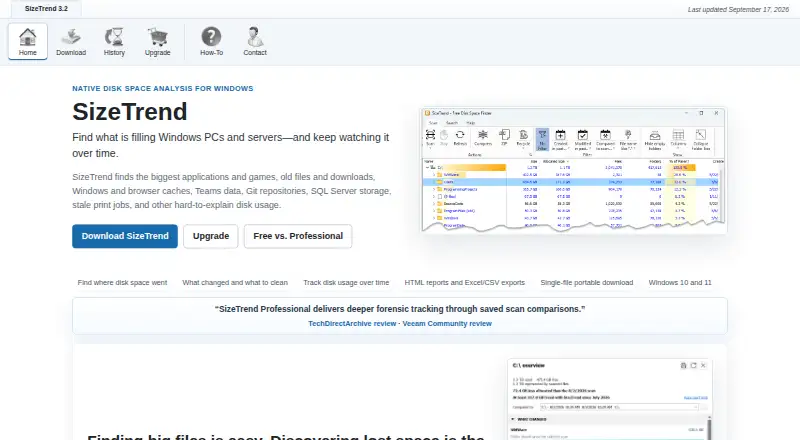
SizeTrend is a Windows disk-analysis app for finding how files, folders, and applications use space. It offers local scans for free, while Professional adds scheduled and network-folder scans, report exports, and broader snapshot comparisons. The paid edition costs $69.99 as a one-time license, with volume prices for larger orders.
Review
In a line
SizeTrend analyzes disk space on Windows 10 and Windows 11. A single-file portable download is available.
What it does
Scan files, folders, and applications to see application sizes and file-type breakdowns. The free edition includes local drive and folder scans, cleanup and storage recommendations, file and content analysis, duplicate-file analysis, and saved scan snapshots.
Search can filter by name, text, binary content, type, size, or date. SizeTrend can find duplicates by name, size, or content, compress files or folders in place, and scan external drives.
Professional adds scheduled scans, automatic storage history, and unlimited saved-snapshot comparisons. It can schedule one-time, daily, weekly, or monthly jobs.
How it connects
SizeTrend runs on Windows and uses Windows Task Scheduler for recurring scans and reports. Professional can scan network folders and export HTML reports or Excel and CSV scan data.
The free edition permits one What Changed comparison when a compatible snapshot exists. Scheduled tasks that run while logged off cannot access EFS-encrypted files.
Good fit
SizeTrend suits Windows users who need to understand local or external-drive storage, locate duplicate files, review file types, or keep scan snapshots.
Professional is aimed at people who need network-folder scans, recurring reports, exported data, storage history, or repeated comparisons.
Watch for
The software is Windows-only. Network scanning, scheduled scans, exports, automatic history, and unlimited snapshot comparisons require Professional.
Check the EFS restriction if you plan logged-off scheduled scans: those jobs cannot read EFS-encrypted files. The free edition has a one-comparison limit when a compatible snapshot exists.
Pricing
SizeTrend Free costs free and keeps core local-analysis features available without a subscription. Professional costs $69.99 as a one-time license, includes all future versions, and has a 14-day trial of Professional features.
Volume prices are $49.99 one-time for 5 or more licenses, $39.99 one-time for 10 or more, $29.99 one-time for 20 or more, and $19.99 one-time for 40 or more. An unlimited single-site license costs $999.99 one-time.
Purchases are processed by FastSpring.
Verdict
Choose SizeTrend Free for straightforward Windows storage checks, duplicate finding, and saved snapshots on local drives and folders. Its portable format may help when you do not want a standard installation.
Pay for Professional when recurring scans, network locations, report files, storage history, or unrestricted comparisons matter. Organizations should compare the volume tiers with the $999.99 unlimited single-site option. Avoid it if you need a non-Windows platform or if logged-off jobs must read EFS-encrypted files.
Our take
SizeTrend is a practical choice for Windows users who want clear views of disk usage without a recurring bill. The free edition covers everyday local analysis, while the one-time Professional license adds network locations, scheduled work, exports, and ongoing history. Its main boundaries are platform support and the EFS limitation for logged-off tasks. Buyers should also consider how many licenses they need, since the per-license price drops at five, 10, 20, and 40 seats, with a separate unlimited single-site option.
- Free local drive and folder analysis
- Finds duplicates by name, size, or content
- Professional includes scheduled and network-folder scans
- Exports HTML, Excel, and CSV reports
- One-time license includes future versions
- Runs only on Windows 10 and 11
- Logged-off scheduled tasks cannot access EFS files
- Free edition allows one What Changed comparison
- Advanced features require the paid edition
- Pick it ifWindows users checking local or external-drive storage; Teams needing scheduled scans and exported reports; Organizations buying multiple licenses
- Skip it ifYou need macOS, Linux, or another non-Windows platform; Logged-off scheduled scans must read EFS-encrypted files; You require network scans or unlimited comparisons for free
Pricing
A free edition covers core local analysis. Professional is $69.99 one-time with a 14-day feature trial and no subscription.
- SizeTrend FreeLocal drive and folder scans · Overview with cleanup and storage recommendations · File, content, and duplicate-file analysis · Save scan snapshotsFree
- SizeTrend ProfessionalOne-time purchase. No subscription. All future versions are included. · Scheduled scans · Network-folder scans · HTML, Excel, and CSV exports · Unlimited saved-snapshot comparisons · Automatic storage history$69.99 one-time
- 5+ licenses5+ licenses · 5 licenses minimum$49.99 one-time
- 10+ licenses10+ licenses · 10 licenses minimum$39.99 one-time
- 20+ licenses20+ licenses · 20 licenses minimum$29.99 one-time
- 40+ licenses40+ licenses · 40 licenses minimum$19.99 one-time
- Unlimited single-site licenseUnlimited single-site license · Unlimited single-site coverage$1,000 one-time
As dimastr.com lists them, checked 28 Sept 2026.
Questions
What is SizeTrend?
SizeTrend is a Windows application for analyzing disk use across files, folders, applications, and external drives.
Is there a free version?
Yes. SizeTrend Free includes local drive and folder scans, file and duplicate analysis, cleanup recommendations, and saved snapshots.
How much does Professional cost?
Professional costs $69.99 one-time, with no subscription. Professional features can be tried for 14 days.
Can SizeTrend scan network folders?
Yes, but network-folder scanning is a Professional feature.
What reports can it export?
Professional can export HTML reports and Excel or CSV scan data.
Does it schedule scans?
Professional supports one-time, daily, weekly, and monthly schedules through Windows Task Scheduler.
What is the EFS limitation?
Scheduled tasks running while logged off cannot access EFS-encrypted files.
Are volume prices available?
Yes. One-time per-order prices apply from five licenses, with tiers for 10, 20, and 40 licenses, plus an unlimited single-site license.