SpeedyRead iPhone Speed-Reading App Review
speedyread.app · checked 15 Oct 2026
An iPhone reading trainer that presents text word by word and records your progress.
How it plugs in
Signal on Speed Reading Apps6.3#6 of 27
SpeedyRead turns PDFs, Word documents, ePubs, Markdown, HTML, web articles, and camera-scanned pages into reading practice on an iPhone. Text appears sequentially, with pacing and audio controls, while reading positions are kept on the device. It runs on iOS 18 or newer and offers Free and $1.99-per-month Premium tiers.
Review
In a line
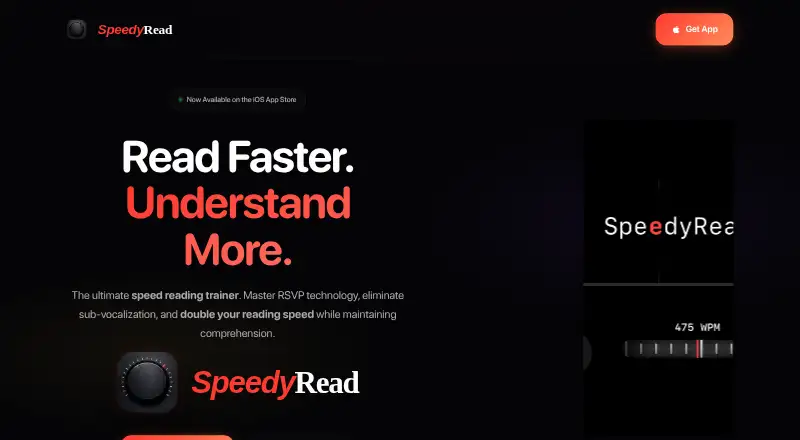
On iPhone, SpeedyRead displays imported text in a one-word sequence. Its Rapid Serial Visual Presentation layout holds each word at a consistent focal spot, reducing the need for eye movement.
What it does
PDFs, Word documents, ePubs, Markdown, HTML, and other material can be imported, including documents opened from Apple Files. Entering a web address pulls out the article without advertising or page clutter. Printed pages can be scanned with the camera using live OCR and a torch.
A tactile wheel with haptic feedback sets the display rate anywhere from 300 to 725 words per minute. Audio mode speaks along with the displayed words, offering 50 to 450 words per minute and multiple voices.
Built-in comprehension exercises support faster reading practice. The app records reading speed changes and book-completion statistics, while automatic session saving lets you resume where you stopped.
How it connects
Documents can come in from Apple Files, while Safari and the system Share Extension can send content to SpeedyRead. Its library and progress are stored on the device for offline use.
The published product information does not describe a public API, software development kit, open-source code, or self-hosting option. Personal files remain off servers unless a cloud-backup feature is introduced in the future.
Good fit
Students, professionals working through reports and articles, lifelong learners, and people managing read-later lists are among the app's intended users.
It fits readers seeking one-word pacing they can adjust, camera scanning, synchronized audio, comprehension practice, and saved positions on an iPhone.
Watch for
SpeedyRead runs only on iPhone and needs iOS 18.0 or newer. Apple has not specified which accessibility features the developer supports.
The privacy policy says anonymous usage statistics may be collected, along with the device model and operating-system version for diagnostics. Contacting support may involve sharing an email address. Apple also identifies identifiers, usage data, and other information as potentially used for tracking or linked to you.
The app has no public API or self-hosting choice, and personal files stay local rather than syncing to a cloud service unless that option is added later.
Pricing
SpeedyRead can be downloaded at no charge and includes a Free plan. In-app purchases are available.
Premium costs $1.99 per month, with billing each month after a 14-day trial period.
Verdict
For iPhone owners, SpeedyRead offers a focused way to move through imported documents, web articles, or photographed pages. Its adjustable display and audio speeds, practice exercises, and local progress records cover both training and everyday reading.
Choose another option if you need Android, desktop access, a documented developer interface, cloud file syncing, or clearly stated accessibility support. Check the iOS requirement and data disclosures before subscribing.
Our take
SpeedyRead is aimed at iPhone users seeking structured speed-reading practice. It accepts many common document types, extracts clean web articles, scans paper pages, and keeps progress available offline. You can begin on the Free plan, while Premium becomes paid after its 14-day trial. Its narrow platform support, local-only file handling, lack of a public API, and limited accessibility disclosure make it less suitable for mixed-device households, developers, or readers who depend on cloud libraries.
- Imports PDFs, Word files, ePubs, Markdown, HTML, and more
- Offers display pacing from 300 through 725 words per minute
- Scans printed pages with live OCR and torch assistance
- Saves library and progress locally for offline reading
- Provides comprehension exercises and reading statistics
- Works only on iPhone running iOS 18 or later
- No public API, SDK, open-source code, or self-hosting option
- Personal files remain off servers unless a future cloud-backup feature is enabled
- Apple has not indicated supported accessibility features
- Collects anonymous usage data and some diagnostic information
- Pick it ifiPhone users practicing faster reading; Students and professionals handling articles or reports; Readers with read-later lists
- Skip it ifYou need Android, desktop, or older iOS support; You require cloud file syncing or a public developer API; You need documented accessibility support
Pricing
The Free plan costs nothing to download. Premium is $1.99 per month, billed monthly, and begins with a 14-day trial.
- FreeFree download · in-app purchases availableFree
- Monthly Premiummonthly · Premium access · 14-day free trial$1.99/mo
As apps.apple.com lists them, checked 15 Oct 2026.
Questions
Which devices support SpeedyRead?
SpeedyRead is an iPhone-only app and requires iOS 18.0 or later.
Which document types can SpeedyRead open?
It supports PDFs, Word documents, ePubs, Markdown, HTML, other content, and documents opened from Apple Files.
Can it handle web pages and paper pages?
Yes. A URL can be used to extract an article without ads or clutter, and the camera can scan printed pages with live OCR and torch support.
Is offline reading available?
The library and reading progress remain on the device for offline use. Personal files are not sent to servers unless a future cloud-backup feature is enabled.
What is the Premium price?
Premium is billed monthly at $1.99 and includes a 14-day trial; a Free plan is also available.
Is there an API for SpeedyRead?
The published product information does not describe a public API, SDK, open-source code, or self-hosting option.