SQLPad: Free Self-Hosted SQL Web App
sqlpad.github.io · checked 11 Oct 2026
A no-cost, self-hosted web workspace for writing SQL and reviewing query output.
How it plugs in
Signal on SQL Query Tools6.1#13 of 31
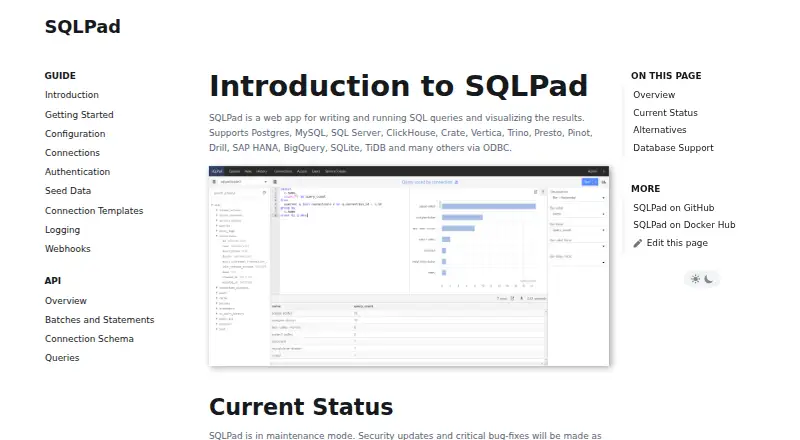
SQLPad provides a browser-based interface for composing and executing SQL, with options to inspect or download returned data. It supports Linux and self-hosted deployments, uses SQLite by default for application storage, and connects with numerous database systems. Authentication methods, role controls, query history, an API, and configurable export formats are included.
Review
In a line
Use SQLPad in a browser to compose and execute SQL, then inspect the resulting data. It is free and can be self-hosted on Linux.
What it does
You write SQL in the browser, run it against a connected database, and view the returned data. Query history is available for past work.
When configured, SQLPad offers downloads in CSV, JSON, and XLSX formats. Standard query output defaults to 10,000 records, while history views default to 1,000.
How it connects
Its documented driver list covers PostgreSQL, MySQL, SQL Server, ClickHouse, Crate, Vertica, Trino, Presto, Pinot, Drill, SAP HANA, BigQuery, SQLite, TiDB, Cassandra, Athena, and ODBC.
It has a REST-style API and can authenticate API requests with generated bearer service tokens. Configurable webhooks can send HTTP POST messages for events such as user creation, query creation, and batch completion.
By default, SQLite and the local file system hold queries, results, and web sessions. The backing database can instead be an external SQLite, MySQL, MariaDB, or SQL Server instance. The project is MIT-licensed, and its repository was archived on August 23, 2025.
Good fit
SQLPad suits people who want a browser-based SQL workspace that they can host themselves. Its documented database drivers cover many relational, analytical, and cloud data systems.
Available sign-in methods include local email and password, Google OAuth, OpenID Connect, SAML, LDAP, and an HTTP authentication proxy. Separate Admin and Editor roles divide administrative work from query editing.
Watch for
SQLPad is maintained on a limited basis, with security updates and critical fixes planned when needed and possible. The archived repository is an important check before adopting it.
Opt-in multi-statement transactions are documented for MySQL, SQLite, Postgres, and ODBC, and transaction requests need to keep reaching the same SQLPad instance.
A configuration passphrase can protect sensitive connection information stored in the backing database. Local passwords use bcrypt, but deployment and credential settings still need review.
Pricing
SQLPad offers a free plan.
Verdict
Choose SQLPad if you need a no-cost, self-hosted browser for SQL work across several database types, with roles, authentication choices, exports, and an API.
Look elsewhere if you require an actively developed project or need transaction behavior without routing requests to one instance.
Our take
SQLPad covers the core path from entering a query to reviewing or exporting its results, and it can fit installations that need self-hosting, multiple login methods, and separated admin and editor duties. Its broad driver list and API add flexibility. The main decision point is project status: maintenance mode and an archived repository may matter more than the free price. Confirm that your database, deployment layout, transaction needs, and security configuration match the documented behavior before choosing it.
- Free plan with self-hosted deployment
- Drivers for many databases plus ODBC
- REST-oriented API using bearer service tokens
- Distinct Admin and Editor roles
- Downloads available in CSV, JSON, and XLSX
- Limited maintenance activity
- GitHub repository archived on August 23, 2025
- Default limits of 10,000 query rows and 1,000 history rows
- Some transactions need all requests routed to one SQLPad instance
- Pick it ifSelf-hosted browser SQL work; Teams needing roles and several authentication options; Users connecting to varied database systems
- Skip it ifYou need an actively developed project; Your transaction setup cannot keep requests on one instance
Pricing
SQLPad has a free plan.
Questions
Is SQLPad free?
Yes. SQLPad offers a free plan.
Where can SQLPad run?
SQLPad is available as a web application, supports Linux self-hosting, and documents an API.
Which databases can SQLPad connect to?
Its documented drivers cover PostgreSQL, MySQL, SQL Server, ClickHouse, Crate, Vertica, Trino, Presto, SAP HANA, BigQuery, SQLite, TiDB, Cassandra, Athena, and ODBC.
Does SQLPad have an API?
Yes. The project documents a REST-style API and uses generated bearer service tokens to authenticate API requests.
What export formats are supported?
Configuration can provide downloads as CSV, JSON, or XLSX, with those formats enabled by default.
Is SQLPad still maintained?
The project describes maintenance as ongoing only as needed and as possible for security updates and critical fixes. GitHub shows the repository archived on August 23, 2025.
What access controls does SQLPad provide?
It defines Admin and Editor roles: editors handle queries, while admins manage connections, access, and users.