StudyCards: Flashcards from PDFs, Chats and Slides
studycards.io · checked 15 Oct 2026
Build browser-based flashcard decks from chats, PDFs, slides and more, then review them with spaced repetition.
How it plugs in
Signal on AI Study Tools6.3#57 of 96
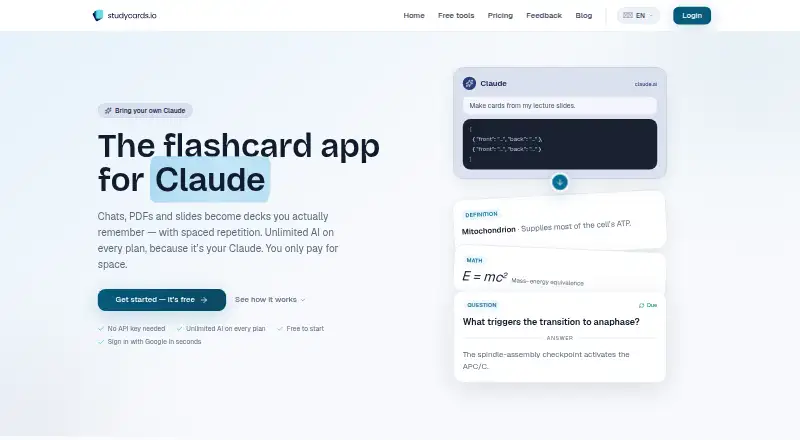
StudyCards is a web service and REST API for making, organizing and reviewing flashcard decks. It can turn chats, PDFs, PowerPoint files and other materials into cards, including through your own Claude. Its FSRS scheduler plans reviews, and it offers imports, sharing and printable PDF export for established study routines. A free plan is available, with paid plans starting at $5 per month.
Review
In a line
StudyCards is a browser-based service for creating, managing and studying flashcard decks.
Chats, PDFs, slides and other study materials can be converted into cards intended for spaced-repetition study.
What it does
You can make cards manually with an editor that supports keyboard shortcuts and autosave, or generate them from source material. In-browser reading of PDF and PowerPoint files creates prompts for your own AI without sending those files to StudyCards.
The service includes AI flashcards and AI quizzes, but not AI summaries. Reviews follow FSRS, an algorithm described as the successor to SM-2. You can share decks with a public link and export any deck as a double-sided printable PDF.
Free text-to-flashcards, PDF-to-flashcards and deck-conversion tools work without login and process content in the browser. StudyCards works in modern browsers and offers swipe gestures for studying on mobile; no mobile app is listed.
How it connects
StudyCards offers an open REST API v1 and an open-source MCP server for Claude Desktop and Claude Code. With your own Claude, cards can be made through a copy-and-paste bridge, the MCP server or the API, and the site says AI use is unlimited on every plan.
You can import Anki and Quizlet decks. Its browser-based converters also accept Quizlet, CSV and Markdown decks. Card images are kept in EU Supabase storage and use your plan's storage allowance.
The hosted service supports Google sign-in through Supabase Auth and says it does not receive Google passwords. Public pages describe the hosted service but do not state that self-hosting or separate language SDKs are available.
Good fit
StudyCards suits people who want one browser workspace for building decks from notes, chats, PDFs or slides, then reviewing them on an FSRS schedule. It also fits users moving decks from Anki, Quizlet, CSV or Markdown.
Its API and MCP server suit Claude users who want to create cards through their own AI setup. Deck links, keyboard shortcuts, autosave and printable exports support sharing, editing and offline paper study. English, German and Spanish are listed as available languages.
Watch for
The Free plan limits each PDF upload to 20 pages, while Plus and Ultimate allow unlimited pages. When a plan reaches its capacity, you must free space or upgrade before adding more.
Images attached to cards count toward storage. There is no free trial and no stated mobile app. Public documentation is mainly homepage instructions, FAQs, tools pages and blog guides rather than a separate API reference site.
PDF and PowerPoint parsing happens locally in the browser, while attached card images reside in EU Supabase storage. Its privacy policy lists TLS, encryption at rest, row-level database security and JWT authentication; the maker says it follows GDPR and does not sell personal data.
Pricing
StudyCards uses a freemium model. Free costs $0 and includes 10 sets, 1,000 cards, 50 MB of storage, 20 PDF pages per upload and unlimited AI use with your own Claude.
Plus costs $5 a month, billed monthly, including VAT in USD. It allows 100 sets, 10,000 cards, 10 GB of storage and unlimited PDF pages per upload.
Ultimate costs $15 a month, billed monthly, including VAT in USD. It removes set and card count limits, provides 100 GB of storage and allows unlimited PDF pages per upload. There is no free trial.
Verdict
Choose StudyCards if you want browser-based flashcard creation from mixed study files, FSRS scheduling and imports from established deck formats. The free tier is suitable for smaller collections, while the paid tiers mainly add storage, capacity and PDF-page limits.
It is less suitable if you require a dedicated phone app, self-hosting or extensive SDK and API documentation. Check how much image storage and how many sets your decks need before selecting a plan. Claude users should weigh the copy-paste bridge, MCP server and REST API against their workflow.
Our take
StudyCards is a practical option for learners who want to turn existing files and conversations into review cards without sending source PDFs or PowerPoint files to the service. Its free tier covers a modest collection, and the $5 and $15 monthly plans raise storage and deck limits. The service may not fit people seeking a native phone app, self-hosting, or a deeply documented developer platform. Review your expected image storage, PDF sizes and preferred Claude connection before paying.
- Turn chats, PDFs, slides and other materials into flashcard decks
- FSRS schedules reviews for spaced repetition
- Anki, Quizlet, CSV and Markdown deck options are available
- Open REST API and open-source MCP server
- Free plan includes 10 sets and 1,000 cards
- No mobile app is listed
- Free PDF uploads are limited to 20 pages each
- Card images count against storage limits
- No free trial
- Pick it ifLearners building decks from mixed files and chats; Claude users who want API or MCP card creation; People importing existing Anki or Quizlet decks
- Skip it ifYou need a dedicated iOS or Android app; You require self-hosting or separate language SDKs; Your decks need more storage than the plan limits allow
Pricing
Free includes 10 sets, 1,000 cards and 50 MB storage. Plus is $5/month with 100 sets and 10 GB; Ultimate is $15/month with unlimited sets and cards and 100 GB. Both paid plans include VAT, bill monthly in USD, and allow unlimited PDF pages per upload.
- Free10 sets · 1,000 cards · 50 MB storage · 20 PDF pages per upload · unlimited own-Claude AIFree
- Plusmonthly; incl. VAT, billed in USD · 100 sets · 10,000 cards · 10 GB storage · unlimited PDF pages per upload$5/mo
- Ultimatemonthly; incl. VAT, billed in USD · unlimited sets and cards · 100 GB storage · unlimited PDF pages per upload$15/mo
As studycards.io lists them, checked 15 Oct 2026.
Questions
Does StudyCards have a free plan?
Yes. Free includes 10 sets, 1,000 cards, 50 MB storage, 20 PDF pages per upload and unlimited AI use with your own Claude.
Can it import Anki or Quizlet decks?
Yes. The pricing and tools pages list Anki and Quizlet imports. The browser converters additionally work with Quizlet, CSV and Markdown decks.
Are PDFs uploaded to StudyCards?
PDF and PowerPoint files stay in your browser while prompts are prepared, rather than being uploaded to StudyCards. Images attached to cards are stored in EU Supabase storage.
Does StudyCards have an API?
Yes. It advertises an open REST API v1 and an open-source MCP server for Claude Desktop and Claude Code.
Is there a phone app?
No mobile app is listed. StudyCards runs in modern browsers and is described as offering swipe-gesture mobile study.
What languages are available?
The homepage lists English, German and Spanish.
How much do paid plans cost?
Plus is $5 a month and Ultimate is $15 a month, both billed monthly in USD with VAT included.