
TextExpander: Software Overview and Pricing
textexpander.com · checked 27 Sept 2026
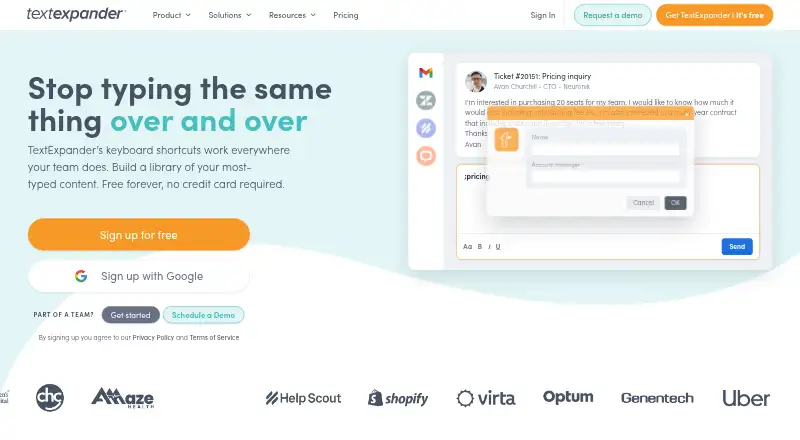
Type a brief shortcut to expand saved text across your supported devices and apps.
How it plugs in
Signal on Text Expanders Software6.7#2 of 20
TextExpander is a freemium text expansion service made by TextExpander, Inc. Snippets can be triggered with a few keystrokes on desktop, mobile, web, and browser-based setups. It offers team sharing, named business integrations, usage history, and paid dynamic content. A free plan remains available, while paid plans add capacity and administration.
Review
In a line
TextExpander keeps reusable snippets ready for insertion after you type a short shortcut. Supported access includes Windows, macOS, iPhone and iPad, Linux through a Chrome extension, Chrome, and the web.
What it does
Repeated wording can be stored as snippets and called up with a few keystrokes on supported devices and apps. Team plans let people share snippets with colleagues.
Paid tiers support dynamic material such as date calculations and JavaScript. Other capabilities include snippet activity history, usage analytics, approval controls, and advanced expansion rules.
How it connects
Named integrations on the page include Zendesk, Salesforce, Epic, Cerner, and HelpScout. Access is provided through browser extension, desktop or mobile setup, and web app.
On Free, up to five members can share snippets across three teams. Help is available through the community and email, while paid plans add priority support. Enterprise may include SSO, SCIM, and customized reporting.
Good fit
It suits people who repeat the same replies, notes, or other text in different apps. Teams can keep shared snippets for common work.
Organizations seeking compliance features can look at Enterprise, which is built for SOC 2, SOC 3, and HIPAA compliance. It may also suit buyers comparing text expanders for desktop, mobile, and web use.
Watch for
Free permits five active snippets. A Free user can replace one active snippet every two weeks, and sharing is capped at five members across three teams.
New accounts preview advanced features for 30 days, then move to Free automatically with five snippets still active. Check the supported platform or browser-extension setup for each device before choosing a plan.
Pricing
The no-cost plan remains available indefinitely without a credit card, providing five active snippets and sharing across three teams. Pro costs $5 per month when paid annually ($60 USD per user) and includes unlimited active snippets, unlimited teams, and 24-hour snippet activity history.
Business costs $10 per month when paid annually ($120 USD per user). It includes unlimited snippets and teams with seven-day activity history. Pro and Business also offer monthly billing.
Enterprise uses custom pricing based on needs and usage. Amounts are listed in USD; tax is excluded, and VAT or GST may be added at checkout. Users can change or cancel plans from account settings.
Verdict
TextExpander is a practical choice when repeated typing is the main problem and your devices match its extension, app, or web options. The free tier works for light personal use or a small shared setup, while Pro and Business remove snippet and team caps.
Buyers needing enterprise identity controls, reporting, or compliance should request an Enterprise quote and confirm the exact controls included.
Our take
Choose TextExpander if you want one library of reusable text available across computers, browsers, phones, tablets, and the web. Its free tier gives a small group a way to start without payment, while paid plans remove the five-snippet ceiling and add longer activity history. Teams should check whether their apps match the listed integrations and whether the browser-extension route works on Linux. Enterprise buyers should ask for a custom quote when they need identity management, reporting, or compliance requirements. The 30-day feature preview also means new accounts should plan for the automatic move to Free.
- Works across desktop, mobile, browser, and web setups
- A forever-free plan does not require a credit card
- Free sharing accommodates up to five members
- Paid tiers provide dynamic content such as date calculations
- Named integrations include Zendesk, Salesforce, Epic, Cerner, and HelpScout
- The no-cost tier permits just five active snippets
- Free users may replace only one active snippet every two weeks
- Advanced features are previewed for 30 days before downgrade
- Enterprise pricing is available only by request
- Listed prices exclude tax and may have VAT or GST added
- Pick it ifPeople repeating the same text across several apps; Small groups that want shared snippets; Organizations needing enterprise controls and compliance options
- Skip it ifYou need more than five active snippets on a free plan; Your device does not support the listed app or extension options; You need a fixed Enterprise price before contacting the vendor
Pricing
The Free plan continues indefinitely without a credit card and provides five active snippets. Pro costs $5 monthly on annual billing ($60 USD per user); Business costs $10 monthly on annual billing ($120 USD per user). Both also have monthly billing. Enterprise is custom. Listed amounts are in USD and exclude tax.
- FreeFree forever; no credit card required · 5 active Snippets · 3 teamsFree
- ProBilled annually at $60 USD · Unlimited active Snippets · Unlimited teams · 24-hour Snippet Activity History$5/mo
- BusinessBilled annually at $120 USD · Unlimited active Snippets · Unlimited teams · 7-day Snippet Activity History$10/mo
- EnterpriseAdvanced security and admin controls · Custom pricingOn request
As textexpander.com lists them, checked 27 Sept 2026.
Questions
What is TextExpander?
It keeps reusable snippets and inserts one when you enter its shortcut on supported devices and apps.
Does TextExpander have a free plan?
Yes. The Free plan has no end date, requires no card, and permits five active snippets.
Which platforms does it support?
Supported access covers macOS, Windows, Chrome, Linux via a Chrome extension, iPhone and iPad, and the web app.
Can teams share snippets?
Yes. Free sharing covers five members across three teams, while paid plans provide unlimited teams.
What integrations are listed?
The page names Zendesk, Salesforce, Epic, Cerner, and HelpScout.
How much do paid plans cost?
Pro is $5 per month with annual billing ($60 USD per user). Business is $10 per month with annual billing ($120 USD per user). Enterprise uses custom pricing.
What happens after the feature preview?
Once the 30-day preview ends, the account switches to Free automatically and five snippets remain active.