Tiimo: Visual Daily Planner Review
tiimoapp.com · checked 30 Sept 2026
A visual planner with reminders, focus tools, calendar imports, and AI planning.
How it plugs in
Signal on Daily Planner Apps7.3#3 of 137
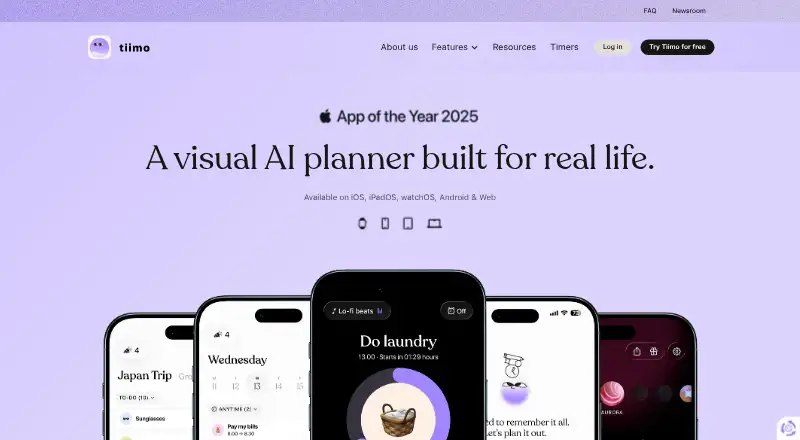
Tiimo offers a visual daily-planning approach for people seeking more structure and flexibility. It combines calendars, recurring tasks, to-do lists, focus sessions, reminders, and an AI co-planner. Apps are available on Android, iOS, macOS, and the web, although some calendar and AI features vary by platform.
Review
In a line
Tiimo is a visual daily planner made with ADHD and autism in mind. It is also intended for anyone who benefits from structure, reminders, and flexible planning.
What it does
Tiimo combines calendar planning, to-do lists, focus sessions, gentle reminders, and AI planning in one app. Visuals, sounds, fonts, and profiles can all be tailored to individual needs.
Its AI co-planner turns ideas into organized tasks, splits tasks into steps, and estimates their duration. This co-planning feature is offered on iOS and through the web app.
How it connects
Google, iCloud, and Outlook calendars can be brought into Tiimo. Outlook and Exchange calendars need to pass through Google Calendar first, and Android does not currently support iCloud calendar imports.
Tiimo runs on Android, iOS, macOS, and the web. The free plan includes iOS and Android apps but not the web app.
Good fit
People seeking a visual routine system with reminders, recurring tasks, focus tools, and calendar planning may find Tiimo suitable. It may also help people looking for a routine planner app, daily planner app, or to-do list app.
Watch for
On Android, the AI co-planner is unavailable; the feature is offered on iOS and the web app. Android users also cannot currently import an iCloud calendar.
Two Tiimo accounts cannot be merged, so you must choose one account to continue using. Tiimo says data can remain for up to two years after cancellation before deletion.
Pricing
Tiimo uses a freemium model. Its Free plan offers selected planning tools at no charge on iOS and Android, while leaving out the web app.
Tiimo Pro monthly has no listed price, is billed monthly, and is charged immediately. Tiimo Pro yearly also has no listed price, is billed for the full year, and includes a seven-day free trial. Each Pro option provides all features across platforms.
Verdict
Choose Tiimo if visual planning, flexible routines, and reminders matter more than having every feature on every device. It is a practical match for ADHD and autism-focused planning, as well as other users who need help organizing tasks.
Review the platform restrictions before subscribing, particularly when using Android with an iCloud calendar or seeking the AI co-planner there. The missing Pro prices also mean you should confirm the cost before subscribing.
Our take
Tiimo is a sensible choice for people who organize better with visual schedules, gentle prompts, and adjustable presentation. Its combination of recurring tasks, calendar imports, focus sessions, and step-by-step AI planning covers several daily-planning needs in one place. Device support differs: AI planning is offered on iOS and the web, whereas Android cannot use iCloud imports. Anyone with multiple Tiimo accounts must keep only one. Try the free plan first, then verify the current Pro price and platform coverage before upgrading.
- Visual planning with adjustable sounds, fonts, visuals, and profiles
- Recurring tasks, focus sessions, reminders, and calendar planning
- Google, iCloud, and Outlook calendar imports
- Free plan available on iOS and Android
- AI co-planner structures ideas into timed steps
- AI co-planner is offered only on iOS and the web app
- iCloud calendar import is unavailable on Android
- Two Tiimo accounts cannot be merged
- The Free plan leaves out the web app
- Pick it ifPeople who want visual routines and flexible daily structure; ADHD and autism-focused planning needs; Users combining calendars, tasks, and focus sessions
- Skip it ifYou require the AI co-planner on Android; You rely on iCloud calendar imports on Android; You need to merge two existing Tiimo accounts
Pricing
Tiimo offers selected tools free on iOS and Android, while the yearly Pro option includes a seven-day trial.
- FreeSelected planning tools · iOS and Android apps only · web app excludedFree
- Tiimo Pro monthlyMonthly; charged immediately · All features across platformsOn request
- Tiimo Pro yearlyFull year; 7-day free trial available · All features across platformsOn request
As tiimoapp.com lists them, checked 30 Sept 2026.
Questions
Is Tiimo free?
Yes. The Free plan has no charge and provides selected planning tools through the iOS and Android apps, but not the web app.
Which devices run Tiimo?
Tiimo runs on Android, iOS, macOS, and the web. Feature availability varies by platform.
Can Tiimo import calendars?
Yes. Google, iCloud, and Outlook calendars can be imported. Outlook and Exchange calendars must first be linked through Google Calendar.
Does Tiimo work with iCloud calendars on Android?
No. Tiimo says Android currently does not support importing an iCloud calendar.
Where is Tiimo's AI co-planner available?
The AI co-planner is offered through iOS and the web app, but not on other platforms.
Can I merge two Tiimo accounts?
No. Tiimo says two accounts cannot be merged, so you must choose one account to keep using.
What happens to my data after cancellation?
Tiimo says it retains data for up to two years after a subscription is canceled, then deletes it.