
Toby: Tab and Link Organizer Review
gettoby.com · checked 15 Oct 2026
Keep browser tabs, links, and web resources organized in searchable Spaces and collections with Toby.
How it plugs in
Signal on Tab Management Software6.6#3 of 27
Toby helps people manage tabs and links through browser, mobile, and web apps. Open tabs can be captured as sessions, resources can be arranged in project Spaces, and signed-in accounts keep Spaces available across devices. Teams can work in shared Spaces and publish collection links. The no-cost tier permits 60 saved tabs; subscriptions add capacity and other tools.
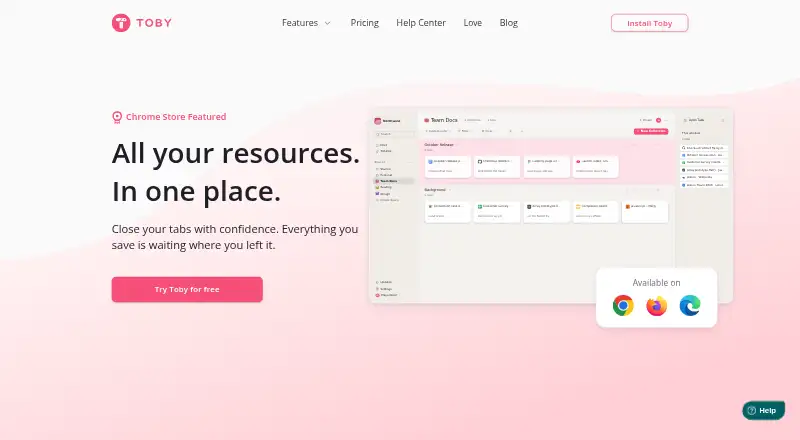
Review
In a line
Toby gives people a way to store browser tabs, links, and other web material for later retrieval. Access comes through a browser extension, website, iOS app, and Android app.
What it does
For each project, team, or idea, users can make a Space and sort its tabs and links into collections. One click captures every tab that is open as a session, which can then be closed.
Across Spaces, searches can match a page title, URL, or note. Smart Sort proposes clusters of related tabs for review, and Next provides a place to pin items that need prompt attention. Notes support checklists, links, and text formatting.
Collections may be published as links for others to view. People added to a shared Space can contribute and organize links. After signing in, users can keep their Spaces synchronized between browsers and devices.
How it connects
Toby lists Google Chrome, Mozilla Firefox, and Microsoft Edge among its supported browsers. Its extension manages browser tabs; Chrome tab groups can also be saved as collections and kept synchronized as they change, but that capability works only in Chrome.
Toby links to apps for iOS and Android and supports Google Sign-On, which lets people enter with a Google account. It is proprietary software, not an open-source project.
Account tabs and lists are stored as part of the service. Toby says it does not monitor visited sites, sell user data, share it with advertisers, or use it to train third-party models. Its AI may read saved-tab website titles, collection titles, and feedback, but not page contents, passwords, browsing history, or personal files.
The web beta omits the open-tabs sidebar, Save session button, and Open all control. Adding tabs there requires pasting their URLs. For more options, see tab management software.
Good fit
People handling numerous tabs for distinct projects may prefer Toby's visual Spaces to ordinary browser bookmarks. Search, session capture, and synchronization make it easier to locate and reopen work.
Teams can use shared Spaces, collection links, centralized billing, and single sign-on through the Team plan. Paid Smart features can label collections, arrange tabs, and cluster open tabs; AI is optional.
Watch for
Starter permits as many as 60 saved tabs. After that cap is passed, existing items can still be viewed, opened, and exported; further saves require reducing the count or upgrading.
Reports on the Android listing mention unreliable collection creation, obstructed controls, and the need to enter link titles manually.
Toby remains proprietary. Its terms assign ownership of the service technology to Launch Labs/Axiom Zen and grant users no ownership rights. Account holders must protect their credentials.
Pricing
Starter is free and includes basic features, unlimited members, and capacity for 60 saved tabs.
With yearly billing, Productivity costs $4.50 per member per month, or $54 for a year. It includes unlimited saved tabs, advanced search, duplicate removal, and AI.
Annual Team billing comes to $8 per member per month, totaling $96 per year. Alongside Productivity features, it supplies single sign-on, priority support, and centralized billing.
Verdict
Toby is worth considering when browser-based work needs project Spaces, session capture, search, and synchronization. Shared collections and collection links also serve collaborative teams.
Before choosing the free tier, account for Starter's 60-tab ceiling and the web beta's missing controls. Android users should decide whether the reported collection and link-entry problems affect their use.
Our take
Toby offers a practical way to arrange browser-heavy projects into searchable, reusable, and shareable Spaces. Starter suits smaller tab libraries, while subscriptions remove the saved-tab cap and add search, duplicate cleanup, AI, or team administration. The principal drawbacks are proprietary ownership, the 60-tab Starter ceiling, web-beta omissions, and reported Android usability concerns. Teams needing single sign-on, centralized billing, or priority support may prefer Team.
- Project Spaces keep tabs and links arranged by work area
- A single action captures a session and can close the original tabs
- Pages can be located across Spaces using titles, links, or notes
- Shared workspaces and published collection links enable teamwork
- Signed-in Spaces stay available across browsers and devices
- Starter permits only 60 saved tabs
- Several controls are absent from the web beta
- Android reviewers describe collection and control problems
- Proprietary software
- Optional AI processes saved-tab and collection titles plus feedback
- Pick it ifPeople managing many tabs across projects; Teams sharing browser resources; Users needing cross-device tab synchronization
- Skip it ifOpen-source software is a requirement; You need over 60 saved tabs without subscribing; You depend on the extension's complete controls in the web app
Pricing
Starter is free with room for 60 saved tabs. Productivity costs $4.50 per member each month on annual billing ($54 per year), while Team costs $8 per member each month ($96 per year).
- StarterUp to 60 saved tabs · unlimited members · basic featuresFree
- Productivityper member / month billed yearly ($54/year) · Unlimited saved tabs · advanced search · duplicate removal · AI$4.50/mo
- Teamper member / month billed yearly ($96/year) · Productivity features · SSO · priority support · centralized billing$8/mo
As gettoby.com lists them, checked 15 Oct 2026.
Questions
Is there a no-cost Toby tier?
Yes. Starter is free and includes basic features, unlimited members, and space for up to 60 saved tabs.
Which browsers appear on Toby's supported list?
Toby lists Google Chrome, Mozilla Firefox, and Microsoft Edge. Chrome is the only browser that can synchronize Chrome tab groups.
Can Toby capture every tab that is open?
Yes. One-Click Save turns the open tabs into a session and can close them once saved.
Will Toby keep Spaces in sync between devices?
Signed-in users can synchronize Spaces across browsers and devices. Toby also offers iOS and Android apps.
Are Toby collections shareable?
Yes. Turn a collection into a link viewable by anyone who has it, and invite teammates to work in shared Spaces.
Which information can Toby's AI process?
Toby says its opt-in AI can use saved-tab website titles, collection titles, and feedback, while leaving out page contents, passwords, browsing history, and personal files.
What changes after Starter reaches 60 saved tabs?
Tabs already saved can still be viewed, opened, and exported. New tabs cannot be saved until the total falls below 60 or the account is upgraded.
Which controls come with Toby's Team tier?
Team combines Productivity features with single sign-on, priority support, and centralized billing.