
Total Uninstall Review
martau.com · checked 28 Sept 2026
Windows software for monitoring installs, removing programs and clearing leftovers.
How it plugs in
Signal on Software Uninstaller Tools5.2#33 of 35
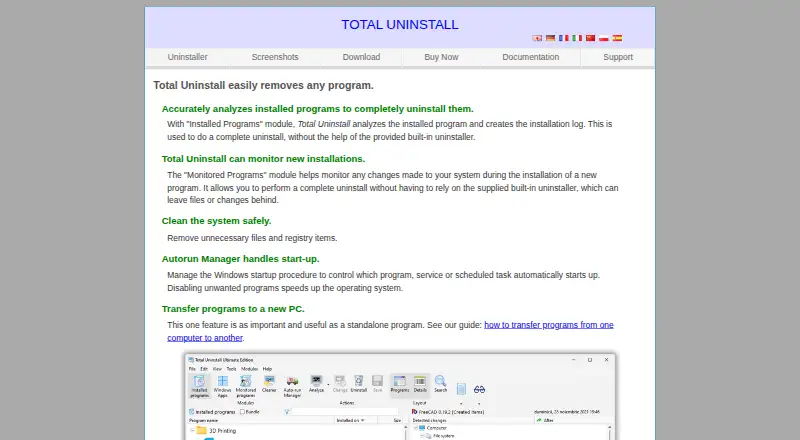
Total Uninstall is a paid Windows uninstaller with a 30-day functional trial. It reviews installed programs, tracks installation changes, clears residual files and registry items, and offers startup management. Batch and forced removal, program transfer, and a portable Technician edition are included. Licensing covers single computers, households, small offices, and technicians.
Review
In a line
Total Uninstall is Windows software for removing programs and cleaning the files and registry entries they leave behind. It supports Windows 11 and has a 30-day trial.
What it does
Installed-program analysis produces installation logs that support a more thorough uninstall. It can scan for leftovers, force removal when needed, and uninstall several programs in a batch.
Windows startup programs, services, and scheduled tasks can also be managed. A transfer feature moves programs from one computer to another.
How it connects
Total Uninstall runs on Windows. Technicians can use a portable edition supplied on two USB memory sticks.
The maker's site provides Documentation and Support sections.
Good fit
It suits Windows users who want installation records, leftover scans, forced removal, or batch uninstall. It can also help households sharing a license, small offices with four computers, and technicians needing a portable copy.
A household family license permits use on as many as three computers. Business and commercial use is excluded from family licensing.
Watch for
Family registration keys do not work on NT-domain computers or servers, so that license is not intended for those environments. Check the license type before using it for work or commercial systems.
The trial lasts 30 days. After the maintenance period ends, the program keeps running without restriction, but the facts do not state how long updates or upgrades continue beyond the first year.
Pricing
There is no free plan. The software requires purchase after its 30-day functional period, while new users receive updates or upgrades at no charge for the first year.
Several Essential, Professional, Ultimate, Small Office, and Technician plans have no listed price. Listed localized prices include Professional Family Upgrade at €39.95 one time, Professional Single Computer at €49.95 one time, Professional Family at €59.95 one time, and Professional Single Computer Upgrade at €29.95 one time.
Verdict
Choose Total Uninstall if you use Windows and need detailed uninstall records, leftover cleanup, startup controls, or batch removal. Its transfer function and portable Technician option add coverage for people managing more than one machine.
Do not select the family license for business use or NT-domain computers and servers. If you need a free product after the trial, this is not a match.
Our take
Total Uninstall is a reasonable choice for Windows users who want more than a basic remove button. Installation logs, leftover scans, forced and batch uninstall, startup management, and program transfer cover several cleanup jobs. The 30-day trial lets you check whether those tools fit your setup. Licensing is more involved than a single-user purchase, with household, office, and Technician options, while family terms exclude commercial use. Buyers who require a free tier or need family keys on NT-domain systems should look elsewhere.
- Analyzes installed programs and keeps installation logs
- Scans leftovers, removes registry items, and supports forced uninstall
- Batch uninstall and Windows startup, service, and task management
- Program transfer and a portable Technician edition
- Runs on Windows, including Windows 11
- No free plan after the 30-day functional trial
- Family license excludes business and commercial users
- NT-domain computers and servers reject family registration keys
- Updates or upgrades are free for one year for new users
- Pick it ifWindows users needing detailed uninstall records and cleanup; Households or small offices choosing a multi-computer license; Technicians who need a portable uninstaller
- Skip it ifYou need a free plan beyond the 30-day trial; You plan to use a family license for business or commercial work; Your computers use an NT domain or server setup
Pricing
Paid software with a 30-day functional trial and no free tier. For new users, complimentary updates or upgrades last one year; the application keeps running afterward.
- Essential — single computer (new user)1 licensed computerOn request
- Essential — family (new user)Up to 3 computers · Same householdOn request
- Professional — single computer (new user)1 licensed computerOn request
- Professional — family (new user)Up to 3 computers · Same householdOn request
- Professional — Small Office4 licensed computersOn request
- Ultimate — Small Office4 licensed computersOn request
- Professional — Technician2 USB memory sticksOn request
- Ultimate — Technician2 USB memory sticksOn request
As martau.com lists them, checked 23 Sept 2026.
Questions
Does Total Uninstall have a free plan?
No. The program is functional for 30 days, then purchase is required. No free tier is stated.
What operating systems does it support?
It runs on Windows, with Windows 11 listed as supported.
Can it remove leftover files and registry entries?
Yes. It scans for leftovers and removes unnecessary files and registry items.
Can Total Uninstall uninstall several programs at once?
Yes. Batch uninstall is included, along with forced uninstall when a normal removal does not work.
How many computers does the family license cover?
The household option supports up to three computers. Family licensing excludes business and commercial users.
Is there a portable version?
Yes. Technicians can obtain a portable edition on two USB memory sticks.
What happens after the maintenance period?
The program continues running without restriction after maintenance ends. New users receive complimentary updates or upgrades during the first year.
Can it move programs between computers?
Yes. A program-transfer feature moves programs from one computer to another.
Near it
All alternatives →- A3AppZapper 3000#32 on this board
- OO
 O&O AppBuster#34 on this board
- AU
 Ashampoo UnInstaller#31 on this board
- PAPatchClean AI#35 on this board
- A
 AppRemover#30 on this board
- YU
 Your Uninstaller!#29 on this board
- T3TrashMe 3#28 on this board
- TU
 Total Uninstaller#27 on this board
- MI
 Mirekusoft Install Monitor#26 on this board
- W
 Winhance#25 on this board