UninstallView: Free Portable Windows Uninstaller
nirsoft.net · checked 8 Oct 2026
Free Windows utility that lists installed programs and can uninstall them locally or remotely.
How it plugs in
Signal on Software Uninstaller Tools6.3#10 of 35
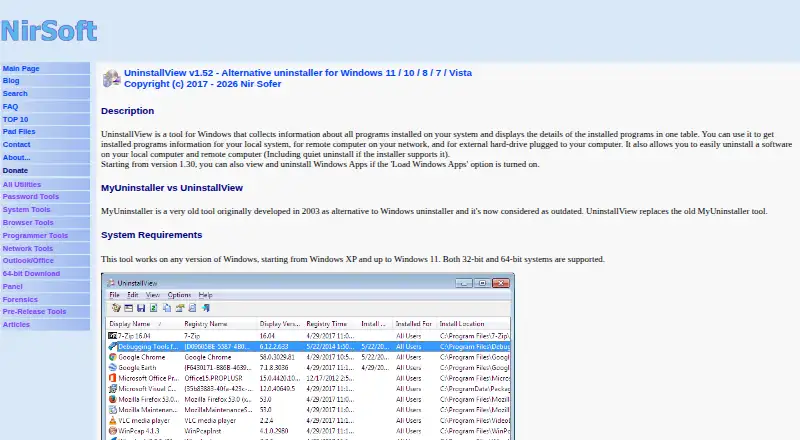
NirSoft offers UninstallView as a portable, no-cost Windows utility. It shows installed programs and details, then runs standard, change-install, or quiet uninstall commands when available. The tool reads uninstall data from local and remote sources, can include Windows Apps, exports results in multiple formats, and removes software on remote computers through PsExec.
Review
In a line
UninstallView displays Windows software entries along with their details. It can start uninstall tasks on the current computer or a remote one.
What it does
The utility reads uninstall entries and presents program details. You can use standard uninstall, change-install when offered, or a quiet command when the program supplies one.
With Load Windows Apps enabled, it can also list and uninstall Windows Apps. Batch uninstall is supported.
How it connects
UninstallView retrieves uninstall records from the current system, other user profiles, remote computers, external drives, or shadow copies.
Installed-program inventories can be written as text, tab-delimited, CSV, HTML, XML, or JSON, including via command-line use.
For removal on another computer, place Microsoft Sysinternals PsExec beside UninstallView. Such remote commands execute under SYSTEM, so certain uninstallers might not behave properly.
Good fit
It suits Windows users who need a detailed list of installed software, including entries from other profiles or stored system copies.
Its no-install, portable design works for quick maintenance and for exporting program inventories. NirSoft says it supports Windows XP through Windows 11 on both 32-bit and 64-bit systems.
Watch for
UninstallView does not scan for leftover files, force removals, or monitor installations. Registry information may be supplemented from other sources and may not always be accurate.
Removing uninstall Registry keys is disabled initially, applies only to local current-user data, and could make later uninstallation impossible. Remote removal also needs PsExec and may fail with some uninstallers.
Pricing
UninstallView is free freeware for Windows. There is a free plan and no separate free trial. Redistribution is allowed when the utility is unmodified, not sold, and not bundled into a commercial product.
Verdict
Choose UninstallView for a portable Windows inventory of installed software, batch removal, exports, or uninstall data drawn from remote and offline sources.
Look elsewhere if you need leftover cleanup, forced uninstall, install tracking, or dependable remote removal for every program.
Our take
For Windows administrators and careful users, UninstallView offers a practical way to inspect uninstall records from local, remote, or stored system sources without installing the tool. Its free price and export formats add value for inventories and documentation. The utility is less suitable for cleanup workflows because it does not hunt leftovers, force removals, or watch installations. Remote work also adds a PsExec dependency and can behave differently from a local uninstall. Check its Registry-key warning before deleting entries.
- Free, portable utility for Windows
- Lists programs from local, remote, and stored system sources
- Supports batch uninstall and Windows Apps
- Saves inventories as text, CSV, HTML, XML, or JSON
- Works without an installation process or extra DLL files
- No leftover-file scan or forced uninstall
- No install monitoring
- Remote uninstall needs PsExec and may fail for some programs
- Registry information can be inaccurate
- Deleting some Registry keys can block future uninstall
- Pick it ifPortable Windows software inventories; Batch removal and export tasks; Reviewing uninstall data from other sources
- Skip it ifYou need leftover cleanup or forced removal; You require install monitoring; Remote uninstall must work for every program
Pricing
Free freeware for Windows, with no separate trial. Redistribution is allowed only under the stated unmodified, noncommercial conditions.
- UninstallViewFreeware · Windows utility · redistribution allowed if unmodified and not sold or included in a commercial productFree
As nirsoft.net lists them, checked 8 Oct 2026.
Questions
Is UninstallView free?
Yes. UninstallView is freeware with a free plan and no separate free trial.
Which Windows versions does it support?
According to NirSoft, supported releases run from Windows XP through Windows 11, for both 32-bit and 64-bit systems.
Can it uninstall Windows Apps?
Yes. Enable Load Windows Apps to show those apps and make them available for uninstall.
Can it remove software from another computer?
Yes. Put Microsoft Sysinternals PsExec in UninstallView's folder; remote commands run as SYSTEM and some uninstallers may not work properly.
What files can it export?
It can save lists as text, tab-delimited, CSV, HTML, XML, or JSON, including through command-line operation.
Does it remove leftover files?
No. UninstallView does not provide leftover scanning, forced uninstall, or installation monitoring.
Does UninstallView need installation?
No. Start UninstallView.exe directly; no installation process or additional DLL files are required.
Near it
All alternatives →- SO
 Soft Organizer#9 on this board
- U
 Uninstalr#11 on this board
- IUIObit Uninstaller#8 on this board
- BC
 Bulk Crap Uninstaller#12 on this board
- GU
 Geek Uninstaller#7 on this board
- J
 Jharu#13 on this board
- AAppCleaner#6 on this board
- AAAdvanced Application Uninstaller and Cleaner#14 on this board
- RURevo Uninstaller#5 on this board
- W
 wmole#15 on this board